Why does Quicken continually ask me to "Review Downloaded Transactions"

Quicken constantly asks me to "Review Downloaded Transactions" for an account when in fact there are NO downloaded transactions for that account…
Quicken Classic - R65.17, Windows 11 PRO current on updates
My data file is NOT being synced nor backed up.
Answers
-
It's probably data file corruption. My first troubleshooting step would be to Validate/Super Validate the data file.
0 -
Thanks for the response but it's not file corruption It's been going on for awhile and I've run multiple validations in the past… I think it changed after one of the release updates not recent updates but older updates. Possibly when they reintroduced pending transactions…
Quicken Classic - R65.17, Windows 11 PRO current on updates
My data file is NOT being synced nor backed up.
0 -
As a second troubleshooting step, I would advise you to restore a data file backup dated before you experienced any issues.
0 -
I will answer my own question. It appears that when a "pending transaction" is downloaded and NO "Downloaded" transaction is present, the "Review Downloaded Transaction" is triggered. This is obviously a bug. A pending transaction should not be considered a "Downloaded Transaction"…
Quicken Classic - R65.17, Windows 11 PRO current on updates
My data file is NOT being synced nor backed up.
0 -
Of these 11 accounts that indicated Downloaded Transactions, 3 actually had any downloaded transactions.
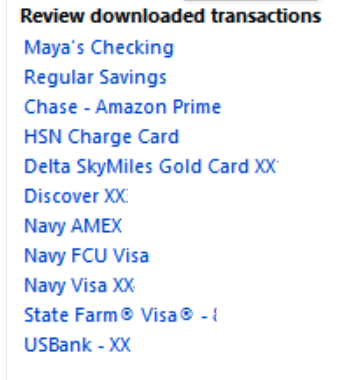
[Edited - Censored Partial Acct Numbers]
Quicken Classic - R65.17, Windows 11 PRO current on updates
My data file is NOT being synced nor backed up.
0

Categories
- All Categories
- 68 Product Ideas
- 35 Announcements
- 223 Alerts, Online Banking & Known Product Issues
- 21 Product Alerts
- 633 Welcome to the Community!
- 673 Before you Buy
- 1.2K Product Ideas
- 54.1K Quicken Classic for Windows
- 16.4K Quicken Classic for Mac
- 1K Quicken Mobile
- 813 Quicken on the Web
- 115 Quicken LifeHub