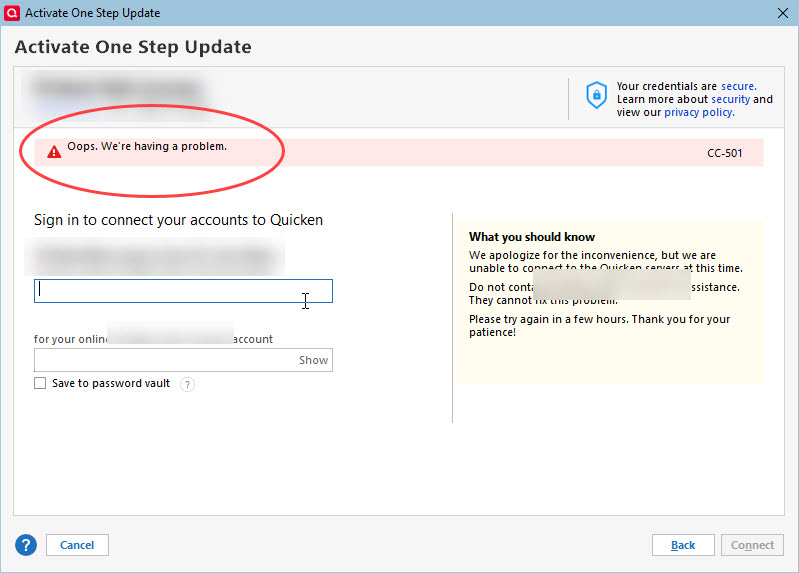
Since 5/1/2025 one step update has stopped working. There is no error but only 2 of 8 accounts have updated on one day.
Also having issues. Connections break completely every couple of days, requiring resets of every account — only for them to break again. And today, they won't reset, and throw CC-501 errors. Very frustrating, Quicken.
one step update doesn't pull all transactions from Bank of Oklahoma. I have several accounts and it's the same with all of them. seems to be a recurring problem for many people and many different financial institutions.
Is there a fix?
This problem is still not fixed. I also sent in a report today.
Same problem with OSU as reported by many folks. Started mid May now no updates. I opened the report and issue days ago and no response. Deactivated some accounts no change. Single account update doesn't work either. Update does attempt to download as one bank notified me of account activity but no downloads. Ran validation a few time no change. A few times, the ADD ACCOUNT screen appears but if not complete and garbled. The OSU screen shows the accounts in waiting state the the program become deactivated. Can't move any windows or minimize all you can do is end the program in task manager. Without updates, can't manage my accounts or cash positions :(
I am also experiencing this issue. My last successful download for any account was May 17th. I deactivated and reactivated 1 account, Quicken reset the balance to zero and deleted 3 years worth of transactions. Luckily I had done a backup 2 days prior so I was able to restore.
Quicken Classic Deluxe
Version R62.16
Build 27.1.62.16
I am also experiencing this issue. My accounts were updating fine yesterday. This morning nine of my accounts would not update. Under the One Step Update Summary the nine accounts required to be fixed. I fixed several of the accounts and closed Quicken. When Quicken was reopened, ran the One Step feature, the accounts that were fixed, now have to be fixed again.
Same here. Sometime after 5/6/25 it seems it stopped downloading for pretty much ALL my accounts (Chase, Citibank, Amex, checking/savings). I'm having to, yet again, deactivate and reactivate almost every account.
Oh, and don't forget to readjust your Opening Balance, since the deactivate/reactivate process will screw that up too.
Any update on this issue? June 10, still not working for me.
Same problem on my end as most of the other folks here. Some days, all my 13 or so accounts download successfully. Most days, whether the downloads work or not, it takes considerable time. Usually, from start to finish, it is at least 10 minutes, but usually much more. Then it often returns several accounts showing download errors (think they're usually CC-501 or CC-800/801). I have had to reset and/or deactivate accounts several times. Often too I have had to reauthorize accounts. Finally I get everything setup again until the next day and the buffoonery starts all over again. I won't even bother getting into the frequent Quicken starts resulting in an empty, frozen screen, even though I'm running it on a newer 32 GB RAM, 2 TB SSD drive with plenty of space. I spent good money reluctantly renewing my subscription again only to many spend hours on this nonsense. We keep hearing from the online Quicken reps that the issue is being addressed but this just goes on and on.
This reminds me of the issue months ago where it was apparently a Quicken update that triggered the problem where in the Bills & Income section there was a setting of, for instance, Due in 30 Days that would no longer stick to one's selection they way it always did previously. Finally after a couple of months it got resolved yet, during that time, Quicken found plenty of time clearly using plenty of diverted resources rebranding and changing the Quicken logo. I hope and pray each day that a strong competitor to Quicken for Windows surfaces.
I JUST THIS MORNING WENT THROUGH THIS ISSUE CC800 JUST WITH THE CREDIT CARDS I REAUTHORIZED ALL THE CREDITS AND NOW IS WORKING. I HAVE A PROBLEM WITH DISCOVER BUT WHEN I LOGED IN THEY WHERE DOWN.
I have the same issues. But, I would be happy if after downloading it would tell me which accounts didn't download!!
Instead I have to individually check everything that didn't get a red mark to check your downloads to see if the bank had something forme.
Very frustrating!
PLEASE FIX THIS ASAP!
June 12th and I have the problem still. The last update that I was able to complete was on June 3rd. I have backed-up, restored older versions of back-ups with no solve. I have to download transactions from each of my accounts manually. Also am not able to sync to mobile and web without it hanging / freezing.
The only way for me to stop from hanging is to do a CTRL ALT DEL through the task manager and then reopen the folder.
Pay way too much money a year to have this happening.
There is no update on this Ticket #11718340/CTP-12574.
I tried the method above from Quicken Kristina to deactivate accounts one by one and Quicken hangs up on the first account attempted. This issue was sudden and I checked Norton and Quicken was on the trusted apps list and I even attempted to deactivate and reset accounts with the firewall off and no luck.
One Step Update is not working with Chase Credit Cards. I have several cards and all are experiencing issues. Screenshots show one cards last download a week ago. I try it everyday and it always shows as successful. This particular card has 60 purchases since 6/13. None of the transactions downloaded. Another card shows an online balance of over a $TRILLION.
TRILLION.
Are any other users still having issues maintaining connections? I have had to re-set and re-enable the connection for ALL my accounts more than a dozen times in the past three months. I'm a 30 year Quicken user, but I'm growing concerned that the software is no longer reliable. And updates on this ongoing issue are much too infrequent. Team Quicken, can you please address this?
I am also having difficulties with the "One-Step Update." The update process seems to take longer than usual, I get no error messages, but I have no downloaded transactions to review. This is happening on numerous accounts.
This issue is impacting my use of Quicken as well. Running version R63.21, have rebuilt my file, had to reconnect all institutions to start using the update. That worked for a few days and now it is failing again.
What information is needed, how do we get movement to a solution on this issue?
SIGH. I was so please when Intuit moved Quicken to a new company outside. The Mac version improved 1000%, and until this issue, has been, IMO, flawless. But now, this is disappointing that this issue still seems to affect people. I too see times when downloads fail. It is a lot more steady these days, but still not 100%. And on-line accounts that had details, no longer do, and the previous details actually disappeared in some of them. That is also not good. Please tell us Quicken that this issue is getting top priority and you are all working on it? Thank you.