What bills are being updated? What data is being updated?

Quick92
Quick92 Quicken Windows Subscription Member ✭✭✭

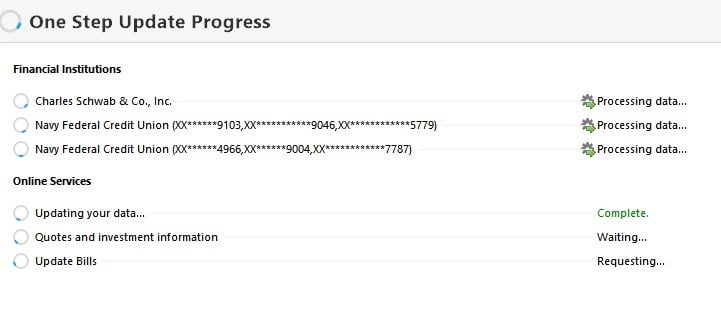
When I ran one-step update yesterday, under the heading of "Online Services" I saw activity caleld "Updating your data" and "Update Bills." I am not using (or don't want to use) cloud services or online billing. So how can I track down the source of this activity?
Screenshot 2025-05-28 135410.jpg
Tagged:

Comments

  • dseayme
    dseayme Quicken Windows Other Member ✭✭

    I'm wondering the same thing.

  • UKR
    UKR Quicken Windows Subscription SuperUser ✭✭✭✭✭

    Even if you have turned off "Sync to the cloud" (Edit / Preferences / Mobile & Web) because you are not using Quicken on the Web or the Quicken App on your smartphone …

    If you have accounts activated for transaction downloading, a certain minimum amount of data must be synced between your Quicken data file and the Quicken / Intuit download server so that this server can do regular transaction staging for you, to speed up the transaction processing time during One Step Update.

    I have seen the "Updating your data" come and go from time to time. I have not been able to figure out what turns it on and why … and I have not seen or heard anything from the Quicken programmers about that … mum's the word.
    I wouldn't worry about its presence or absence … as long as One Step Update brings in my transactions when it's supposed to, I'm happy.
    The same applies to an infrequent popup "Syncing" message. If the server needs to refresh certain account details due to server changes, etc., … by all means, let it do it … just as long as everything works the way it's supposed to.

    And that's my 2¢.

  • Quick92
    Quick92 Quicken Windows Subscription Member ✭✭✭

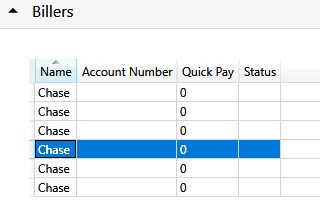
    I still have phantom online billing activity. I tried using online Chase credit card bills and didn't like it. To fix other problems, (CC-800), I have since deleted all online account info, created a copy of my file, and re-established connections without adding online billing. When I choose "About" from the Help menu while holding Shift, I see six online biller entries. How can I delete these?

    Screenshot 2025-06-27 163329.jpg
This discussion has been closed.