I can enter my id and password it is signing in to Discover and wants to send a pin number to my phone but i never get the pin.
Gee, that sounds familiar to me 🤔 Can't promise this will work for you, but had similar problem with another online bank site; plus still do with a current one. When (in my case, the online bank) sends me the pin; it is automatically, for some reason, identified as SPAM, and sent to spam folder. Since I've learned this particular bank always makes this error 'almost' constantly, I routinely check the SPAM folder. 9 out of 10 times, pin is there. You might try that? If not, 'maybe' you have accidently blocked the Discover Card # on your phone, or Discover has wrong # for contacting you? Hopefully this helps?? Anyway, good luck, hang in there.
This pin was supposed to come as a text so far have not found a spam file there is no other choice but text at this point I am locked out of Discover. i was able to log into account yesterday and phone no and it is correct.
@Richard Sturgeon You mentioned you have not found a spam file. Does this mean you can't find the Spam Folder on your phone? Don't understand exactly what you mean, but let me guess? To find your Spam Folder on an Android Phone open up your Message App, look in 'right hand corner'. There should be an icon with an identifier associated with your name. Click on that, it opens up a long list, among them should be Spam & Blocked Numbers. Click on that and check if you have any messages from Discover Bank. Maybe this helps 🤔?? Otherwise, I'm not sure what the solution is. Hopefully some other folks on this blog can offer some solution, many have more experience with Quicken than yours truly 😉 Good Luck.
@Richard Sturgeon have you tried calling Discover? It could be a Discover account profile issue. They can also unlock your account if that is the issue.
Yes i just got off the phone with Discover and they are very nice about unlocking the account.
Palace i did find the spam file on the phone in text file Thank you, but there was not pin numbers from discover.
I called Discover today and after talking to 3different people they tell me that they do not offer pin numbers to log into Discover through Quicken so i am back to square one they told me that i have to contact Quicken to resolve this problem i am still getting the CC800 message i can log into quicken but the next screen they want a pin number which i never receive.
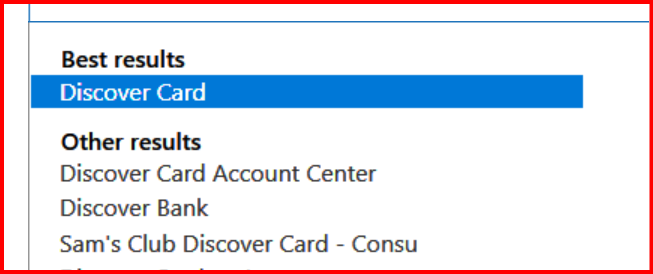
@Richard Sturgeon verify that you are using the correct FI. There seems to be several FIs available for Discover -
Yes i am using the correct FI.
@Richard Sturgeon you probably have done this already, but a lot of times, the financial institution will require you to verify the phone number before you can use it to receive codes or pin numbers through SMS. This verification request is submitted though your profile and entails responding to a text for verification.
I talked with Discover, and they deactivated the number and reinterred it same problem.
When I called Discover about this several months ago, I got the same runaround the first time, but then got a rep who said they had decided that giving a third party access to their data was too risky in today's world and they cut off Quicken's (and other's?) ability to view/download the data. Apparently, it's not on the screens the typical Discover rep reads and I happen to get one who actually knew what was going on. I tried a couple of times later, just to make sure, and I never got my Quicken download to work, so I believe the rep who said they ended Quicken's interface to their system. I've been entering by hand since, and it's a pain…
As @CaliQkn pointed out above, there are three FI's for Discover: Discover Card, Discover Card Account Center and Discover Bank. I am using Discover Card and have no trouble downloading transactions.