Is there a way to show security level detail but not tag level detail, and excluding 0 balances? I'm using the latest Windows release of Classic Premier.
@actuary314 it seems like when you show detail, it's "all or nothing". Tags and accounts with zero balances cannot be suppressed. I tried several combination of options and it seems that "show detail" doesn't allow any other options.
@actuary314 what I have done with a report that I need to customize beyond what Quicken can do, is to export it to an Excel spreadsheet, and customize it there.
Thanks so much. I can suppress tag detail by going to the prior format, but I guess that I need to use Excel to eliminate the 0 balances.
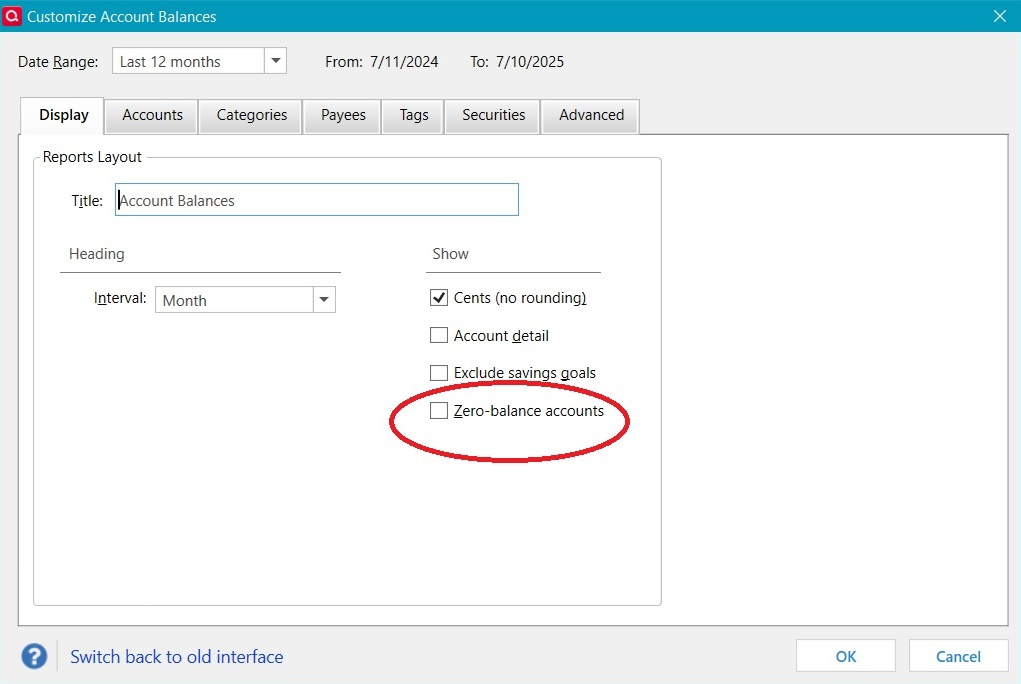
In the Early Access tab in Preferences, select both options. Then you can get rid of the zero balances in your Account Balances Report. Here's a screen grab of the new Options for the report:
I tried it with my accounts, and it correctly eliminated one that had all zeros over the time interval. I have Windows Quicken Classic Deluxe (Windows 10).
@Ducksoup_SD that option is also available in the old interface as well. That isn't the issue. The issue is that once "Account detail" is selected, suppressing zero balance accounts doesn't work.
https://community.quicken.com/profile/CaliQkn thanks, I didn't catch that part of the problem. Do you know if it's a bug or is there a reason it works that way?
@Ducksoup_SD in my opinion, it is a bug. I think you should be able to select filters along with Account Details, but it seems that the Account Details option overrides the filters.
Thanks again for stating the problem clearly and concisely.