Problem downloading with Etrade brokerage account

joeslatt
joeslatt Quicken Windows Subscription Member ✭✭

I have had a finicky E*Trade account that doesn't want to download correctly, so I decided to deactivate/clear and "add account" to reset it. Now, it always changes it to "Simple - Positions Only" and I can't get it to do complete, which I've tried several times. Any helpful suggestions? Thanks.

Comments

  • [Deleted User]
    edited July 16

    @joeslatt here are some steps to be able to use Complete tracking with your E*Trade accounts. The key is to connect your account with Direct Connect.

    1. In Account Details, deactivate your E*Trade account by clicking "Deactivate" in the Online Services tab.
    2. In Account Details, blank out FI Name and Account Number in the General tab.
    3. If you have more than one account with E*Trade, do steps #1 and #2 for each of them.
    4. Reactivate the account(s) by using "Add Account". Type in "E*TRADE".
    5. Click on "Advanced Options" on the righthand side of the screen.
    6. Click on "Continue" until you get to a screen that lists out the connection methods and select the option "Direct Connect".
    7. Keep clicking next to come to the screen where you need to put in your user name and password.
    8. After entering your user name and password successfully, you will then see a list of your accounts with E*Trade. Carefully link your account(s) with E*Trade to the account(s) on Quicken.
  • [Deleted User]
    edited July 16

    @joeslatt it seems like there are several FIs for E*Trade. Make sure to use "E*TRADE" when reactivating your accounts.

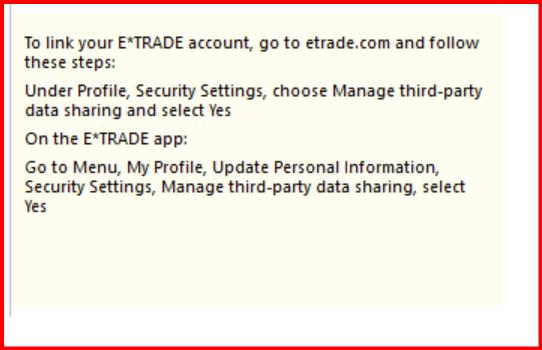
    The other thing to note are the special instructions when connecting with Direct Connect -

    image.png
This discussion has been closed.