Customize Tool Bar option to include transfer between accounts [Edited]
I have been a quicken user for about 20 years.
The last few years, I have asked for an option to customize the tool bar to include TRANSFER between accounts. This is a function of Quicken, but not in the tool bar!
In order to do this, I have to use the radial setting button, or I have to remember the shortcut CONTROL SHIFT KEY.
Why can't we have this as an Icon option in the tool bar?😎
Comments
-
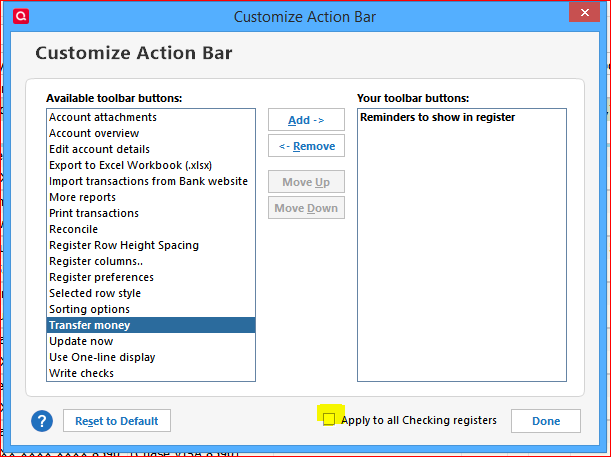
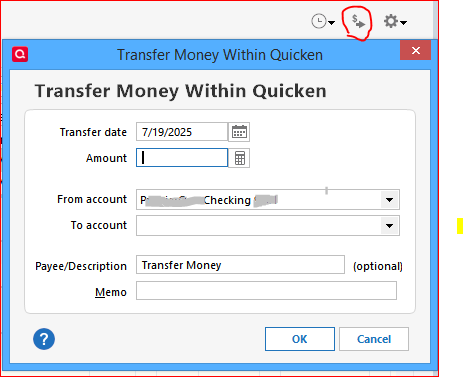
This may currently not be available in the Quicken Toolbar, but you can Customize the Action bar in each account register and add a Transfer Money icon to the Action bar of your register(s).
The Actions gear icon of your banking account register contains a link to the Customize Action Bar function.
Once added, a single click on the Transfer icon opens the Transfer Money popup.
Alternatively, you can always start a new register transaction in the "From account" register and type the "To account" name in the Category field, enclosed in [square brackets], e.g., [XYZ Bank Savings]
1
Categories
- All Categories
- 56 Product Ideas
- 36 Announcements
- 223 Alerts, Online Banking & Known Product Issues
- 22 Product Alerts
- 701 Welcome to the Community!
- 671 Before you Buy
- 1.2K Product Ideas
- 53.7K Quicken Classic for Windows
- 16.3K Quicken Classic for Mac
- 1K Quicken Mobile
- 813 Quicken on the Web
- 111 Quicken LifeHub