Wright Patt Credit Union recent download placed MMA information in Savings

ajdm91mk
ajdm91mk Quicken Windows 2017 Member ✭✭

I run Windows 10, UTD; Quicken, UTD

A couple months ago when downloading account information from WPCU, Quicken place the Money Market Account money into the Savings Account file.

I have tried a few times to reset both accounts. Nothing has worked.

Any suggestions?

Should I close Quicken, completely delete it from my computer and do a complete reload?

This is getting so frustrating.

Comments

  • @ajdm91mk how are you downloading transactions from WPCU? If you open your Account List (Ctrl-A) and look in the Transaction Download column, what does it show for the two accounts?

  • ajdm91mk
    ajdm91mk Quicken Windows 2017 Member ✭✭
    edited August 20

    I am downloading from WPCU

    Savings is "Trusaver 00"

    Personal Capital MMA - 70

    Are the different accounts, the names and numbers of the accounts is directly from WPCU and the paperwork.

    The "Accounts Bar" under "Transaction Download" says "Yes(improve connection)"

  • @ajdm91mk when you look in the Account List on Quicken, what does it show in the Transaction Download column for these two accounts?

  • ajdm91mk
    ajdm91mk Quicken Windows 2017 Member ✭✭

    The "Transaction Download" column for both says: Yes(Improve connection)


    When I do the update on the accounts, I have no problem connecting, other than constantly needing a "pin" texted to me to verify it is me

  • @ajdm91mk in your Account List, click on edit for each of the accounts and in the Online Services tab, what does it say for "Connection Method"?

  • ajdm91mk
    ajdm91mk Quicken Windows 2017 Member ✭✭

    Both sections have the "upgrade to direct connect"

    Or "download and import the transactions"

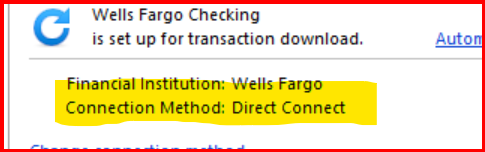
  • @ajdm91mk what does it show for current connection method? The "upgrade to direct connect" should be below that.

    image.png
  • ajdm91mk
    ajdm91mk Quicken Windows 2017 Member ✭✭

    That is what it has. Guess this means I need to talk to my bank. And I need to take a computer in to show them my problem.

  • @ajdm91mk how did you update the transactions in Quicken? Did you do a one step update (OSU)? Or, did you download transactions from your online account at WPCU?

    I think I have a couple of solutions for your issue, but it depends on the way you updated transactions for these accounts in Quicken.

This discussion has been closed.