Securities Comparison Mismatch - again
Hi all, see PDF attachment. I recently purchased these two securities at Merrill Lynch (ML) and then they downloaded in a one-step update to Quicken. I never entered the textual names of the securities so to cause a mismatch. I trade stocks a lot at ML and this is the first time this has occurred. The securities are correctly accounted for in Quicken, but I get this error message every time I update. I've tried several solutions from this forum with no joy. Please help. Thanks for any assistance,
Ken
Comments
-
I have no way of knowing what "several solutions from this forum" you have tried nor what did not work for those approaches.
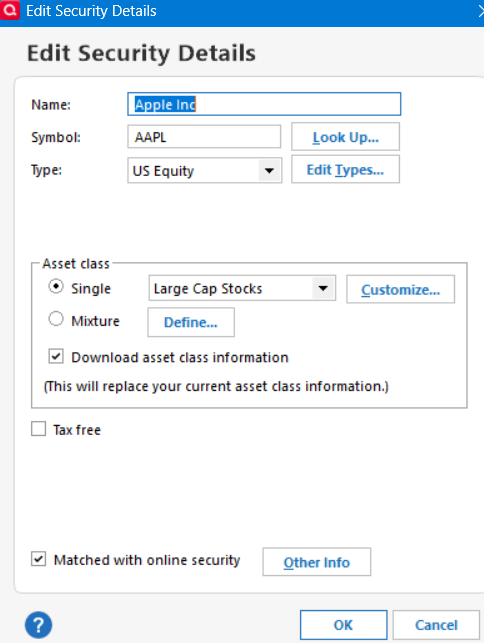
The short version — For those two securities in Quicken, uncheck the box under details about 'Matched with online security". Then do a download again.
0 -
one published solution involves messing with CUSIP numbers. No joy there.
Sorry I'm not following you. On what Quicken screen do I find the box to uncheck?
0 -
It is on the Security Details screen:
0 -
This is happening to me on OSU for only one Schwab account for me. But the Mismatch screen shows NO error. It does not happen on any other account unless I click Portfolio Reconcile setting as expected. I can make it stop by unchecking Preferences/downloaded /Compare account portfolio setting just for that account. Something else is wrong in that account.
0
Categories
- All Categories
- 56 Product Ideas
- 36 Announcements
- 225 Alerts, Online Banking & Known Product Issues
- 22 Product Alerts
- 703 Welcome to the Community!
- 671 Before you Buy
- 1.2K Product Ideas
- 53.7K Quicken Classic for Windows
- 16.3K Quicken Classic for Mac
- 1K Quicken Mobile
- 812 Quicken on the Web
- 111 Quicken LifeHub