Problems with the recent changes to the Memorized Payee List
After the Quicken Classic Deluxe (for Windows) update around July 3, 2025, the Ctrl+T key does not bring up the Memorized Payee List positioned on the current payee. Instead it positions you at the top of the Memorized Payee List and you have to search for the entry you want. This is now a cumbersome user interface.
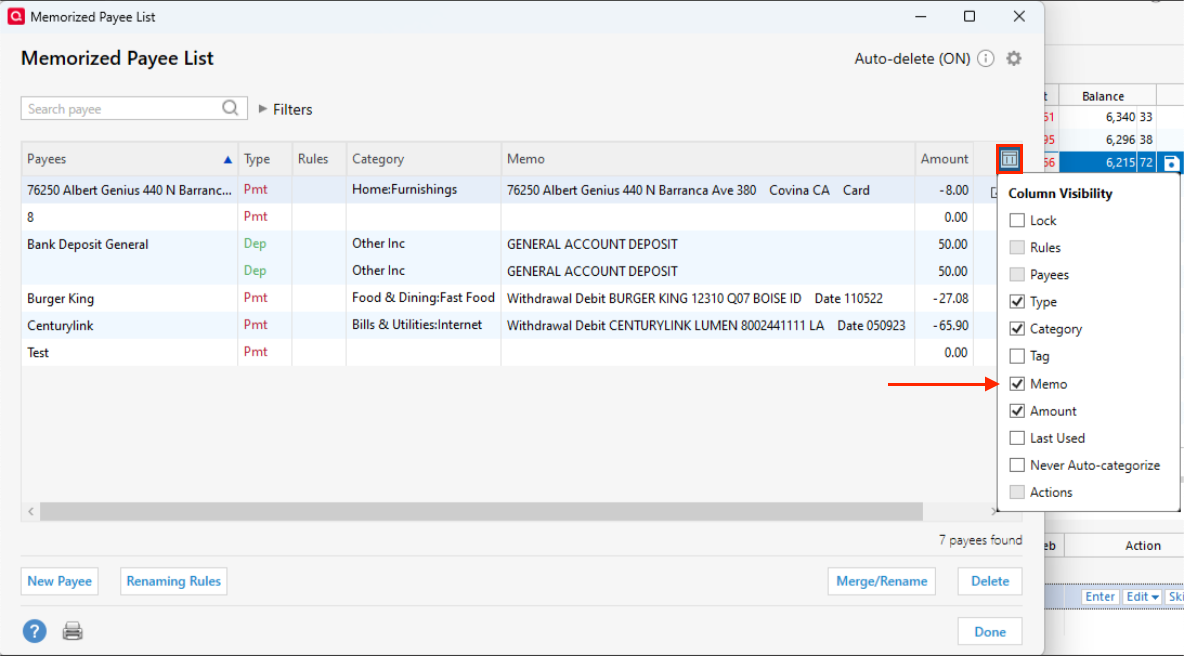
Also, the Memorized Payee List no longer shows memo values until you edit the entry. Clearing memorized memo values is the most frequent change I have to make to this list, so it would be great if Quicken would again show these values in the list.
My current version is R64.25.
Comments
-
Hello @Brams,
Thank you for your question!
I understand how helpful quick-access shortcuts are. You're right that Ctrl + T opens the Memorized Payee List, and while there isn't a single shortcut to directly open a specific payee from the main screen, once you're in that list, you can simply start typing the payee's name to quickly locate and select it.
Another option is to open the account register where you're entering a transaction and begin typing the payee's name in the Payee field on a transaction—Quicken will auto-complete it based on your memorized payees.
Also, if you haven’t seen it yet, there's an option within the Memorized Payee List to add the Memo column, which can help give you more context at a glance.
Hope this is helpful!
Quicken Alyssa
Make sure to sign up for the email digest to see a round up of your top posts.
0
Categories
- All Categories
- 56 Product Ideas
- 36 Announcements
- 223 Alerts, Online Banking & Known Product Issues
- 22 Product Alerts
- 701 Welcome to the Community!
- 671 Before you Buy
- 1.2K Product Ideas
- 53.7K Quicken Classic for Windows
- 16.3K Quicken Classic for Mac
- 1K Quicken Mobile
- 813 Quicken on the Web
- 111 Quicken LifeHub