Removing Fidelity online information

jeanderson
jeanderson Quicken Mac 2017 Member ✭✭✭

I've read the thread discussing issues with reauthorizing Fidelity accounts. I also get the reauthorize messages. However, this is an account I haven't used for over 5 years. In the list of accounts, it shows as online access is deactivated. But it has the Fidelity information in the column for institution.

My question: How do I remove the institution information but sill keep all the historical transactions for the account?

Comments

  • Quicken Alyssa
    Quicken Alyssa Quicken Windows Subscription Moderator mod
    edited September 24

    Hello @jeanderson,

    Great question, and thank you for asking it!

    I think you are referring to the financial institution name in the Account Details window. Am I correct?

    If so, you should be able to remove Fidelity from the financial institution box. If the account is disconnected/deactivated, that field should be editable. If this is not the case, can I please have you try validating your file?

    To do this you will:

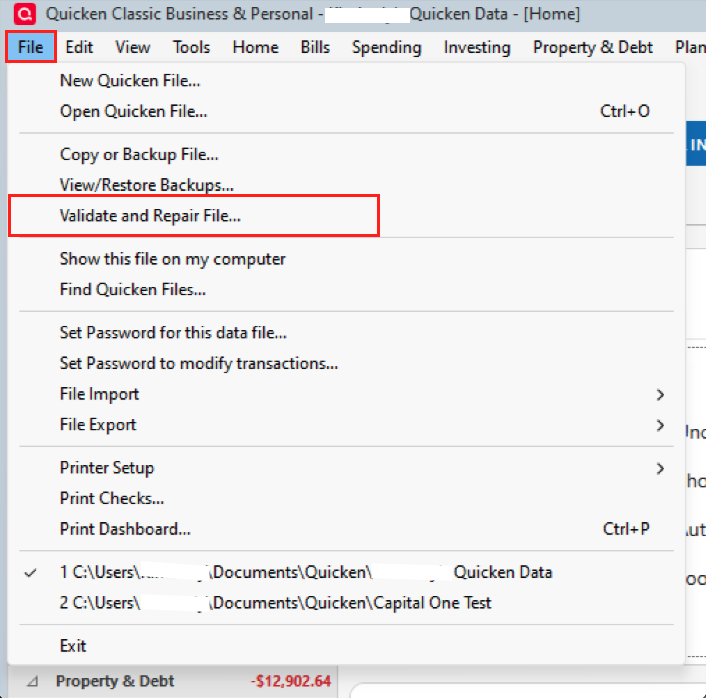
    1. Go to File in the top left of Quicken.
    2. Select Validate and Repair file…
    Screenshot 2025-09-24 at 2.58.07 PM.png

    3. In the validation window, select the first box "Validate file".

    4. Click Ok.

    Once this is done, exit Quicken by going to File>Exit. Reopen Quicken and see if you can now erase the Fidelity information in the Account Details.

    Let me know how it goes!

    Quicken Alyssa

    Make sure to sign up for the email digest to see a round up of your top posts.

  • Quicken Alyssa
    Quicken Alyssa Quicken Windows Subscription Moderator mod

    Hello @jeanderson,

    Thank you for following up and letting us know that you have resolved the issue.

    We are here if you need more help!

    Quicken Alyssa

    Make sure to sign up for the email digest to see a round up of your top posts.

This discussion has been closed.