Driving Me Crazy - Old account updated after stopping updates

gt00tx
gt00tx Member ✭✭✭

I can't believe what is happening…

So, I had an 'old' credit card account. One of those that when they did some internal conversion earlier this year due to some rate change or special offer, they kept the same account number.
I felt I needed to turn off updates for that old one and set up a new account… again, with the same account number.

Updates worked fine for several months. This last time I tried to reconcile (the new account), several transactions were not present. They were not in the old account either as they should not be since I turned off updates.

So, I decided to Reset the new account credentials. It proceeded to update my transactions. I didn't look at them before going back to reconcile, where I found the aforementioned transactions were still missing. Hmm…
And… I see that, for one account or ther other (I deleted so not sure), there are old PAYMENTS previously logged and reconciled, that were being logged again , BUT as unreconciled, unlceared CHARGES (not payments)!

Then, I notice that it brought those missing transactions into the OLD account that I had STOPPED the updates on (but was afraid to CLOSE because I thought it might also close the new account, being it's the same account number)!!

This is totally bizarre. Although, I can possibly understand the confusion to Quicken since I have two accounts with same number. Still, since there were two set-ups, I thought they would have unique identifiers and be able to deal with each as such.

Any insights and an idea on how to clean this mess up?

Thanks!

Comments

  • Quicken Alyssa
    Quicken Alyssa Quicken Windows Subscription Moderator mod

    Hello @gt00tx,

    Thanks for bringing this up—totally get how frustrating it can be when an old account suddenly reappears and causes confusion.

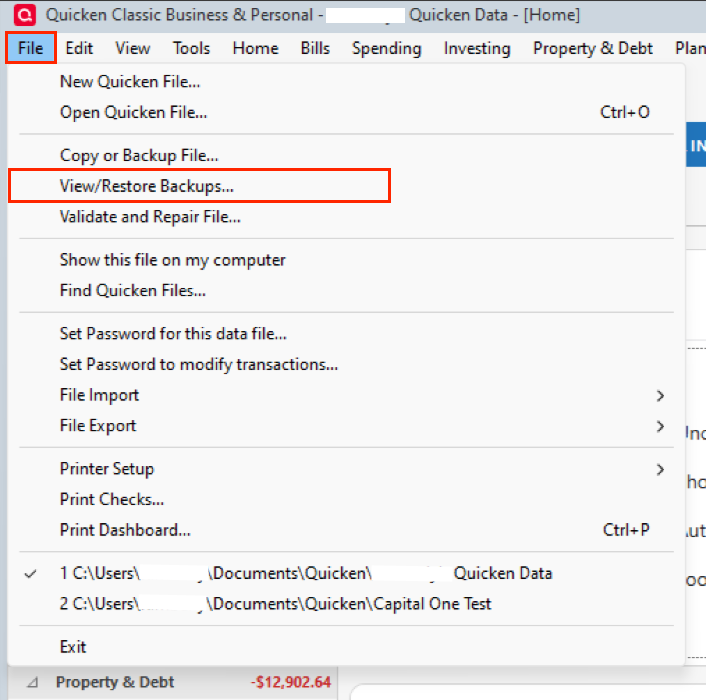
    Honestly, the easiest path forward might be to restore a backup from just before things got mixed up.

    image.png

    Once you're in that backup, double-check that the old account is still disconnected. Then, reconnect the newer account, and when Quicken prompts you, make sure to LINK it to the correct existing account in your file.

    Also, just a heads-up: closing (or even hiding) the old account in Quicken won’t affect the newer one at all. In fact, hiding old or unused accounts can help prevent exactly this kind of mix-up down the line.

    Hope that helps!

    Quicken Alyssa

    Make sure to sign up for the email digest to see a round up of your top posts.

  • gt00tx
    gt00tx Member ✭✭✭
    edited October 5

    Thanks.

    1) Your suggestion about going back to a back-up. That would be a few days ago and would be identical to what I did this morning. I reconnected the new account this morning and that's when it all started. I don't see how going back to a backup with the exact same circumstances would change anything. I also did verify that the old account is still disconnected when all the mess happened.

    2) Again, my concern about Closing the 'old' version remains, because if I 'permanently' close it, since it has the same credit account number associated, I feel that it will NOT ever allow me to do an update with that account number again (for the new version). Edit: I guess I could create it new, all over again… and hope it reconciles.

    3) Since they have the same account number, are you suggesting if I hide the OLD version then do an update, that it may update the NEW version properly?

    I think I'm going to (need to) manually reconstruct one or the other versions and close/delete the other. I don't know…. Quicken certainly doesn't like something. I also don't get why it downloaded old payments as charges on the same date! That's bizarro.

  • gt00tx
    gt00tx Member ✭✭✭

    Thanks Alyssa… I ended up just entering about a dozen transactions to the 'new version' of the account and it reconciled wonderfully. I then deactivated the old one (again) and hid it. I will see what happens in next download.

  • Quicken Alyssa
    Quicken Alyssa Quicken Windows Subscription Moderator mod

    Hello @gt00tx,

    Thank you for following up and providing those additional details.

    Glad you found a resolution that is working for you. If you need more help, you know where to find us!

    Thank you!

    Quicken Alyssa

    Make sure to sign up for the email digest to see a round up of your top posts.

  • gt00tx
    gt00tx Member ✭✭✭
    edited October 6

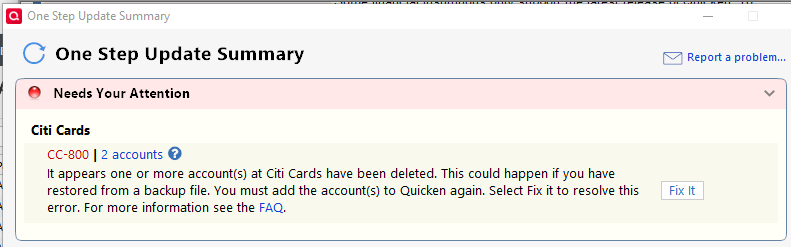
    Well… I did another update after I 'solved' my problem, but went off chasing 23 other rabbits and didn't check the Summary until now. I got a CC-800 error.. (1st image below) To recap, I had deactivated and hid the old account.

    After getting the error, I verified the old account was deactivated and hidden. I checked the new account and it was also deactivated. Hmmm… (I know where this is going…)

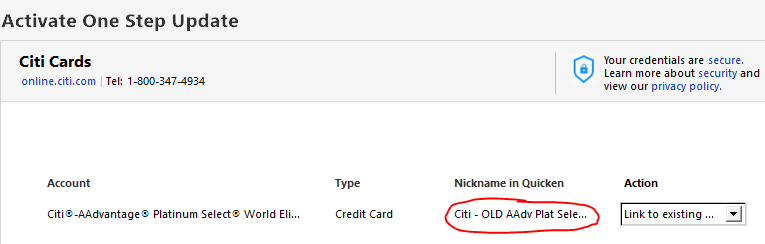
    I attempted to activate it and after I logged in my credentials, it comes to the One Step Update window and.. it wants to relink the OLD account that I have deactivated and hidden! (2nd image below) I know that it cannot handle two accounts with the same account number. I reckon I'm going to have to delete the OLD one. Arrrgh! Otherwise, I will need to enter several months of data for into the OLD one and delete the new one. I don't want to lose all those old transactions. It will mess up other register transactions, won't it?

    Any other ideas? Again, I could try to close it but I fear it will also close the new version, since it's the same CC account number. Does anyone have a sandbox where they can test this?

    image.png

    image.png
  • Quicken Alyssa
    Quicken Alyssa Quicken Windows Subscription Moderator mod

    Hello @gt00tx,

    Thank you for returning, though I am sorry you are having more issues. And thank you for the recap, I really appreciated that.

    First off, I want to reassure you that if you close one account in Quicken, it will not close another. That being said, closing an account on Windows cannot be undone, and you don't have to do it. I think what you have already done by hiding it is enough.

    Second thing, if you click the dropdown arrow, and hover over "Link to existing", it should give you a list of accounts that you can link it to. You should be able to select the new account as long as it is disconnected in Quicken. Do you see this on your end?

    To answer your question about deleting that old account, I would not recommend this, as I think you are correct that it could cause other issues.

    Let me know how it goes. I am happy to provide more guidance if needed.

    Quicken Alyssa

    Make sure to sign up for the email digest to see a round up of your top posts.

This discussion has been closed.