New Account not showing in account List

DLS
DLS Quicken Windows Subscription Member ✭✭

Added New Account Cash

Under Details - Checked Keep Separate, did not check Hide in Account Bar & List, did not check hide in transaction entry (and it does show there). But does not show in my account list and bar. It is under more accounts, manage hidden?

Anyone know how to fix?

Thanks Deb

Comments

  • UKR
    UKR Quicken Windows Subscription SuperUser ✭✭✭✭✭

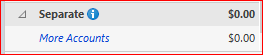
    That's the result of checking the "Keep Separate" option.
    The account will appear at the bottom of the Account Sidebar in section titled Separate

    image.png

    Click More Accounts to see the list of Separate Accounts

    Do you really need to keep the account separate, i.e., totally away from your personal finances?

This discussion has been closed.