Is there a way to export transactions from an IRA account register to csv or excel?

Bert Onstott
Bert Onstott Member ✭✭✭
edited November 25 in Reports (Windows)

I have two IRAs with Fidelity. Both have some transaction mismatches between Fidelity's website and Quicken's. It would make identifying errors much simpler if I could export Quicken transactions to a CSV or Excel file. There is no "Export to Excel…" like there is for my checking account.

I can print transactions to a PDF, but converting the PDF to .csv leaves tons of junk in the resulting file.

Any suggestions?

I'm using Quicken Classic for Windows Premier, Version R64.35, build 27.1.64.35.

Tagged:

Best Answers

  • q_lurker
    q_lurker Quicken Windows Subscription SuperUser ✭✭✭✭✭
    Answer ✓

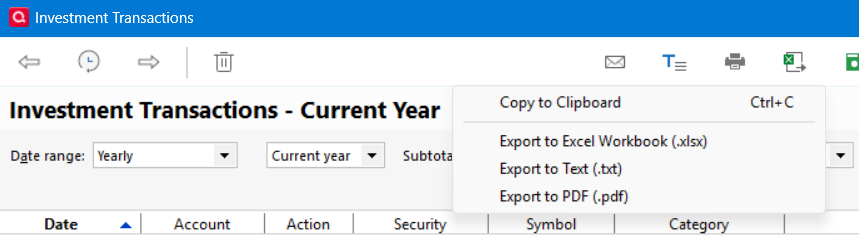
    You can create an Investment Transactions report, copy that to the clipboard, and then paste it into Excel; or Export it to an xlsx file.

    image.png

    Not perfect in that Sells and Reinvestments are presented in two lines.

  • MHSwizzleStick
    MHSwizzleStick Quicken Windows Subscription Member ✭✭✭✭
    Answer ✓

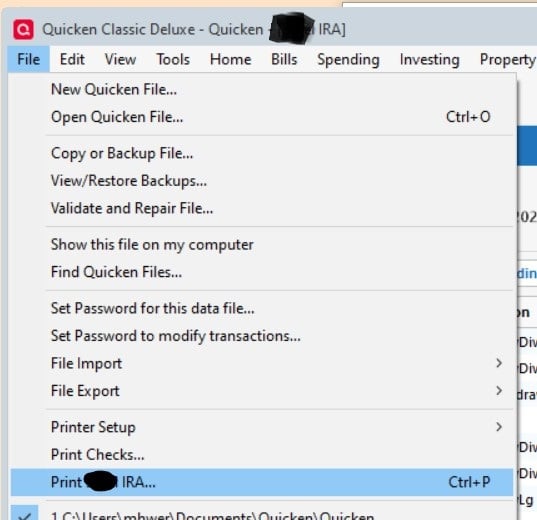
    With the IRA account register open, select File → Print <name of account>

    q1.jpg

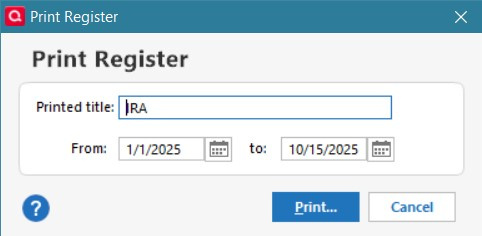
    In the next screen, select the date range and click Print…

    q2.jpg

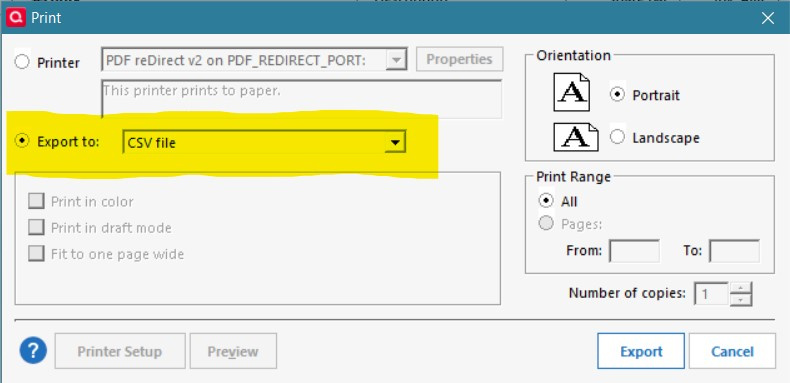
    In the next screen, select Export to: CSV file

    q3.jpg
  • Bert Onstott
    Bert Onstott Member ✭✭✭
    Answer ✓

    Thank you! I did not know that was there.

Answers

  • q_lurker
    q_lurker Quicken Windows Subscription SuperUser ✭✭✭✭✭
    Answer ✓

    You can create an Investment Transactions report, copy that to the clipboard, and then paste it into Excel; or Export it to an xlsx file.

    image.png

    Not perfect in that Sells and Reinvestments are presented in two lines.

  • MHSwizzleStick
    MHSwizzleStick Quicken Windows Subscription Member ✭✭✭✭
    Answer ✓

    With the IRA account register open, select File → Print <name of account>

    q1.jpg

    In the next screen, select the date range and click Print…

    q2.jpg

    In the next screen, select Export to: CSV file

    q3.jpg
  • Bert Onstott
    Bert Onstott Member ✭✭✭
    Answer ✓

    Thank you! I did not know that was there.

This discussion has been closed.