Error message, telling me to reconcile downloaded transactions. There are none.
CC was canceled by the bank. Assigned a new CC number.
I created a new cc, transferred the last entry from CC old to the new. All went smoothly
New cc is reconcilable. Several cycles now. downloads and/or imports work fine.
What have I tried?
- account details, general tab, old cc has new cc account number in the acct number field. Have tried to delete. takes data input. close. open. The problem reappears.
- Try to "deactivate. Get a warning to reconcile 1st. Can't. No transactions.
- Reset account. Same error telling me to reconcile transactions first. There are none.
- Close account. Warning on closing. Accept all transactions. Not closed. Registry still accessible.
- logged off/on
- rebooted the computer, and launched Quicken. The problem remains.
- Validated file. No problems.
Suggestions? I've been reading others' problems of the same nature. No go for me.
Answers
-
Hello @treasur2,
Thank you for sharing your experience and all the steps you have taken to try and resolve this issue.
I do have some follow-up questions for you.
- Where is your data file located?
- Is your file being backed up/synced by any third-party services like Carbonite, OneDrive, or Dropbox?
- Do you have automatic entry turned off for this account?
If you do have auto-entry turned off, let's try turning it on. To do this:
- Go to Tools.
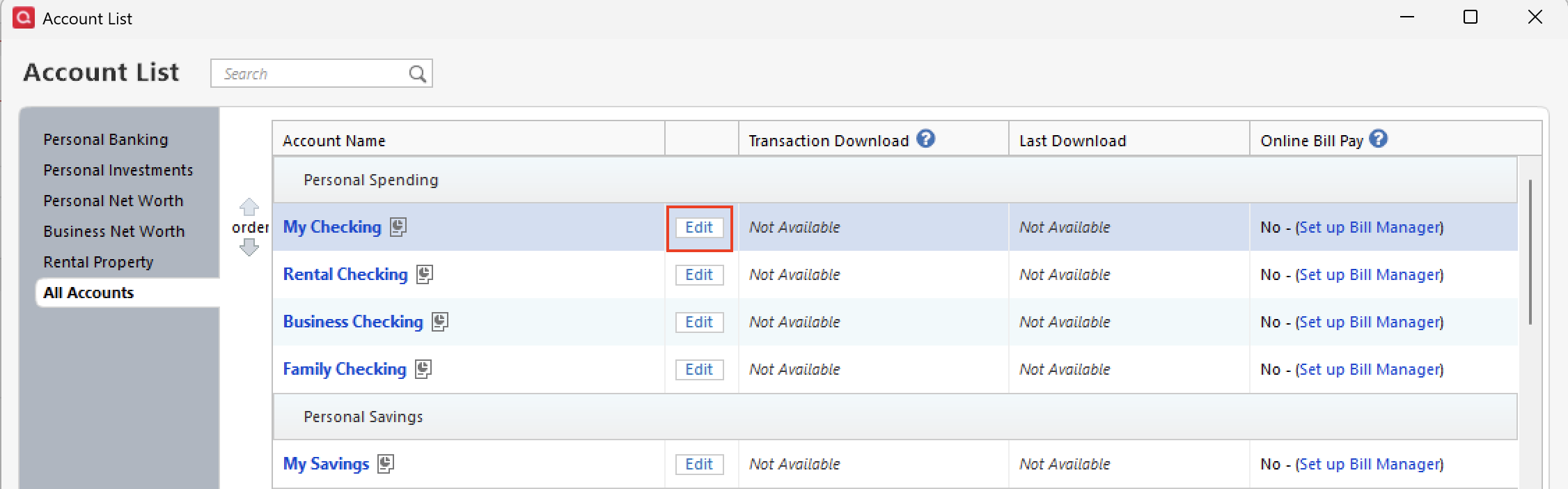
- Select Account List from the menu options.
- Click the Edit button next to the account in question.
- Click over to the Online Services tab.
- You should see Automatic Entry: Off, in blue. Click on this and turn it on.
- Run a One Step Update. Did new transactions come in?
- You can turn automatic entry back off if you would like.
- Try Reconciling again.
Let me know how it goes!
Quicken Alyssa
Make sure to sign up for the email digest to see a round up of your top posts.
0 -
Your on to something…
Path for application is...
"C:\Program Files (x86)\Quicken\qw.exe"Path for data file is...
"F:\Quicken\Project\WorkingFiles\WorkingFile.QDF"and yes. File is backed up via OneDrive, this was just started days ago.
Your suggestions, my steps/results
Turned on auto entry.
Red flag disappearedTurned off
Got warning about all entries will now be manual.Attempted Deactivation. Got the same error message, needing to reconcile.
Checked, no entries to reconcile.Attempted to Reset account. Got same error message, needing to reconcile.
Attempted to close account. Got the "accept downloaded transactions" window. Choose to accept all. The window disappeared. account still in the account list.
account list shows it as "direct connect Yes'.
Noticed...red flag indicator is back next to account.
0 -
I have an idea.
How about creating a dummy cc account? no activation, no connection, no downloading.
"Move" all transactions to dummy. Then attempt to "delete" the bad account.
Then, rename, change account number to origional, close account. no transactions since 2020. Bad cc account only has 219 transactions. Oldest is 12/2019. Newest is 9/2020
Yes, backing up before all, like everyother time.
0 -
Hello @treasur2,
Thank you for following up with additional details.
Yes, you can try out your idea of creating a new account; however, I think doing that would affect transactions using transfer categories, if you use those. Definitely save a backup before you attempt this, so if you aren't happy with the results, you can go back to where you started.
My first recommendation would be to move your data file off the external F Drive that you currently have it on and back onto the C Drive. The default file path is C:>Users>your username>Documents>Quicken. It is best to keep your file there to prevent damage from occurring to it. You can save backups to external drives and cloud services, but we recommend not allowing third-party services to sync/backup your active data file automatically.
Once you have moved the file, you should then validate it.
To do this:
- Go to File.
- Select Validate and Repair file…
- Check the first box for Validate file.
- Click Ok.
When the validation finishes, go to File>Exit. Wait a few seconds and then reopen Quicken. Do you still have the red flag on this account? Are you now able to reconcile without being prompted to accept transactions?
Looking forward to your response.
Quicken Alyssa
Make sure to sign up for the email digest to see a round up of your top posts.
0
Categories
- All Categories
- 56 Product Ideas
- 36 Announcements
- 223 Alerts, Online Banking & Known Product Issues
- 22 Product Alerts
- 701 Welcome to the Community!
- 671 Before you Buy
- 1.2K Product Ideas
- 53.7K Quicken Classic for Windows
- 16.3K Quicken Classic for Mac
- 1K Quicken Mobile
- 813 Quicken on the Web
- 111 Quicken LifeHub