Quicken crashing on Fidelity FCASH pop up window
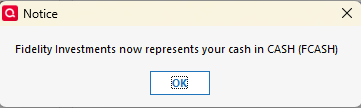
I recently reconnected my Fidelity account with online access, and Quicken is now crashing every time I try to go into one of my Fidelity accounts. When I click on the Fidelity account I get this pop up, when I click Ok or X, Quicken crashes every time.
I got to the Account Details tab so I could try a Reset Account, but there's a single downloaded transaction in that account so I get a message that I have to accept that first. Same problem if I try to Deactivate that account. I have other Fidelity accounts and tried resetting those, but they only reset that specific one.
I've also validated the Quicken file, and nothing about that is in the log or changes.
So.. I can't get into the account to accept the download, I can't reset it, and I can't deactivate it. I can't just delete it as there's a lot of history in the account.
I also just reconnected this account because I copied the last 10 years to a new file (this file) and reconnected every. single. account, so just resorting to a backup isn't feasible either.
Is there a way to accept or delete the downloaded transaction without getting into the account, or any other ideas?! Thanks in advance.
Answers
-
Hello @JustQuick,
Thank you for the detailed description of the issue you are having, and I am happy to help.
First, I would like to check a couple of basic things:
- Where is your file located?
- Is your file being synced/backed up by any third-party services like Carbonite, OneDrive, or Dropbox?
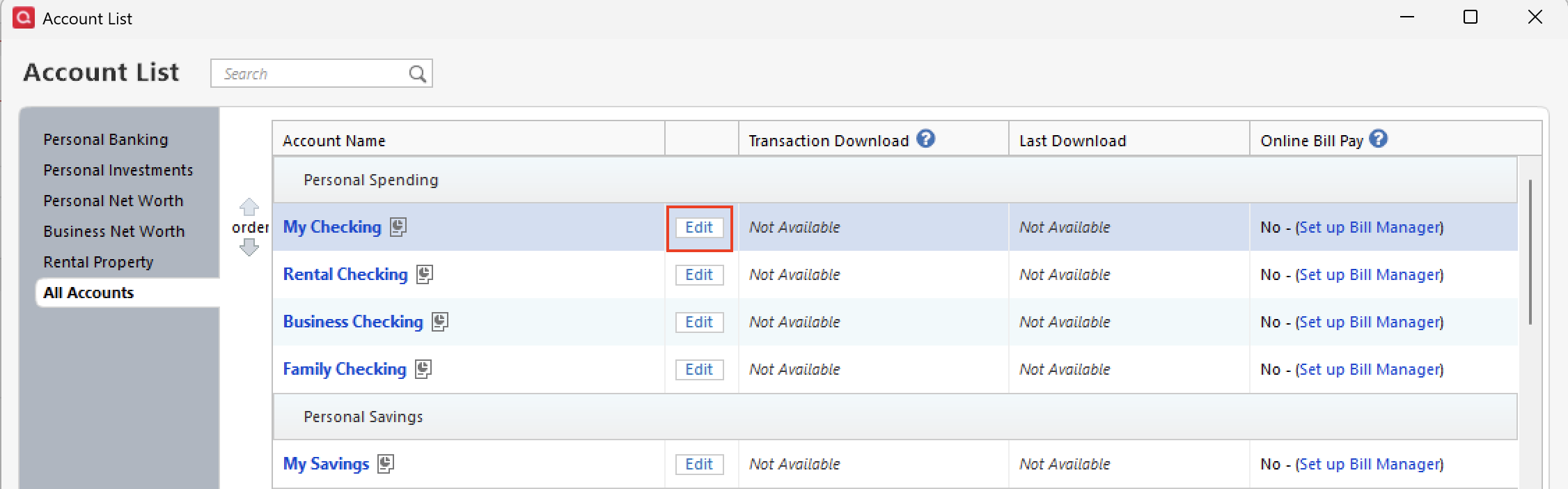
While there is not a way to accept the transactions for this account without getting into the account register, one thing we can try is turning on automatic entry. To do this:
- Go to Tools.
- Select Account List from the menu options.
- Click the Edit button next to the account in question.
- Click over to the Online Services tab.
- You should see Automatic Entry: Off, in blue. Click on this and turn it on.
- Run a One Step Update. Did new transactions come in?
- You can turn automatic entry back off if you would like.
Let me know how it goes!
Quicken Alyssa
Make sure to sign up for the email digest to see a round up of your top posts.
0 -
Hi @Quicken Alyssa. Thanks for getting back so quickly. Good news. I first tried your suggestion and it turned the red flag, for the downloaded transaction, to a blue dot and I was hopeful, but's the downloaded transaction was apparently still there and I needed to get to the register to act on the task. Still couldn't Deactivate online services or reset the account and still threw that pop up every time I try to access the register and it would crash Quicken.
I then tried the Reset Money Market securities/cash option button, and that let me in! I've seen a lot of comments about Fidelities FCASH thing so I'll check that out tomorrow, but for now I've at least saved this file. Thanks!
0 -
Thanks for the update! Happy to hear you have accomplished what you were hoping to!
If you continue experiencing issues with this file, don't hesitate to reach back out. There are more things we can try if needed.
Thanks again!
Quicken Alyssa
Make sure to sign up for the email digest to see a round up of your top posts.
0
Categories
- All Categories
- 56 Product Ideas
- 36 Announcements
- 223 Alerts, Online Banking & Known Product Issues
- 22 Product Alerts
- 701 Welcome to the Community!
- 671 Before you Buy
- 1.2K Product Ideas
- 53.7K Quicken Classic for Windows
- 16.3K Quicken Classic for Mac
- 1K Quicken Mobile
- 813 Quicken on the Web
- 111 Quicken LifeHub