Sudden change of investment acc. to simplified view, Restore detailed view account data from backup?

BlueTurtleJR
BlueTurtleJR Quicken Windows Other Member ✭✭

Hi

I am running Quicken Classic for Windows.
Hope you can help me restore my detailed view data into my most current Quicken data file.

The affected account is the one that handles my employer RSUs through Schwab. These RSUs are vested monthly. Out of the blue, the account now only shows as simplified view, losing all the detail past and future vesting information. This is unacceptable.
I can see detailed view data from a month old backup. Can that account in the backup (w/ detailed data) be copied/transferred to my current Quicken data file?


I've tried restoring to that month old backup, but after a few One Step downloads, many other accounts show numerous errors and inconsistencies that will result in a very arduous effort to clean up.


The easiest solution, keep present up to date data, import the detailed view RSU account from a backup from before the conversion to simplified view. Keep that account from ever having a connection to the brokerage house, to prevent another conversion to simple view.


How can that be done?

Many thanks in advance for your advice

Cheers

Jorge

Regards,

Jorge

Answers

  • Quicken Alyssa
    Quicken Alyssa Quicken Windows Subscription Moderator mod

    Hello @BlueTurtleJR,

    Thank you for sharing your experience.

    Schwab does offer detailed tracking, but I am not sure if the account type has anything to do with it. Can I have you check to see if enabling it is an option?

    To do this:

    1. Go to Tools.
    2. Select Account List.
    3. Click the Edit button next to the account in question.
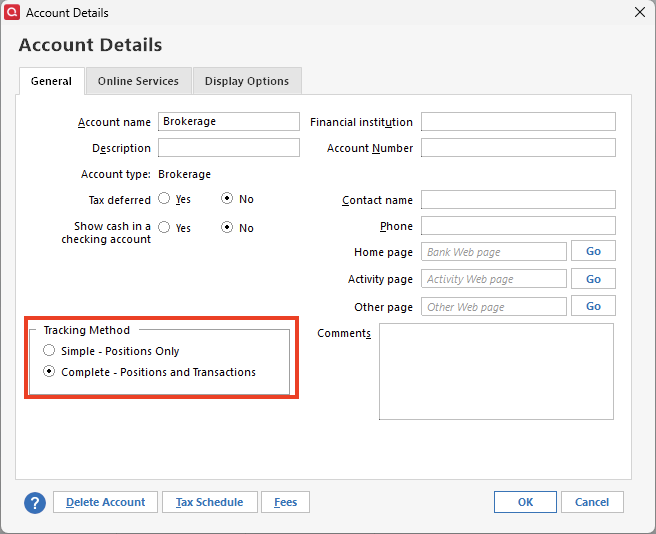
    4. Under Tracking Method, select Complete - Positions and Transactions.
    general tab-complete&simple.png

    Let me know if you now have detailed tracking for this account.

    Quicken Alyssa

    Make sure to sign up for the email digest to see a round up of your top posts.

  • BlueTurtleJR
    BlueTurtleJR Quicken Windows Other Member ✭✭

    Alyssa
    Many thanks for replying.
    This is good to know. I will check once I get home from work.
    On the other hand, resetting this to "Complete" may not bring back all the past/future vest details of the RSU account.
    The original question still stands. I have a backup file with a version of that account with complete details, close to 300 lines of entries, still there.
    Can that account be copied and pasted to my present version of my Qdata file, that is, replace the account there that is now in "Simple" format?

    thank you

    Jorge

    Regards,

    Jorge

  • BlueTurtleJR
    BlueTurtleJR Quicken Windows Other Member ✭✭

    Alyssa

    Your advice indeed fixed the problem. My hand entered feeling was the data was lost forever. Just clicking back to "Complete" magically brought back all the entered past and future transactions on this RSU account. Many thanks for your insight.

    Problem solved!!

    Jorge

    Regards,

    Jorge

  • Quicken Alyssa
    Quicken Alyssa Quicken Windows Subscription Moderator mod

    Hello @BlueTurtleJR,

    Thank you for following up and letting us know that the suggestion worked!

    So happy to hear this issue has been resolved, and that the data you were worried about losing is still there.

    If you need more help, don't hesitate to reach out!

    Thanks again!

    Quicken Alyssa

    Make sure to sign up for the email digest to see a round up of your top posts.

This discussion has been closed.