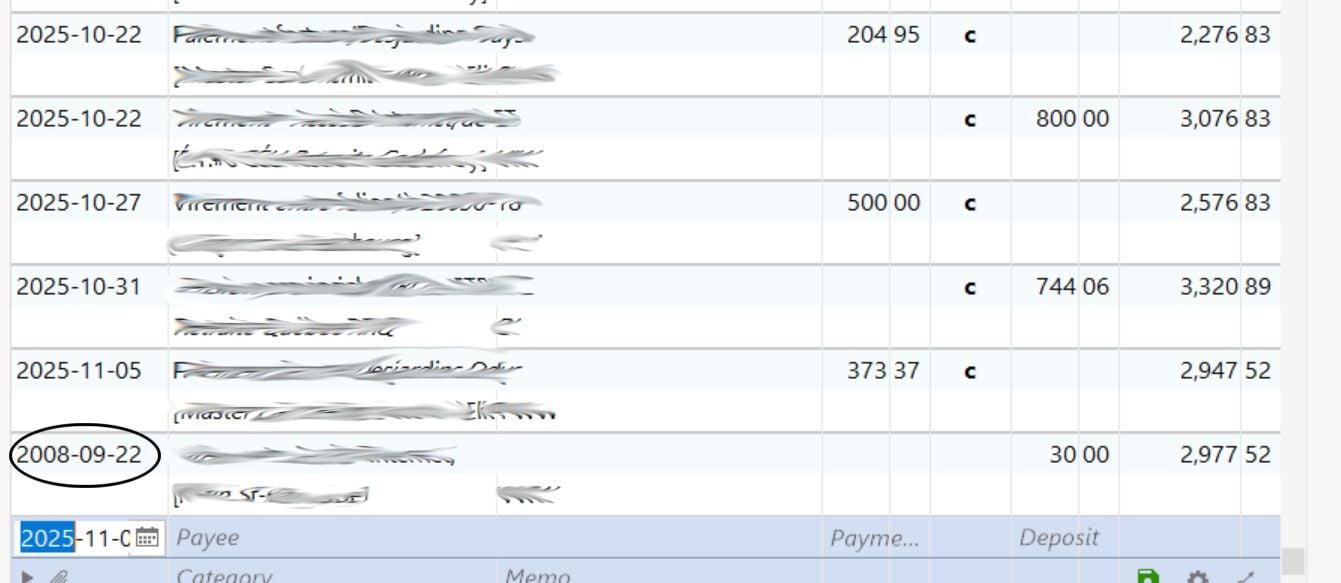
This morning I got this strange date error in one account. This transaction camed from an hidden account.
I use R64.31 Canadian version of Quicken Classic Deluxe. I use Quicken since 1997.
Alain
What actual register are you looking at? Or are you looking at the All Transactions register? Is your register properly sorted by Date in ascending order (Date column header shows ▴ next to it)? Is your register filtered by some search or include/exclude criteria?
That problem transaction from 2008 appears to be a transfer transaction. Was this transaction changed to a transfer in the originating register when it shouldn't have been changed?
I look at a banking register. I don't know why, my sorting option was set to "by cleared". I use Quicken since 1997, it's the first I saw something like that.
Thank you
Things like that can happen when, while moving the mouse across the Quicken window, you accidentally click the mouse while moving over the Clr column header. I've managed to do that myself on occasion.
Thanks for reporting back. I'm happy to hear that all is OK now.
It was exactly what I did !