Self-referential USAA transfer transactions
USAA transactions from online sync auto-populate the category with the same account, rather than to the correct accounts into which transfers are being made, as you can see in the screen grab.. Efforts to manually adjust/create matching transactions to the correct account (e.g. USAA Credit Card) compound the issue with the sync active. This is obviously messing up a lot of balances, and is only an issue for USAA, none of my other linked institutions.
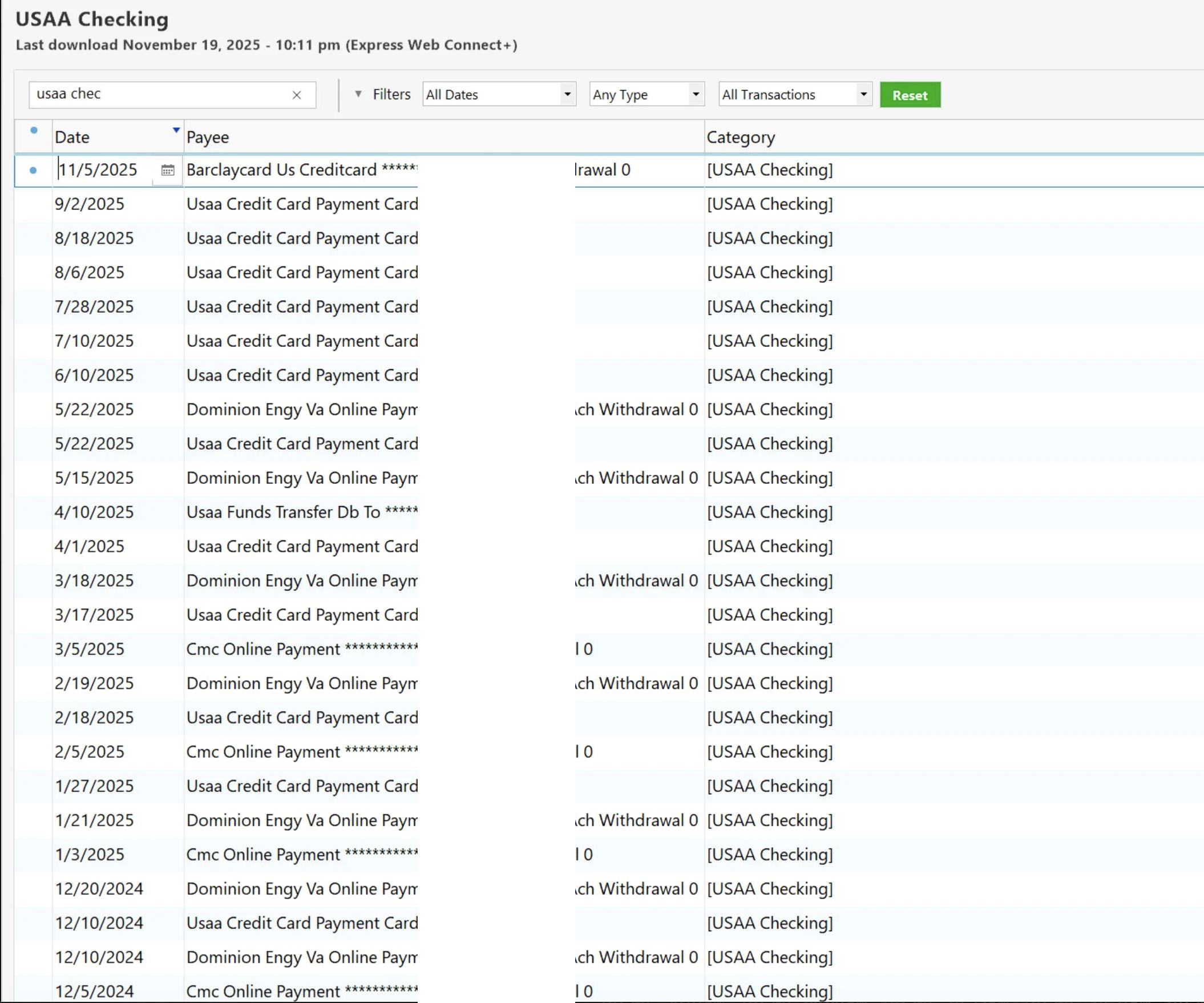
Is this a known bug, a mistake on my part, or is there some other workaround?
[Edited-Screenshot/Readability]
Answers
-
Hello @ajRu3192,
Thank you for sharing your experience.
There are a few things that we can check to get to the bottom of this.
- Do you have any Renaming Rules that could be causing this?
- Here, you are looking for any rules that you may have set up for these payees that could be contributing to this.
- Another thing to check would be Memorized Payees.
- Here, you would be looking to make sure these payees aren't memorized with the incorrect category.
- You mentioned the cloud sync, are you using Quicken Mobile & Web?
- Where is your data file located?
- Is your file being synced with any third-party services like OneDrive, Dropbox, or Carbonite?
Looking forward to your response.
Quicken Alyssa
Make sure to sign up for the email digest to see a round up of your top posts.
0 - Do you have any Renaming Rules that could be causing this?
-
If you have issues with transfer transactions not being generated correctly:
For best results I recommend you manually enter transfer transactions into your register BEFORE you download transactions from the bank which contain the transfer confirmations.
I also recommend you turn off "automatically accept downloaded transactions into registers", for better control of what appears in your registers.
For recurring transfers use scheduled reminders and enter them a day or two before the due date.
Be sure to use distinct Payee Names for each transfer / credit card payment to avoid confusing Quicken - memorized payee entries.
Manually recorded Transfer transactions are recorded with the Transfer-To account name in the Category field, enclosed in [square brackets], e.g., "[ABC VISA]".
That takes the guesswork out of the download process. Because a correctly entered transfer transaction already exists in your account registers, the download process should just match the downloaded transfer transaction to the existing one in both accounts.Where are the "Auto-accept downloaded transaction" settings?
There are two places where this is controlled in Quicken for Windows:- Globally, for all accounts, in Edit / Preferences / Downloaded Transactions
- For each account individually, the global setting can be overridden from the Edit Account Details screen, Online Services Tab. Look for blue text "Automatic Entry is: ON / OFF". Click the text to change the setting.
0
Categories
- All Categories
- 56 Product Ideas
- 36 Announcements
- 223 Alerts, Online Banking & Known Product Issues
- 22 Product Alerts
- 701 Welcome to the Community!
- 671 Before you Buy
- 1.2K Product Ideas
- 53.7K Quicken Classic for Windows
- 16.3K Quicken Classic for Mac
- 1K Quicken Mobile
- 813 Quicken on the Web
- 111 Quicken LifeHub


