Account forecast inaccuracies

VTBoarder
VTBoarder Quicken Windows Subscription Member

I have had this problem for some time. With one specific bill reminder, the projected balances screen shows inaccurate data. See the snip for details. This only happens with the Capital One bill, and it skews the forecast until I enter it.
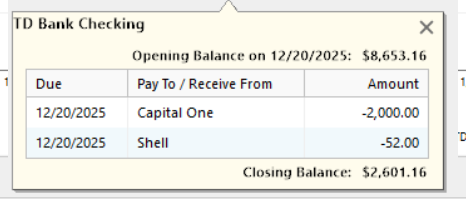
image_2025-11-24_085127222.png

I have updated to the latest version, this has persisted over several updates. Currently on R64.35 Build 27.1.64.35. I have deleted and recreated the reminder. I have removed the Shell reminder. I have edited the date of both of these. That confirmed that it is the CapOne bill. I have edited the dollar amount. I'm out of ideas. Any other solutions? Has anyone seen the same? TY.

Answers

  • Quicken Alyssa
    Quicken Alyssa Quicken Windows Subscription Moderator mod

    Hello @VTBoarder,

    Thank you for sharing your experience, I am happy to help.

    I have some follow-up questions for you.

    • Where is your data file located?
    • Is your file being synced/backed up by any third-party services like OneDrive, Carbonite, or Dropbox?
    • Are you using Quicken Mobile and Web apps?

    I am curious if the cloud sync could be a culprit for this issue you are having. Can I have you delete the problem reminder and then reset the Quicken cloud to see if it resolves the issue?

    To do this:

    1. Delete the reminder.
    2. Reset the Quicken Cloud.
    3. Add the reminder back into Quicken.

    After completing these steps, check to see if the issue still occurs.

    Let me know how it goes.

    Quicken Alyssa

    Make sure to sign up for the email digest to see a round up of your top posts.

  • VTBoarder
    VTBoarder Quicken Windows Subscription Member

    Hi, I don't use Quicken Cloud. The data file is located on my laptop with backups on my NAS (network attached storage) via mapped drive, but the issue predates that new storage location Perhaps after I bake a couple of pies, I might delete and recreate the reminder. Thanks

  • VTBoarder
    VTBoarder Quicken Windows Subscription Member

    Update, I made a backup of my data file and ran the repair option (File\Validate and repair file) which apparently found and repaired a damaged reminder. The text output showed this:

    Quicken found a damaged scheduled reminder and removed it. Please check your scheduled reminders by going to Tools>Manage Bills and Income Reminders.

    I was able to find the reminder, which was still present, and verified that things now appear to be accurate.

    Thanks for your help.

  • VTBoarder
    VTBoarder Quicken Windows Subscription Member

    This was an important fix, because the problem was preventing an accurate forecast. Now that it is fixed I can lower my distributions from a brokerage account.

  • Quicken Alyssa
    Quicken Alyssa Quicken Windows Subscription Moderator mod

    @VTBoarder,

    Thank you for following up and letting us know what worked to resolve the issues you were seeing.

    If you need more help, don't hesitate to reach back out!

    Thanks again!

    Quicken Alyssa

    Make sure to sign up for the email digest to see a round up of your top posts.