Duplicate transactions downloading since version 8.3.3 update

System
System Member admin

This discussion was created from comments split from:

Duplicate downloaded transactions

.

Comments

  • GCarey
    GCarey Quicken Mac Subscription Member

    I have the same issue. Started after the last Quicken Mac update.

  • Quicken Alyssa
    Quicken Alyssa Quicken Windows Subscription Moderator mod
    edited 6:32AM

    Hello @GCarey,

    Thank you for sharing your experience and reporting the issues you are having.

    This Support Article addresses duplicate transactions in Quicken Mac. You may find duplicate accounts or transactions in Quicken for Mac if one of the following conditions has occurred:

    • You have deactivated and then reactivated your account(s) with the financial institution.
      • When reactivating your existing account(s) in Quicken Mac, you should be prompted to Add, Link, or Ignore the accounts found at the bank using your credentials. If you accidentally chose Add rather than LINK, you can end up with duplicate accounts.
        • Solution: Deactivate the duplicate/new account, then delete it. Follow the Reactivate instructions, making sure to carefully LINK the accounts.
          • Reactivating an account also has the potential of creating duplicate transactions. Quicken will automatically download the most recent 90 to 200 days of transactions (depending on the financial institution), including those that have already been downloaded.
        • Solution: Delete the duplicates from the account register.
    • Your financial institution has changed the format for returning the Financial Institution Transaction ID (FITID) in a Direct Connect account.
      • This can cause duplicate transactions to download because Quicken flags previously downloaded transactions by the Financial Institution Transaction Identification (FITID) as a mechanism to prevent duplicates from downloading. When that FITID changes on existing transactions, and they're transmitted to Quicken, Quicken has no way of knowing that they're actually duplicates of previously downloaded transactions.
        • Solution: Delete the duplicates from the account register.
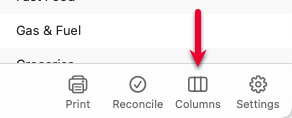
          • Tip: You can enable the FITID column by clicking the Columns button at the bottom of the register and selecting FITID image.png

    Let me know how it goes!

    Quicken Alyssa

    Make sure to sign up for the email digest to see a round up of your top posts.