This discussion was created from comments split from:
Duplicate transactions downloading since version 8.3.3 update.
Same issue, plus transactions not importing, errors when trying to import Quicken files. Spread across different bank accounts, not unique to one bank. Quicken Canada has been detreating for a while now, it’s now at the worst I have ever experienced, almost like just filling everything in an Excel spread sheet, manual for transactions. have reported errors to Quicken ??, Used product for decades. What’s up?
Hello @ASutt,
Thank you for reporting the issues you are seeing. I am happy to help!
This Support Article addresses duplicate transactions in Quicken for Windows. There are a few possible causes of duplicate transactions. You can attempt the steps provided below to resolve this issue; otherwise, you can restore a backup from before the start of the issue.
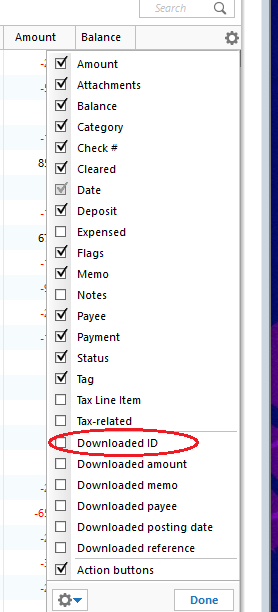
To resolve the issue, we'll first need to determine what's causing these duplicates by looking at the Downloaded ID for these transactions:
Please review the article linked above for solutions to each of these scenarios.
If duplicates continue to download, you may require assistance from either the Online Banking Support for your bank or from Quicken Support.
As for the problem you are having with importing QFX files, we do have a Known Issue in the latest QWIN-US releases, R65.15 and R65.17, that sounds like what you are experiencing. In that alert, uninstalling and reinstalling the Quicken application resolved the issue. Please try those steps and let me know if it resolves the issue you are having.
Let me know how it goes!
@ASutt,
Just checking in, we haven't heard back from you in a while.
Do you still need assistance?
Thank you!
Hello again,
Checking in once more before this thread is closed.
Let us know if you still need assistance.
Hello,
Due to the lack of response, I went ahead and closed this post.
If you still require assistance, please feel free to start a new post.