Fidelity Rewards Card from Elan Financial--recent transactions missing in download

John McCoy
John McCoy Member ✭✭

Classic for Windows R65.17, Build 27.1.65.17, Fidelity Rewards Card from Elan Financial. Not all transactions shown as POSTED on Fidelity's website are downloading. For example today (12/13/2025), transactions from 12/10 through 12/12 are missing from the download. I had to enter them manually using the Fidelity website. I think this has happened for the last month or so.

Comments

  • Quicken Alyssa
    Quicken Alyssa Quicken Windows Subscription Moderator mod

    Hello @John McCoy,

    Thank you for sharing your experience and reporting the issues you are having.

    It sounds to me like you are experiencing missing transactions. Please check out the linked support article. You mentioned that this has been happening for about a month, so the steps to follow are:

    Be sure to follow these steps in order:

    1. Go to Edit > Preferences > Downloaded Transactions. The option Automatically add to banking registers needs to be unchecked.

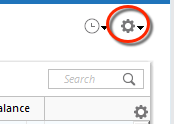
    2. Refresh your online account information by clicking the Actions Gear Icon on the upper right of the register, and select Update Now. Follow the on-screen instructions to complete the update.

    RegisterActionGear_support

    3. Confirm that the Sort Order in your account is by Date; just click the top of the Date column in your account register. It's possible the transactions are in your register, but not where you thought they'd be.

    WinDateSortGif_support

    4. Click the Reset button at the top of the register. This will confirm that there's no filtering in your account register.

    5. Try refreshing your login session: To do this, go to Help > Refresh Sign in. After completing the log-in process, try running a One Step Update again.

    6. Go to Tools > Account List and check Show Hidden Accounts at the bottom left. Confirm the missing transactions haven't been added to a hidden account by clicking on the name of any account that appears with a check mark in the Hidden column.

    WinShowHiddenAccounts_support

    If these steps do not resolve the issue, please contact Quicken Support directly for further assistance. They will be able to take a closer look and process an escalation if needed.

    Thank you!

    Quicken Alyssa

    Make sure to sign up for the email digest to see a round up of your top posts.