One Step Update not working (again)
Had this problem a few days ago as well — freezes and I have to CTRL+ALT+DEL to stop Quicken. Happens when I do all accounts as well as accounts individually. Have Super-Validated the file, made a copy, reset a few accounts — all to no avail.
Oddly, when I restart Quicken, most times the downloaded transactions appear so on some level it is working, just not wrapping up properly.
Comments
-
Hello @kswann99,
Thank you for sharing your experience and reporting the issues you have encountered.
I appreciate you sharing what troubleshooting steps you have already tried, although I am sorry that you haven't been able to resolve this issue.
We do have a Support Article for the One Step Update freezing issue. In some circumstances, Quicken for Windows may start to slow down, freeze, or crash during the One Step Update process when updating connected accounts. While the actual cause of the performance dip or crash can be hard to isolate, we do have a list of possible fixes and troubleshooting steps to try.
It sounds like you have already tried narrowing this down to a specific account, which is step one. That was unsuccessful, so we can move on to step two.
Disable Mobile & Web Sync
If you have Mobile & Web Sync enabled, a possible solution for slow One Step Updates is to disable the Mobile & Web Sync feature within Quicken when not actively using it.
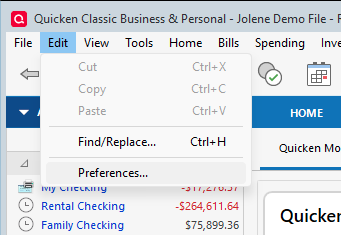
- From the Edit menu, choose Preferences....
- Click Mobile & Web from the left-hand menu.
- Click the Sync toggle so it reads OFF.
- Attempt the One Step Update again.
And step three:
Reset Sync to Cloud data
- Log out of the Quicken mobile app (if applicable) and access Quicken on your desktop/laptop.
- From the Edit menu, choose Preferences....
- Choose Mobile & Web from the left-hand menu.
- Click the blue Reset your cloud data link and follow the on-screen instructions to reset Cloud Sync. (The sync has to be turned on to do this)
- Sync your desktop file to the cloud.
- Log back into the mobile app (if applicable).
If these don't have any effect on the behavior, please continue with the rest of the steps outlined in the article, and let me know how it goes.
Hope this helps!
Quicken Alyssa
Make sure to sign up for the email digest to see a round up of your top posts.
0
Categories
- All Categories
- 61 Product Ideas
- 35 Announcements
- 223 Alerts, Online Banking & Known Product Issues
- 21 Product Alerts
- 704 Welcome to the Community!
- 672 Before you Buy
- 1.2K Product Ideas
- 53.9K Quicken Classic for Windows
- 16.4K Quicken Classic for Mac
- 1K Quicken Mobile
- 812 Quicken on the Web
- 115 Quicken LifeHub