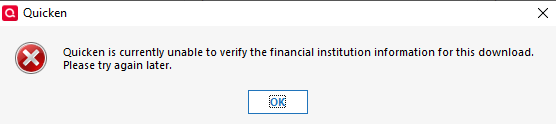
Simplii Financial Credit Card Interface Stopped Working

image.png

In the last few weeks the download for Simplii Financial credit card stopped working. Very frustrating. Noticed it first after upgrading to a recent Quicken upgrade. Have since upgraded to the most recent Quicken version but still getting the same error. I am using Quicken for Windows Classic Business and Personal. I find it so discouraging when these problems occur. I just paid for a new annual subscription just before this happened.


Comments

  • Arctic Hare
    Arctic Hare Quicken Windows Subscription SuperUser ✭✭✭✭

    What version of Quicken are you running now?

  • rab
    rab Member ✭✭✭
    image.png

    Canada Version R65.20 Build 27.1.65.20

  • Arctic Hare
    Arctic Hare Quicken Windows Subscription SuperUser ✭✭✭✭

    I asked about the version because some people manage to get the US version installed, which would cause that problem; however, the Rev # you posted is, in fact, the latest Canadian version.

    I would try creating a brand new Quicken file - as a test - and try setting up downloads from your financial institution in the new file. Let us know the result of that test.

    FWIW, it is highly unlikely this issue is related to the version upgrade. It is highly likely that is mere conincidence. I'm not suggesting you don't have an issue. I'm merely suggesting that the issue is unrelated to the version upgrade.

  • rab
    rab Member ✭✭✭

    Your points are well-taken. And, of course, it is possible that this is some change made at the bank for this type of account. The important distinction here is that it is only the credit card download that has stopped working. The downloads for all other accounts at this bank (chequing, savings, TFSA, high-interest, etc.) continue to work just fine. It is only the credit card account that fails.

  • UKR
    UKR Quicken Windows Subscription SuperUser ✭✭✭✭✭

    If you are trying to import a QFX file downloaded from the bank's website and it fails … you may want to read and follow (bookmark) this lengthy discussion: Simplii bank Canada-CC-885 error — Quicken

    In a nutshell … it appears to me that the bank decided to no longer support QFX file downloads.

  • Arctic Hare
    Arctic Hare Quicken Windows Subscription SuperUser ✭✭✭✭

    However, that FI is still listed in the FIDIR.TXT for EWC and WC downloads, so, in theory, it should still be supported.

  • UKR
    UKR Quicken Windows Subscription SuperUser ✭✭✭✭✭

    Which fidir.txt file are you looking at? The US or the Canadian version's file? I understand they're different.
    What FID number(s) are posted in the bank's record?

    My US fidir.txt file shows this:
    05060 05060 05060 Simplii Financial https://www.simplii.com/ 1-888-872-4724 https://www.simplii.com/en/home.html ACTIVE BANKING,CREDIT,ACCOUNTINFO&EXP-WEB-CONNECT NOT_QBP NA

    Note that &WEB-CONNECT is absent … which would explain the CC-885 "unable to verify" error when importing a QFX file into the US version of Q Windows.

    And, looking into a downloaded QFX file (edit with Notepad), what number is used in the <FID> and <INTU.BID> records at the top of the file?

    The users complaining about this issue:
    Are they downloading from a US branch of Simplii or a Canadian branch?
    Are they using the US version of Quicken for Windows, the Canadian version for Windows or the Mac version (set to US or CA?)

  • Arctic Hare
    Arctic Hare Quicken Windows Subscription SuperUser ✭✭✭✭

    I was looking in the Canadian FIDIR.TXT and it contains this line for simplii:

    05060 05060 05060 Simplii Financial https://www.simplii.com/ 1-888-872-4724 https://www.simplii.com/en/home.html ACTIVE BANKING&WEB-CONNECT BANKING,CREDIT,ACCOUNTINFO&EXP-WEB-CONNECT NOT_QBP NA

    We did establish above that the OP is using the Canadian version of Quicken Classic.

    I do note, however, that the &Web-Connect entry does not contain "Credit", so it looks like Simplii decided to stop supporting credit card download.

  • rab
    rab Member ✭✭✭

    Thanks to you folks for the continued interest and work on this issue. I am just getting back to this issue now that the holiday rush has subsided. Based on your comments, I have done a couple of things:

    First, I checked the QFX file for the <FID> and <INTU.BID> records. <FID> does not exist but <INTU.BID> is "05060".

    Secondly, I tried re-processing a QFX that I had previously successfully processed. This file now fails with the same error I have been encountering. This leads me to believe that the problem is not with either the download file or the recent updates. I am unfamiliar with the fidir.txt file you are referring to but I suspect this result would support the theory that the problem is with that file. I suppose the question now is whether this problem occurs because someone edited that file incorrectly or there has been a policy decision. As mentioned before, it is only the credit card accounts that fail. The other account types process without issue.

    Again, thanks for pursuing this with me. I appreciate your efforts.

  • Arctic Hare
    Arctic Hare Quicken Windows Subscription SuperUser ✭✭✭✭

    The FIDIR.TXT is a file on your local PC that defines which download protocols are supported/permitted for each financial institution. The Quicken program frequently downloads updated versions of the FIDIR.TXT. The fact that the "Credit" entry for Web Connect has disappeared out of the entry for Simplii indicates that Web Connect download of credit accounts is no longer supported. You would have to ask Simplii what the reason is for that. It is a bit of an anomaly.

    The path where you can find the FIDIR.TXT is here: C:\ProgramData\Quicken\Can\Inet\Common\Localweb\Banklist\2019

    You might be able to get the QFX file to import temporarily by editing the the FIDIR.TXT file. I've never tried that, but I think that might work until Quicken downloads and replaces your edited file with a fresh version. You might try that as a test to prove out what I've explained. However, the action that needs to be taken to solve this on a permanent basis is to campaign Simplii to restore support for downloading credit accounts.

    To be clear, the FIDIR.TXT definitely plays a role in the issue you are experiencing, but I wouldn't say the problem is with that file because that file merely reflects what has been agreed by contract between each financial institution and Quicken.

  • rab
    rab Member ✭✭✭

    Thanks for the clarification on the FIDIR.TXT file. I tried editing the record for Simplii but there was no change. I may have to revert to the automated connection - assuming it still works!