How to adjust size of account list?

Hello everyone, I don't know what I did but my account list on right side of screen now takes up almost half the screen. I cannot figure out how to reduce the size of my account list back to normal. Any help would be appreciated Thanks, Happy New Year. Jim
Best Answer
-
You should be able to hover your mouse over the line until you see a double-arrow, then just drag to the desired size.
 1
1

Answers
-
You should be able to hover your mouse over the line until you see a double-arrow, then just drag to the desired size.
1 -
GeoffG, Thanks that worked. I had tried that several times before but couldn't get double arrow. Now , How do I get all registers to open all the way on remainder of screen . I did the double arrow to expand the registers, but when I close them out and reopen , they reopen to about half screen. I truly appreciate the help
0 -
GeoffG, I solved the problem. Turned off popup registers. I was clicking everything before trying to reduce account list size. Once again, Thanks for your help. Jim
0 -
Not sure how you have the registers set up - there is not much to control, but you can check to see that you do not have pop-up registers checked.
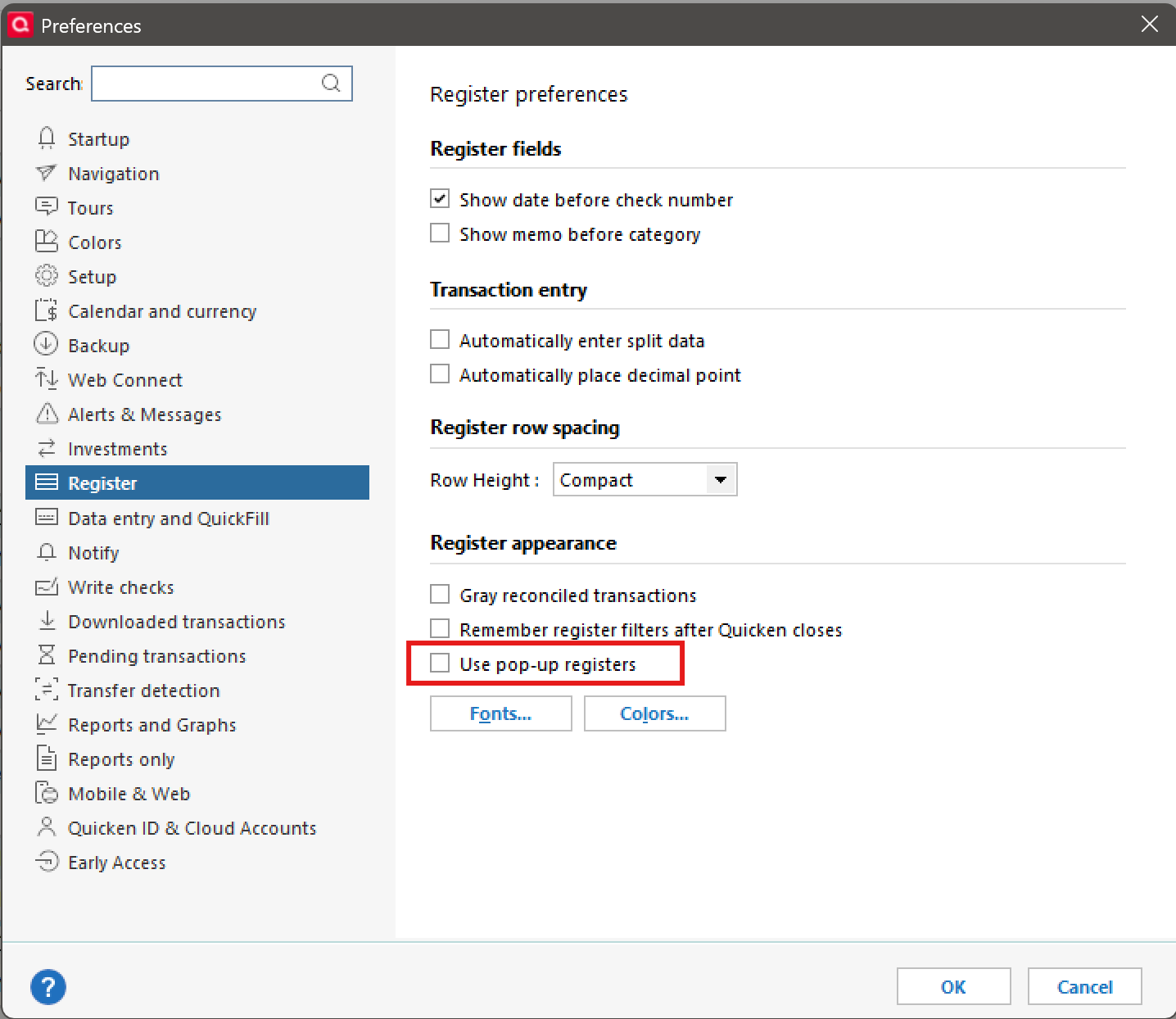
If that doesn't work, if you could supply a screenshot with any sensitive data masked might help.
0 -
Glad you found it.
0