No downloads in a week...
Goes through the motions, but no downloads on any of my accounts since 12/27. There are plenty of cleared transactions available on the respective sites (amex, fidelity, ally, chase, amazon, etc)
Nada.
The constant debugging is getting old.
Quicken no longer makes my life easier. I will likely not renew my subscription.
Comments
-
Hello @Dave493,
Thank you for reporting the issue you are having, though I am sorry for the frustration.
If you are open to it, we can troubleshoot the issue. Please provide more information.
- When you update your accounts, are you receiving any errors on your end?
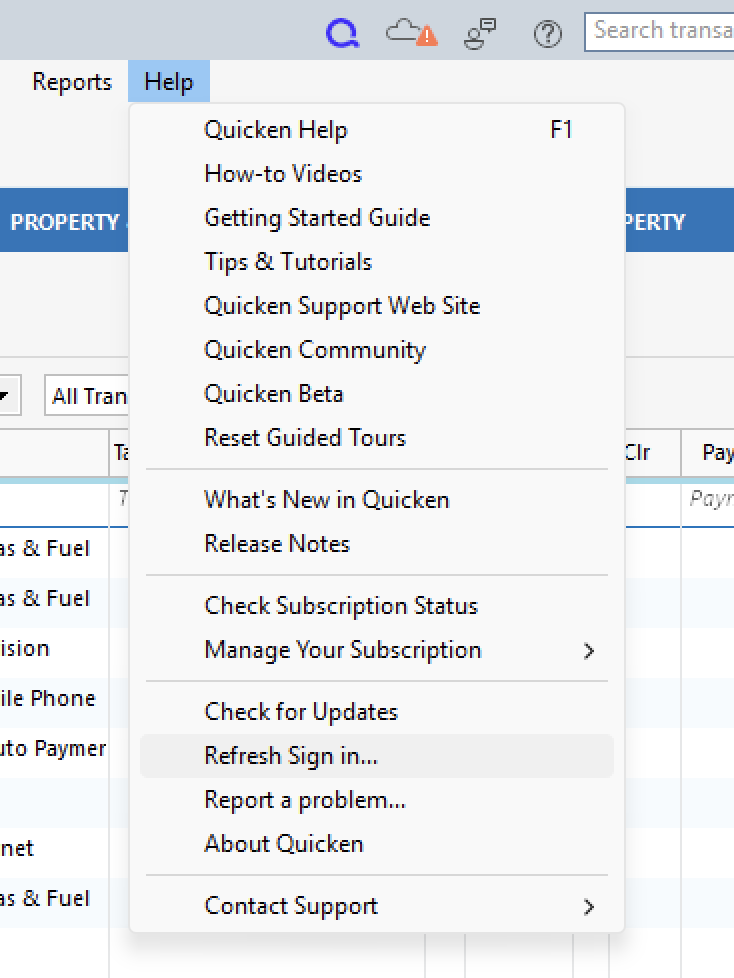
- Have you tried refreshing your sign-in?
- You can do this by going to Help>Refresh Sign in.
- Where is your data file located?
- You can see this by going to File and looking at the bottom of the menu. #1 with a checkmark is the file location. The data file should be stored locally. The default file path is C:>Users>username>Documents>Quicken, and this is where we recommend keeping it.
- Is your file being synced/backed up by any third-party services like Dropbox, Blackblaze, or OneDrive?
- Including your active data file in services like these can cause damage to the file. If your file is being accessed by any of the services listed or similar services, you should exclude/remove it.
Internally, I can see a few errors with your connections. For Chase, we should be able to resolve that one by following the steps below.
- Create a backup of your Quicken file first.
- Deactivate all Chase accounts in Quicken.
- Select the Tools menu and select Account List....
- In the Account List, select the account you want to deactivate, and then click Edit.
- In the Account Details window, click the Online Services tab.
- Click Deactivate next to the service you want to disable.
- Click Yes to the message confirming if you want to disable this service. Note: If you do not receive this message, additional information is available below.
- Click OK to the confirmation message.
- If you have an investment account that is linked to a cash account, you need to deactivate the online services from the investment account which will automatically deactivate the linked cash account.
- Important: If you are deactivating/reactivating an account to fix an issue, you'll need to deactivate all the accounts with the affected financial institution that you have activated in Quicken (including hidden ones). Once they're all deactivated, then you can follow the steps to reactivate.
- Revoke Quicken’s third-party access from the Chase website.
- Reactivate the accounts in Quicken.
- Go to Tools > Add Account.
- Select the bank for the deactivated account(s). If prompted, select the connection method.
- Enter your credentials and click Connect.
- When the list of located accounts appears, choose LINK next to each account you want to reactivate.
- Click Next, then Done on the last prompt.
We may need to repeat these steps for other financial institutions you are connected to, like American Express and Bank of America, but let's start here and see how it goes. Bank of America and Amex are showing different statuses than Chase, so I'm hoping refreshing your sign-in might clear those up.
Let me know how it goes.
Quicken Alyssa
Make sure to sign up for the email digest to see a round up of your top posts.
0 -
Hello Alyssa. Thanks for the reply.
Other than the occasional error with Citi, I don't get any errors. The update process appears to proceed normally - but nothing is downloaded. All downloads broke at the same time as far as I remember.
Fidelity was also working properly until this time. I have been using two different files during the past few months: one without Fidelity connected and one with as a test case. Both were working ok until now.
I tried refreshing the sign-in to no avail.
The data files are on the local PC drive. I do not use the cloud services you mentioned.
Disconnecting and reconnecting Chase seemed to do something as I received a few downloaded transactions. Time will tell if new transactions continue to be downloaded.
Having to repeatedly disconnect and reconnect accounts is very tedious as I get a flood of old transactions that I have to manually delete one by one.
PS. I tried "resetting" the Amex account (not de/reactivating) and it actually downloaded. I'll try this for the rest as it is usually the less painful option.
vr,
0
Categories
- All Categories
- 41 Product Ideas
- 36 Announcements
- 223 Alerts, Online Banking & Known Product Issues
- 21 Product Alerts
- 526 Welcome to the Community!
- 676 Before you Buy
- 1.3K Product Ideas
- 54.3K Quicken Classic for Windows
- 16.5K Quicken Classic for Mac
- 1K Quicken Mobile
- 814 Quicken on the Web
- 115 Quicken LifeHub