Where did my backups go?

melemond
melemond Quicken Windows Other Member

Yesterday I clicked on my Quicken icon in the taskbar. Before yesterday, when I did this, I was immediately seeing my check register and a familiar toolbar. This time, when I clicked the icon, nothing familiar came up. I cannot find any backups, even though I back up regularly. Where in the world did my regular, familiar Quicken go? Where did my backups go? I am very distressed about this and would appreciate any help anyone can give me.

melemond

[Edited-Readability]

Answers

  • Quicken Alyssa
    Quicken Alyssa Quicken Windows Subscription Moderator mod

    Hello @melemond,

    Thank you for sharing your experience. I am happy to help!

    I have seen, in the past, where Quicken has opened up a new file. To check this, you can go to File and select the second file listed at the bottom of the menu. Unless you have opened other files, #2 should be the last file you were in. If that doesn't work, please check out this Help Article on restoring backups.

    To restore a Quicken data file:

    1. Connect to the drive that contains your backup file; this could be your computer's hard drive, a Dropbox drive, a USB drive, or other backup media.
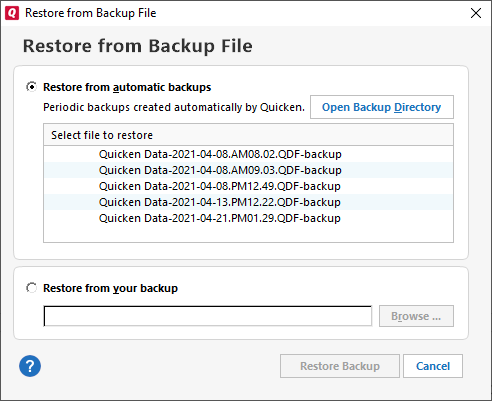
    2. Choose File menu > Backup and Restore > Restore from Backup File. The Restore from Backup File screen will appear.
      Opens image in full screenOpen restorefrombackup.png?inst-v=6f114eb8-44e4-43f1-8c2c-6e35a714f9e6
    3. If you want to restore a backup file that Quicken created automatically for you, choose Restore from automatic backups, and then select one of the backup files listed.
    4. If you want to restore a backup file that you created yourself, choose Restore from your backup, and then click Browse to locate your backup.
    5. Select Restore Backup. This will overwrite your current file.

    Have you already tried these steps? Let us know if this resolves the issue or if you still need assistance.

    Thank you!

    Quicken Alyssa

    Make sure to sign up for the email digest to see a round up of your top posts.