Incomplete securities download from Scotia bank/ScotMcLeod using Quicken for Mac

J-PH
J-PH Quicken Mac Subscription Member
edited January 8 in All Things Canadian (Mac)

One-step download provides incomplete security positions across all brokerage accounts. (no QFX files are used). Each account is missing security positions. The displayed number of security positions doesn't match the actual number in the accounts. The total aggregated number of security positions across all accounts can vary on each one-step download. The number is predominantly consistent yet can change randomly. The positions are missing appear to be random. This suggests a time-out issue. Additionally, the currency conversions are not consistently being performed. The error is consistent and reproducible, although there appears to be a random element as to what securities are missing and when security conversions are performed.

[Edited-Readability]

Comments

  • Quicken Alyssa
    Quicken Alyssa Quicken Windows Subscription Moderator mod

    Hello @J-PH,

    Thank you for reporting the issues you are running into.

    To see what could be happening here, we will need to take a look at your log files to determine how this information is being sent from the bank.

    I recommend you contact Quicken Support directly so they can investigate this with you and process an escalation if needed.

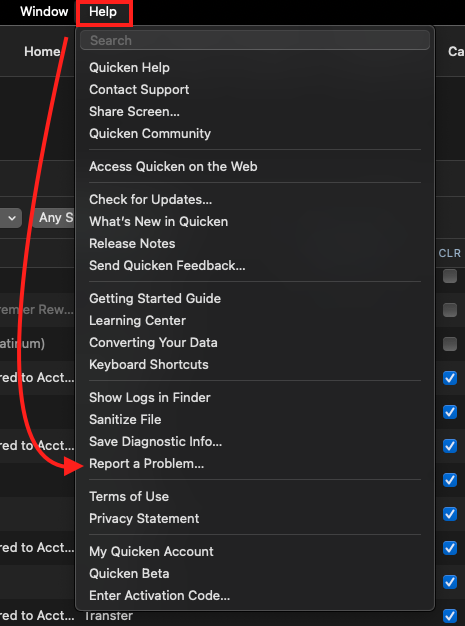
    In preparation for this interaction, you can go to Help>Report a Problem>Send to Quicken from within the software.

    help report a problem-mac.png

    This will allow you to send over your log files.

    Collecting screenshots comparing what's shown on the bank's website to what's in Quicken will also be helpful. If you need help collecting these things, our support agents can walk you through it step by step.

    Thank you!

    Quicken Alyssa

    Make sure to sign up for the email digest to see a round up of your top posts.

  • J-PH
    J-PH Quicken Mac Subscription Member

    Will do, thank you.