I am using Quicken Classic Deluxe ( Release R65.29 ).
Below find an example Reconcile Details window:
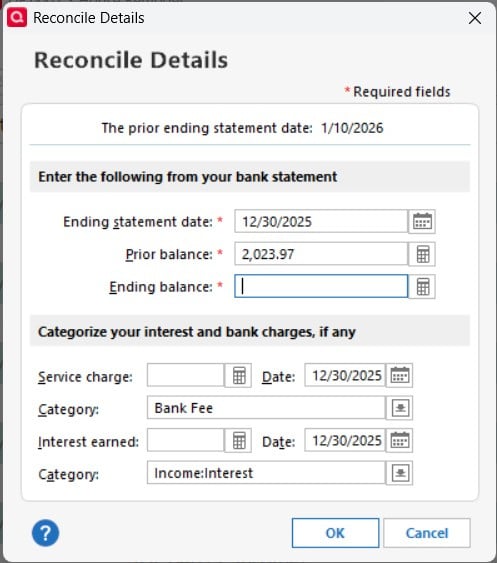
The fact that this window decides to display 12/30/2025 is extremely annoying. The (apparent) reason that the window displays 12/30/2025 is because the previously performed reconciliation was for 11/30/2025.
The bank reports reconciliation data as of the last day of each month of the year, yet the Reconciliation Window uses
12/30/2025 when the previous end of month was 11/30/2025
10/30/2025 when the previous end of month was 9/30/2025
7/30/2025 when the previous end of month was 6/30/2025
5/30/2025 when the previous end of month was 4/30/2025
3/29/2025 when the previous end of month was 2/29/2025
3/28/2025 when the previous end of month was 2/28/2025
for these important end of month dates and these important end of month dates are clearly incorrect.
This annoying behavior applies to the Ending statement date: field, the Service charge: Date: field, and the Interest earned: Date: field.
It is certainly legitimate to propagate forward reconciliation dates such as 1/10/2025; i.e. the reconciliation statement ends on the 10th of each month. That mechanism seems to provide useful and expected results as reconciliation proceeds forward in time.
However, propagating the date forward in such a manner doesn't consider the fact that often the required date is the end of the month. There are also situations where the bank provides end of quarter reports.
For the end of the month this sequence proceeds (31, 28/29, 31, 30, 31, 30, 31, 31, 30, 31, 30, 31).
For the end of the quarter this sequence proceeds (31, 30, 30, 31).
I have a suggestion for the product improvement team, as follows.
It is extremely annoying that Quicken does not understand that much of the bank reporting occurs at the end of a month or the end of a quarter.
It will be greatly appreciated when the software is modified so that the Reconciliation Details window can be instructed such that the date in question should default to the end of the month or to the end of the quarter. Likely, each date field must be instructed separately.
In that way, as reconciliation proceeds forward it would instead of the obviously broken sequence provided above rather proceed as follows.
For quarterly sequencing:
when previous reconciliation was Q4 (12/31/XXXX), the next default date will be 3/31/XXXX
when previous reconciliation was Q1 (3/31/XXXX), the next default date will be 6/30/XXXX
when previous reconciliation was Q2 (6/30/XXXX), the next default date will be 9/30/XXXX
when previous reconciliation was Q3 (9/30/XXXX), the next default date will be 12/31/XXXX
For monthly sequencing:
when previous month was Dec (12/31/XXXX), the next default date will be 1/31/XXXX
when previous month was Jan (1/31/XXXX),
the next default date will be 2/28/XXXX for non leap years, or
the next default date will be 2/29/XXXX for leap years
when previous month was Feb (2/XX/XXXX), the next default date will be 3/31/XXXX
when previous month was Mar (3/31/XXXX), the next default date will be 4/30/XXXX
when previous month was Apr (4/30/XXXX), the next default date will be 5/31/XXXX
when previous month was May (5/31/XXXX), the next default date will be 6/30/XXXX
when previous month was Jun (6/30/XXXX), the next default date will be 7/31/XXXX
when previous month was Jul (7/31/XXXX), the next default date will be 8/31/XXXX
when previous month was Aug (8/31/XXXX), the next default date will be 9/30/XXXX
when previous month was Sep (9/30/XXXX), the next default date will be 10/31/XXXX
when previous month was Oct (10/31/XXXX), the next default date will be 11/30/XXXX
when previous month was Nov (11/30/XXXX), the next default date will be 12/31/XXXX
Sunshine and roses!


