I am getting CC-501 error for all my FIs, except Capital One. That includes Charles Schwab, Chase, Citi and others. I've restarted Quicken and reset my sign-in. Quicken Windows
I'm seeing similar behavior. And not only are they failing to update, they all now have the circle with a line through it next to them. I tried restoring from backups going back a week, all of which I know WERE working just fine, but I get the same result. Resetting cloud data does no good either.
Hello @Camelot_One & @compuwise,
Thank you both for reporting the issues you are seeing.
After reviewing both of your connections internally, I am unable to see any errors from our end. Are you both still experiencing this issue?
If so, the CC-501 error occurs when Quicken is unable to connect to your bank account for recent transaction information. If you receive this error for more than 24 hours, please reach out to Quicken Support directly. They can investigate the issue further and process an escalation if needed.
Thank you!
I was receiving this error on more than a dozen banks/brokerages, and repeat attempts at updating failed. I had to go through each bank and reset the connection, which required re-authorizing with each. And then I had to log in to each account to compare balances, because resetting causes Quicken to enter random amounts for an opening deposit on some (but not all) accounts. I'm not sure where it gets those amounts, or how it picks which accounts it modifies.
I guess I spoke too soon. After going through and fixing/resetting every single connection yesterday, I had things working normally. It WAS downloading transactions. I created a new backup.
This morning, only 3 of those newly reset connections completes a One Step Update. 23 different banks/brokerages fail with CC-501 errors.
I have noticed similar issues over the past week. Multiple accounts brokerage and credits cards started losing connection, ending up with the red circle with the line through it. I have had to go through the process a few times reconnecting the accounts to get the downloads working again. Very sporadic and decided to check the community as I was wondering if others have seen this issue.
@Camelot_One &. @rdc25,
Thank you for adding to this discussion.
I am not seeing any CC-501 errors when checking your connections internally. Are you still experiencing this issue?
If so, please reach out to Quicken Support directly so they can further investigate the issue and escalate if needed.
On a separate note, @Camelot_One, it appears you are receiving a CC-505 error wth Citizens Access. If you are still receiving this error tomorrow;
Try refreshing your online account information:
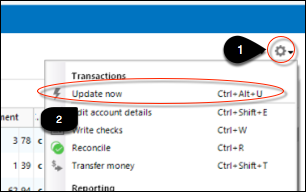
1. From your account register, select the Actions gear icon at the very top right of your register (Ctrl + Shift + N).
2. Select Update Now.
3. Follow the on-screen instructions to complete the update.
4. Repeat these steps for each financial institution experiencing this error.
If the error persists for more than 48 hours, please reach out to Quicken Support through the link above.