CC-800 repeating

mbinday
mbinday Quicken Windows 2017 Member ✭✭

I'm getting a CC-800 error on all my accounts. It forces me to re-register each and every bank and credit card on Quicken.

This happened yesterday. I fixed it. It happened again today. Fixing this is highly time consuming and not feasible every time I log on.

My only "unusual" use is that my Quicken files are stored on a Sharepoint drive and mirrored on my home and laptop computers. I log on from both which allows me to use Quicken while traveling. In all cases Quicken load the data file successfully. Then fails the online update with this error.

The CC-800 says this can happen if you restore from a backup file. Is Quicken now tracking which computer I'm using and treating a login from a second computer as a backup? And blowing me up because of this?

Answers

  • Quicken Alyssa
    Quicken Alyssa Quicken Windows Subscription Moderator mod

    Hello @mbinday,

    Thank you for sharing your experience.

    Quicken is not meant to be used in the way you are describing. One Quicken file should not be synced between two computers, and doing so can cause damage to your data file. The default location for a Quicken Windows file is C:>Users>username>Documents>Quicken, and this is where we recommend keeping it.

    The best way to access the same data from two computers is by using the desktop version on your main computer, and then using Quicken on the Web on the secondary computer.

    You can follow the steps below to set up Quicken Mobile & Web.

    First, set up Quicken Mobile Sync in Quicken Desktop:

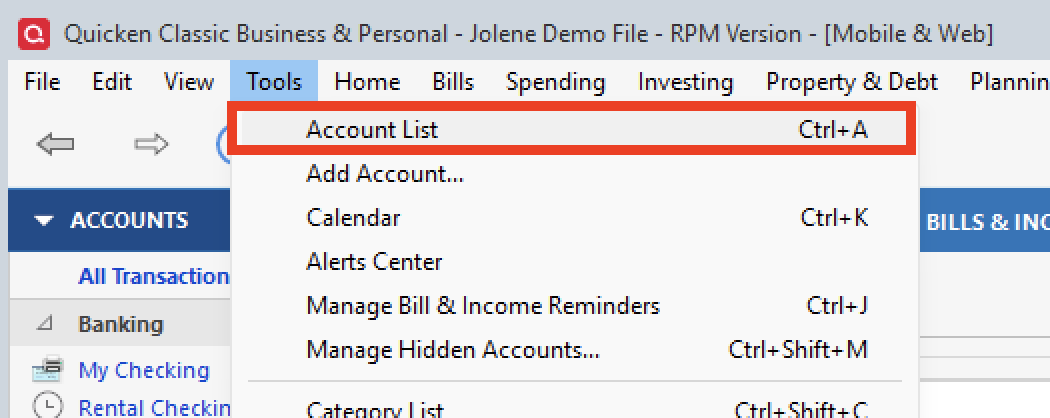
    1. Open Quicken and go to the Mobile & Web tab. Depending on the sizing of the Quicken window, the Mobile & Web tab may be located in the More tab.

    image.png

    2. Click Get Started to select the accounts you want to sync to your mobile device.

    Mobile%20Get%20Started.png

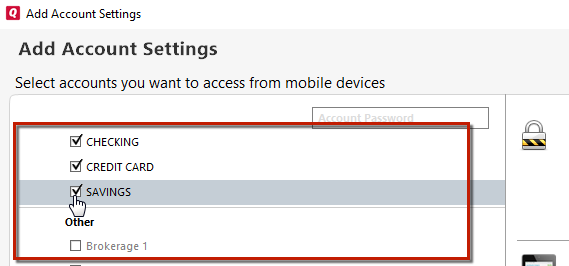
    3. Place a check next to each account you want to sync to mobile. 

    Sync%20Select%20Account_2.png

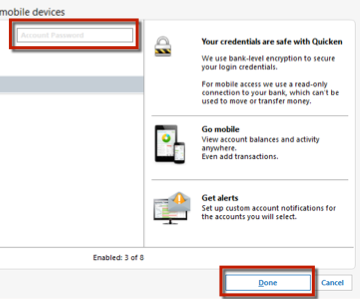
    4. After selecting the accounts you want to sync, type your bank password(s) in the field(s) above the accounts and click Done. Then, click Done again on the Accounts Synced dialog. 

    Sync%20Select%20Accounts%202.png


    To sync your Quicken data to Quicken Mobile: 

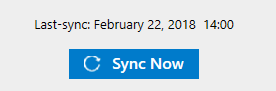
    1. Click Sync Now under the Mobile & Web tab 
    Sync%20Now.png

    2. Go to your mobile app and sign in with your Quicken ID

    3. Swipe down on the Mobile App home screen. All the data from the cloud is then downloaded to your mobile device.

    Note: To sync whenever you perform a One Step Update, just select Sync to Quicken Cloud under your One Step Update settings:

    OnlineServicesCheckbox.JPG

    Hope this helps!

    Quicken Alyssa

    Make sure to sign up for the email digest to see a round up of your top posts.

  • Scott McCauley
    Scott McCauley Member ✭✭✭

    I just had the same thing happen this morning. Something is wrong with Quicken servers - it has to be. I've done nothing unusual and it's bizarre that it is happening across every financial institution.

  • csilvest
    csilvest Quicken Windows Subscription Member

    Same thing just happened to me when trying to do a one step update today (1/23/2026). 11 of 12 accounts are now returning the CC-800 error.

    I'm only accessing my Quicken file from the local C: drive and have not restored from back up.

    Clearly this is a Quicken issue, not an end user issue.