Error Reading From Quicken File Name when logging into Quicken Mac

Geo H
Geo H Quicken Mac Subscription Member ✭✭✭

For the last few weeks I have been getting a system message when I am logging in to Quicken, after entering my password. The message states that "An unexpected error occurred while trying to read from "quicken file name". I select the "Relaunch" button, reenter my password and the file opens as normal.


Tagged:

Comments

  • John_in_NC
    John_in_NC Quicken Mac Subscription SuperUser, Mac Beta Beta
    edited January 23

    If you are having this issue with the Desktop version of Quicken for Mac, my first suspicion is that you have your file stored in a non-standard location. This includes a location that is synced to a network drive such as iCloud.

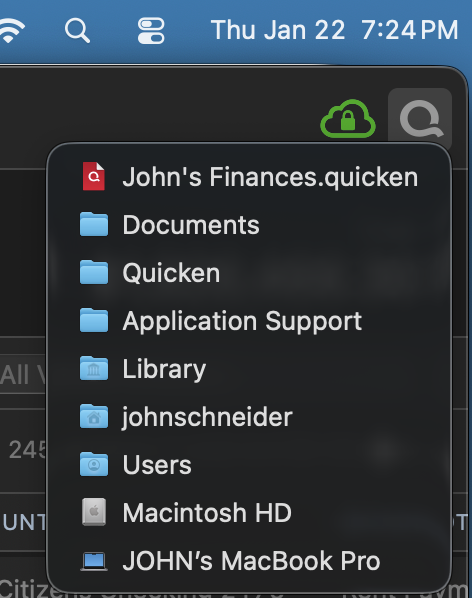
    Please do the following: once you get Quicken open, hold down the command key and click on the Q (logo) at the very upper right of your Quicken Window. This will show you the path. Take a screenshot, or note the path of your file and report back.

    Screenshot 2026-01-22 at 7.24.40 PM.png

    If you are less familiar with taking screenshots, you can simple note the path instead (I.e. "My File:Documents:Quicken:Application Support: Library. . . "

  • Geo H
    Geo H Quicken Mac Subscription Member ✭✭✭

    John I sent you a reply but I don't see it in this string. I entered it and clicked on the Post Comment button. Is that not the correct way to answer you? I'm not a frequent user of the community.

  • John_in_NC
    John_in_NC Quicken Mac Subscription SuperUser, Mac Beta Beta

    No worries, @Geo H. I think you are posting correctly as I see this post. It is most likely the 3rd part forum software Quicken uses had some hiccup and your post got lost, or its spam filter algorithms put it in a holding queue.

    You can always try again. I apologize for the hassle.

  • Geo H
    Geo H Quicken Mac Subscription Member ✭✭✭

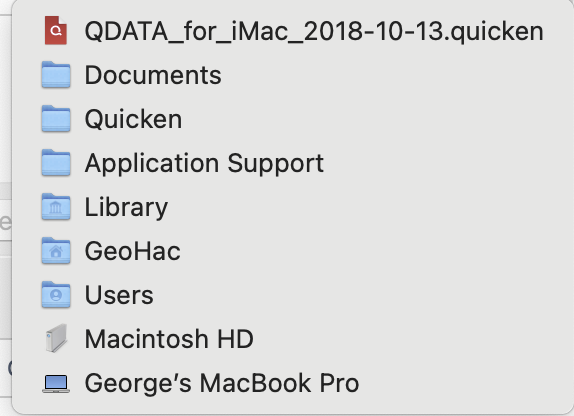
    John, No apology needed. I took the screen shot and it appears to image yours. Here is the screen capture. I await your response.

    image.png
  • Geo H
    Geo H Quicken Mac Subscription Member ✭✭✭

    John, I neglected to tell you that this does not happen every time I open Quicken. For instance it just happened today but for the previous two times I logged in there was not an issue. It is definitely not consistent.

  • John_in_NC
    John_in_NC Quicken Mac Subscription SuperUser, Mac Beta Beta

    Hi, again, @Geo H

    Your file is tucked away in the correct location. Good.

    Your MacBook Pro could be having some issue (software or hardware) as to why it sometimes has issues opening the file-I don't know.. But, this isn't something we often see with Quicken except when the file is stored on networked/cloud stored drives. And that doesn't appear the case here.

    If you are worried about the integrity of your data, (as I would be) you can File:Export:Quicken Transfer File (QXF). Then, import that file into a brand new Quicken file.

    It is a lower fidelity copy of your data, but all the transactional history will be there (sans saved reports, online setups, etc.) Basically, you are getting all your transaction history in a fresh file.