This discussion was created from comments split from:
Fidelity Connection Issues.
On 2/10 I had to reset my connection with Fidelity for my IRA, Trust, and Brokerage accounts. At that time the data downloaded.
Now on 2/14 when I try to update, no information is downloaded even though there were transactions at Fidelity on the 12th and 13th. One step update states updating/supposedly updates and says processing data but no information is downloaded.
Hello @rayseidlinger,
Thank you for sharing your experience.
I know you mentioned having recently reset the accounts; however, that is the first step I would try to resolve this. Here are the steps:
If the transactions still don't download after resetting, this would be considered a Missing Transactions issue. Here are the first few steps to check for that.
1. Has the sort order been changed in the register? Confirm that the Sort Order in your account register is by Date; just click the top of the Date column in your account register. It's likely the transactions are in your register, just not where you thought they'd be.
2. Click the Reset button at the top of the register. This will confirm that there's no filtering in your account register.
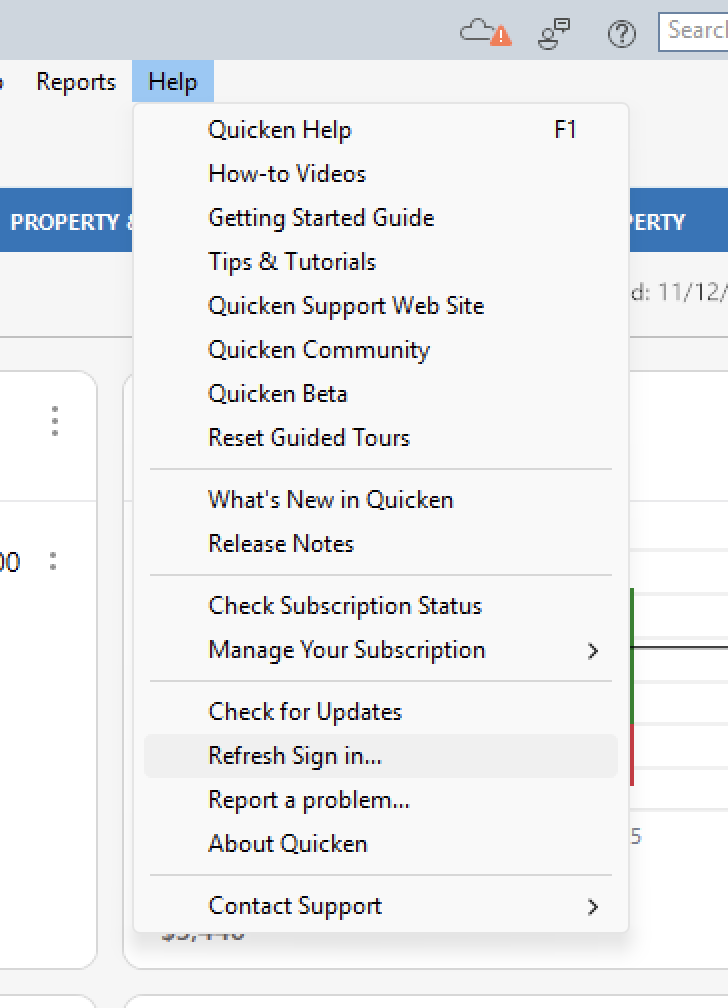
3. Try refreshing your login session: To do this, go to Help > Refresh Sign in. After completing the log-in process, try running a One Step Update again.
4. Are these missing transactions over 90 days old? Transaction download is typically limited to the last 90 to 200 days, depending on the financial institution. If you need transaction history older than what the download contains, many banks will make this available on their website via Web Connect. To use Web Connect, you can find information here, or contact your bank.
5. Are these transactions still marked as "pending" on your bank's website? Pending transactions have been authorized by your bank but not cleared and paid from your account yet. Most banks don't allow transactions to download until the transaction clears the bank.
6. Are you using Web Connect (logging in to your bank's website to manually download transactions in Quicken)? Some banks only allow downloads to Quicken after the statement closing date, meaning that you won't see new transactions in Quicken until the statement closes. If you can't select a date range when you try to download from your bank, it means that you're only able to download new transactions after the statement closing date.
For the remaining steps, please check out the linked article.
Let us know how it goes!
@rayseidlinger,
Just checking in, we haven't heard back from you in a while.
Do you still need assistance?
Thank you!
Hello again,
Checking in once more before this thread is closed.
Let us know if you still need assistance.
Due to the lack of response, I went ahead and closed this post.
If you still require assistance, please feel free to start a new post.