Transactions Disappearing

lrusso
lrusso Quicken Mac Subscription Member ✭✭

Version 8.4.2 (Build 804.59835.100) - macOS 15.6.1

Ever since this version, I've been experiencing manually entered transactions disappearing after hitting save. Also, the revised transaction reverts to the original state after saving the revision. Finally, constant issues with the financial institution syncing. I gone decades loving Quicken and not having any issues, but here we are. How does one send feedback to the Quicken programmers about these issues?

[Edited - Readability]

Comments

  • Quicken Laura
    Quicken Laura Quicken Windows Subscription Moderator mod

    Hi @lrusso,

    Thank you for sharing your experience with us. Unfortunately, there is no way to send the feedback directly to our programmers, but I'll be happy to help you troubleshoot the issue.

    There are some Quicken settings we may have to check to make sure it is displaying all your transactions correctly:
    1. Has the sort order been changed in your account register?
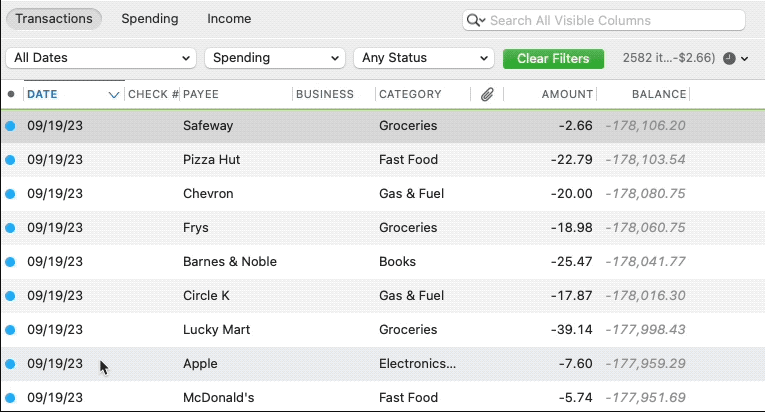
    Confirm that the Sort Order in your account register is by Date. If it is not, click on the top of the Date column in your account register. Your missing transactions could be in your register, just not where you thought they would be.

    Screenshot 2026-02-22 at 8.21.56 AM.png

    2. Do you have any filters set? Click the Clear Filters button to the right of the account register’s filter dropdowns. This will confirm that there is no filtering in your account register.

    If everything you checked previously (order by date and filters) is correct, but your new transactions are still not showing, you can try restoring a backup from before the problem started (e.g., if it started yesterday, restore a backup from the day before yesterday).

    Restore Quicken data

    1. In Quicken, select File > View/Restore Backups...
    2. Browse your computer or external media to find the backup file you want to restore. The Quicken backup file has the extension .quicken2017backup or .quickenbackup.
    3. Select the file to restore.
    4. Click Choose.

    Please let me know how it goes!

    Quicken Laura

    Make sure to sign up for the email digest to see a round up of your top posts.