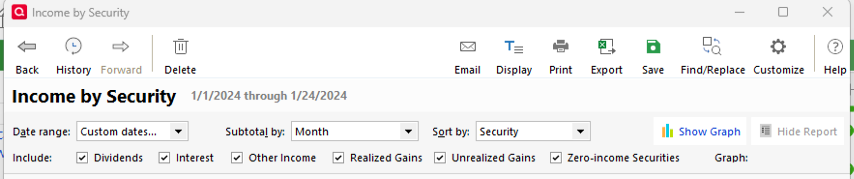
Income by Security report only gives a summary total.
Version R65.29,
The report only gives a yearly total. The only options are to select Date Range.
[Edited - Readability]
Comments
-
Thank you for sharing the additional details and your screenshot.
The Income by Security report in Quicken can display income (dividends, interest, etc.) broken down by different periods or groupings. What you see depends on how the report is customized.
You can adjust:
- The Date Range (for example, a specific month, custom period, or full year).
- The Subtotal by setting (such as Time – Month/Quarter/Year, Security, Account, etc.), which controls how the data is grouped.
To customize the report:
- Open the report.
- Click Customize.
- Go to the Display tab.
- Change the Date Range to your desired period.
- Change Subtotal by to Month (or another interval) to see more detailed totals instead of only a yearly summary.
From your screenshot, it appears the Subtotal and Sorting options may not be visible. If you don’t see those customization options, please try the following:
- Close the report (do not save it).
- Click Reports.
- Select Investing.
- Choose Income by Security from the standard report list.
Then check again to see if all customization options are available
If you’re still not seeing those options, please let me know, and we’ll continue troubleshooting.
Quicken Laura
Make sure to sign up for the email digest to see a round up of your top posts.
0
Categories
- All Categories
- 57 Product Ideas
- 34 Announcements
- 237 Alerts, Online Banking & Known Product Issues
- 19 Product Alerts
- 511 Welcome to the Community!
- 678 Before you Buy
- 1.4K Product Ideas
- 55.2K Quicken Classic for Windows
- 16.7K Quicken Classic for Mac
- 1K Quicken Mobile
- 828 Quicken on the Web
- 123 Quicken LifeHub