How to use Quicken/Mac Budgeting...given the problems?

JoSheem
JoSheem Quicken Mac Subscription Member ✭✭

Looking at posts about Quicken/Mac Budgeting is very discouraging. Please let me know any tips you have that will help.

My Goal: I want to look back and see what we actually spent in each of my categories between 01/2025 and 12/2025 - the amount per month and the total for the year. And I would like to be able to enter a budgeted amount for each category and have the program compute the actual spending. My Quicken data file for last year is already complete - all accounts Reconciled, all transactions Categorized.

I am not clear on the following -

(does Quicken provide basic how-to instructions, and if not, why not?)

• Should I start by setting the "Budget as of…." function to 1/2025 to set the 12-Month period displayed?

• Having done that, is Quicken supposed to populate the Budget fields (months) with the actual spending for that time period?

• Quicken seems to go ahead and automatically set the Budgeted Amount per Category to the amount actually spent - if that's normal, I guess I have to then use the "Edit Budget" feature to adjust the budgeted amount to my target number.

• When the time comes to move on to a new year, am I supposed to (a)duplicate the budget, and then (b) set a new start date? — how?

As an alternative (and considering the problems users seem to be having with the Budget feature in Quicken) can you describe or point to instructions for exporting the above data into a spreadsheet so I can manually create the information display I want?

Thanks for looking. Any help will be greatly appreciated!

Comments

  • bmciance
    bmciance Quicken Windows Subscription SuperUser ✭✭✭✭✭

    I use Windows so I can't help with Mac but I did find this:

    https://www.quicken.com/content/quicken-mac-creating-and-editing-budget

    Hopefully it helps. Otherwise hopefully some Quicken Mac uses will contribute some suggestions.

    Quicken Windows user since 1993.

  • JoSheem
    JoSheem Quicken Mac Subscription Member ✭✭

    Thank you @bmciance ! I appreciate the suggestion. I also note that the video is six years old, so further evidence that Quicken has neglected budgeting for Mac.

  • John_in_NC
    John_in_NC Quicken Mac Subscription SuperUser, Mac Beta Beta

    Hi, @JoSheem

    I have used the Quicken for Mac budget for 16 years. And while it does have a few hiccups, it serves its purpose. I have found many of the complaints more rooted in people wanting different budgeting styles-and trying to appease everybody is like trying to get a group of friends to agree on what pizza is best. There are so many styles, and budgets are so very personal. What works best depends on your needs.

    The Quicken budget is simple: you set a monthly goal, and you are either above/below it. No rollovers, no moving $ to other categories (envelope style budgeting) etc.. And come next month, the process begins anew.

    You certainly could accomplish answering your questions above with a report containing said categories for the prior year, but I do suggest you setup a budget. You can always do both.

    For most people, the starting period will be 1/1 as you are likely not a business with a different "fiscal year" that starts in a different month.

    Tip: start with only a few categories you really are interested in tracking for now: if you add too many (especially ones you can't control), it can be become overwhelming and you will abandon it. I see this from experience here. I personally only track my discretionary spending categories and don't even worry about the income as that varies for me.

    I would start with a budget of 1/1/2026 for now to get the current year setup and rolling. You should be able to look back at prior years and have it apply the same categories. Same for moving forward to next year: you don't duplicate the budget, you use the existing one and go forward into the next year and it will ask you what budget categories to use so you don't have to set everything up again.

    Screenshot 2026-02-26 at 10.13.22 PM.png

    The budget view is a bit more versatile than people give it credit for, you just need to play around with it to examine the various options on how it displays goals. (Do you want it monthly, or against yearly goal? How do you want the display bars to show?) That's up to you. And, editing is equally diverse.

    I would set one up-you can have as many budgets as you want, and you can delete what ones aren't working. I suggest working in the 12 month view. You will learn the most by exploring it. So, play around with it-you can always delete and start over. Yes, getting budget goals will also require a little legwork on your own-Quicken can only do so much figuring that out.

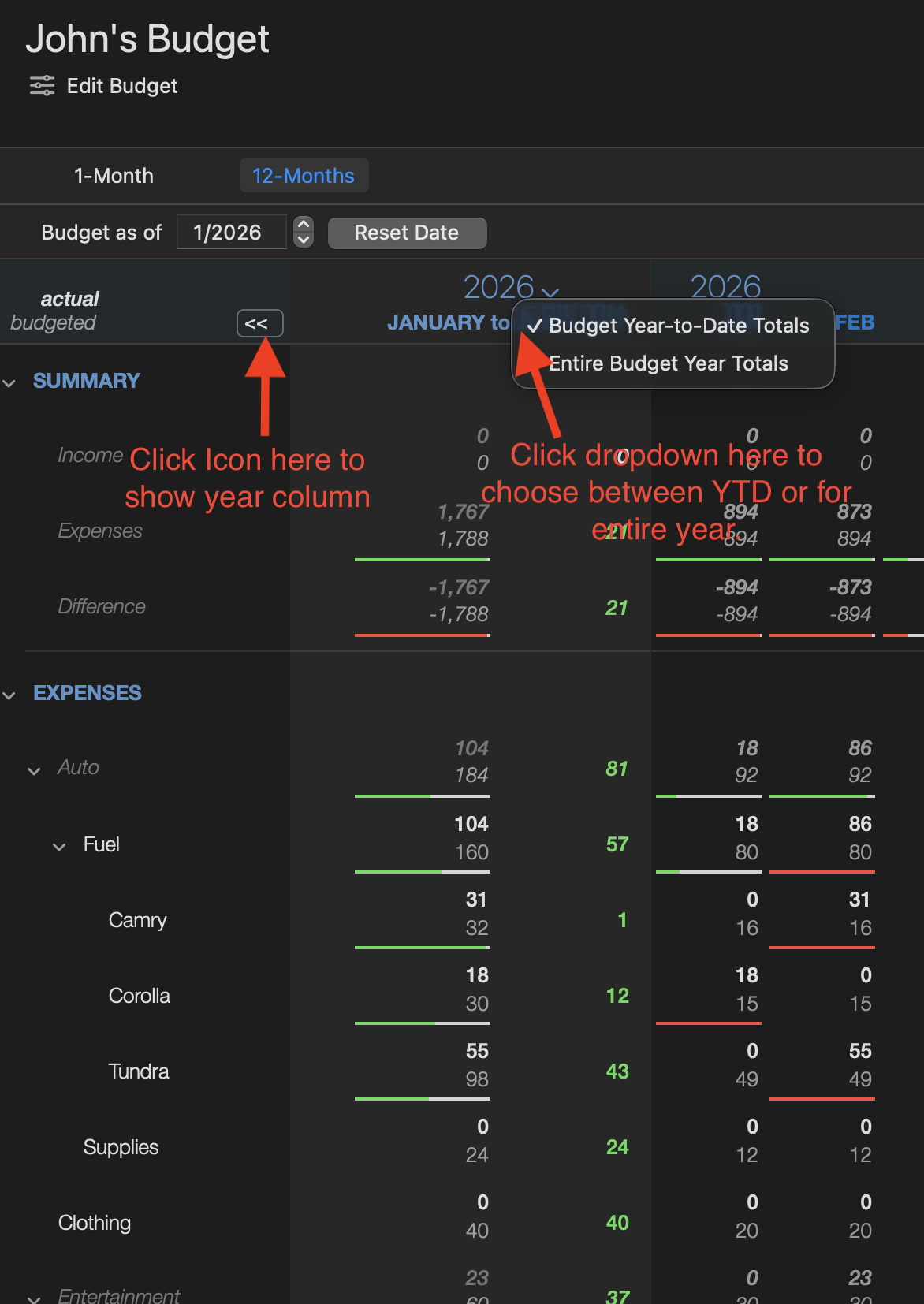
    Here is a screenshot of how I have mine setup for goals, etc. I include it because most people don't know that you can expand that center column to show how you are doing for the year versus just the month.

    Screenshot 2026-02-26 at 10.21.40 PM.png

    Good luck, and horse around with it. Ask if you have any questions.

  • John_in_NC
    John_in_NC Quicken Mac Subscription SuperUser, Mac Beta Beta
    Screenshot 2026-02-28 at 9.30.06 PM.png

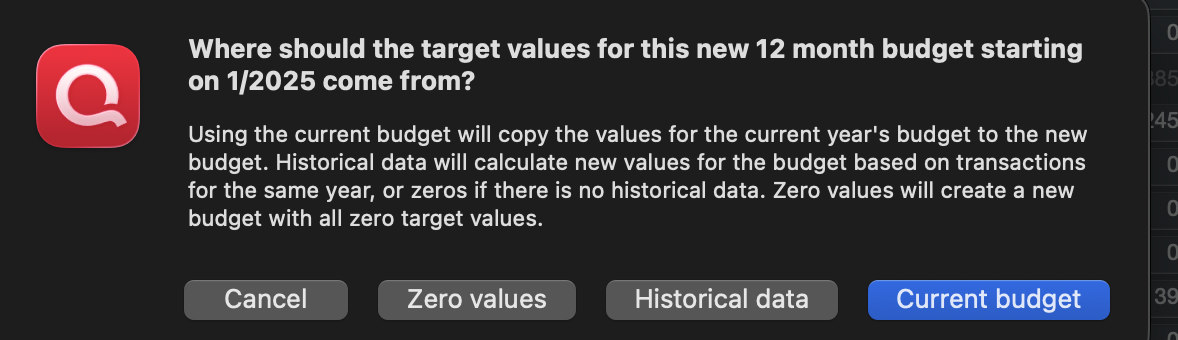
    One last thing I should note is that one of the "hiccups" I mentioned is regarding rolling years forward: to trigger that dialog about setting up next/last years dialog, you need to select the year in the date field and click the up or down arrow.

    For example, if later this year you want to roll forward budget numbers, then select the year and click the up arrow. If you don't do this before 12a 1/1/27, then it will roll forward with the same #s without asking. Not a huge deal, but be aware of it.

    You can also use the down arrow trick to generate the budget for your 2025 budget. That is why I suggest getting 2026 setup first.

    This is easier than creating a bunch of separate budgets. One budget can have as many years/goals in it as you want.

  • JoSheem
    JoSheem Quicken Mac Subscription Member ✭✭

    Thank you VERY MUCH @John_in_NC ! Aside from your helpful tips, the sense I get that you have had success using Quicken budgets is good medicine for the frustration I've been feeling! Probably confirming your point about there being many different kinds of budgets, I'm not sure that your suggestions will help me with my current problem - I'm attempting to create a budget for a previous year (2025), not the current or next one. I want to see how we did last year. The big issue is that Quicken is not filling in spending data from last year - numbers I know are in my Quicken data file. Confusingly, some months do get the data, others don't. Anyway, I very much appreciate you taking the time to reply. You may have inspired me to have a better experience going forward, even if I don't succeed in looking back.

  • John_in_NC
    John_in_NC Quicken Mac Subscription SuperUser, Mac Beta Beta

    Thanks for the update, @JoSheem

    I still suggest you focus on setting up a budget for 2026 first and make sure that is working to your satisfaction. Then, you can roll that same budget back to 2025 (or earlier) to see how you are doing.

    If it doesn't pick up transactions, then something else is amiss and we can address. In my experience, the program is working correctly, but it is something else (such as having a transx categorized slightly differently, transfers, Parent/Sub Categories, different currencies, etc.) that causes the lack of visibility.

    Good luck!

  • mybank2002
    mybank2002 Quicken Mac Subscription Member ✭✭✭✭

    Hi @JoSheem ,

    I understand the frustration you are describing. Budgeting is one of the main reasons many of us track everything in Quicken in the first place, so when the tools are confusing or behave inconsistently, it can be discouraging.

    A couple of things that might help, based on my experience using Quicken for Mac:

    First, what you are trying to do, looking back at a completed year and comparing actual spending by month and by category, is definitely possible in Quicken, but sometimes the Reports section is actually easier for this than the Budget screen. If you go to Reports and run a Category Summary or Spending by Category report, you can set the date range to 01/01/2025 through 12/31/2025 and it will show totals by category. If you customize the report to display by month, you can get the monthly breakdown you are looking for. Those reports can also be exported to a spreadsheet if you want to do additional analysis.

    Regarding the Budget view itself:

    • The “Budget as of” date generally controls the starting year for the budget.
    • When you create a new budget, Quicken often prefills the budget amounts based on historical spending, which is why you are seeing numbers automatically appear. Many people then adjust those numbers to their target goals using Edit Budget.
    • One budget can actually span multiple years. When you move the year forward or backward using the arrows in the date field, Quicken will ask whether you want to reuse the same categories.

    One thing I will say is that the budgeting interface in Quicken for Mac still feels somewhat unfinished in places. There are some usability issues that have been discussed for years, such as:

    • Category names are being truncated even when there is unused space on the screen
    • Limited customization of the budget layout
    • Difficulty hiding categories with zero values
    • Lack of a clearer visual structure for parent and subcategories

    So if some things feel awkward, you are not imagining it.

    The good news is that the underlying data is usually solid. Between Reports, Budget view, and exporting to a spreadsheet, you can usually get the information you want, even if the interface takes a little experimenting.

    I would also love to see Quicken continue to improve the budgeting tools in the Mac version, as they are such an important part of financial planning.

    Hopefully, some of this helps a bit while you experiment with the different views.