Bank register differs from actual account balance
This has been an ongoing issue on Windows using Quicken Classic Deluxe; after the most recent release of Quicken R-66.12 it really blew up. Why does the bank balance in my sidebar Account(s) 'All Transactions' show a significantly different balance than my actual bank account balance? What can be done to pull the actual account balance into that view?
Comments
-
Hi @rlmcculley,
Thank you for sharing your concern. I’m happy to help you troubleshoot.
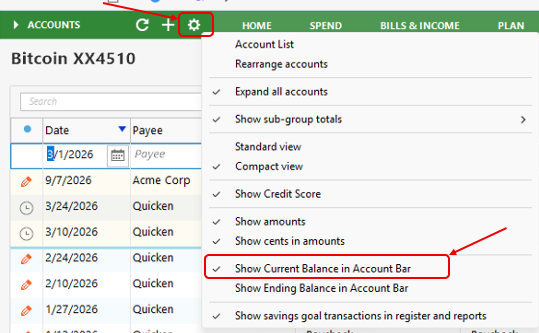
It’s likely that the sidebar is currently displaying the Ending Balance, which includes scheduled reminders. To have it match your actual account balance, please try the following:
- Click the Gear icon in the sidebar.
- Select Show Current Balance in Account Bar.
This should update the sidebar to display your current balance instead.
I hope this helps! Please let me know if you have any other questions.
Quicken Laura
Make sure to sign up for the email digest to see a round up of your top posts.
0
Categories
- All Categories
- 20 Product Ideas
- 34 Announcements
- 247 Alerts, Online Banking & Known Product Issues
- 19 Product Alerts
- 518 Welcome to the Community!
- 682 Before you Buy
- 1.5K Product Ideas
- 55.7K Quicken Classic for Windows
- 16.8K Quicken Classic for Mac
- 1K Quicken Mobile
- 834 Quicken on the Web
- 128 Quicken LifeHub