Quicken Mac automatically entering Manual transactions in the wrong account.

Rob Taft
Rob Taft Member ✭✭✭

I made the switch to the Mac version within the past few months and I was thrilled to see it could support both US and Canadian accounts. However, I have recently had issues with it automatically entering manual transfers.

The first occurrence was right after downloading a wire transfer from an NBIN account (Canadian in USD) to a checking account in the US. The NBIN account does not show transactions at all, it is just the minimal view of the running value of the account. After the download, I noticed my balance was way off on one of my Schwab investment accounts (USD), it was showing the wire transfer as a manual entry, as well as the wire transfer fee as a manual entry, both were linked to the NBIN account. I was confused, thinking I had manually entered it into the wrong account, but then I realized I did not enter it because I didn't know what the transfer fee would be to enter it manually. Then I realized that the NBIN transactions tab is disabled, and I couldn't go to the other end of this transfer. If I attempt to remove the transfer, it affected the balance on NBIN, even though the transactions tab is disabled. I ended up moving the transfer to the checking account and matching the transaction. The transfer fee however…I had to delete it because it wasn't a transfer and didn't belong in this account (maybe there was another way to fix that, idk) and it affected the balance. I don't know if the balance will reset the next download or if it will permanently be off by $20.

Fast forward two weeks, there was a transfer made from a relative into our TD Canada Trust account (CAD). When this downloaded, it appears in the account with the Payee showing as "Transfer", and this is also linked to the same Schwab account (USD). When I look in the Schwab account, I see another manual entry automatically generated. But this time I can see both ends of this transfer. These are accounts in different currencies, straight up transfer with no currency exchange that it automatically entered, and only the Schwab account shows it as a manual entry, the TD account shows it was automatically downloaded.

This appears to only be happening when some form of transfer is made with a Canadian account. When I moved funds between the US checking and Schwab accounts, it seems to automatically link the transactions correctly, with both ends showing the transactions were downloaded.


Comments

  • Quicken Laura
    Quicken Laura Quicken Windows Subscription Moderator mod

    Hi @Rob Taft,

    Thank you for sharing your concern with us. I'm happy to help you troubleshoot the issu

    To fix transactions that were incorrectly categorized as transfers, you typically go to the account where the transaction belongs and change the category. This will ensure the amount remains in the correct account and is removed from the incorrect one.

    In some cases, Quicken doesn't re-download transactions that were previously deleted. If your balance is still incorrect after the next update, you can create a manual adjustment by following these steps.

    To enable the detailed transaction view and create an adjustment:

    1. Open the account you want to adjust (NBIN).
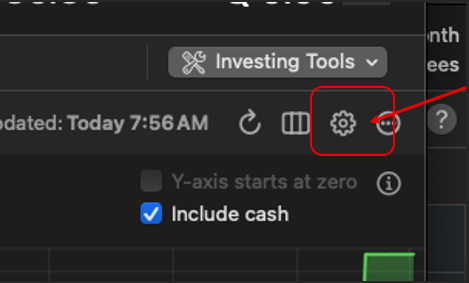
    2. Click the Gear icon in the upper-right corner. Screenshot 2026-03-02 at 8.41.29 AM.png
    3. Select Account Details.
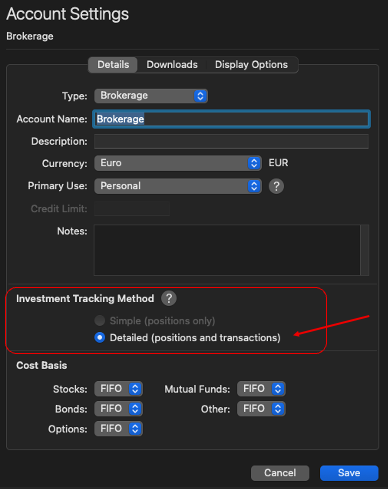
    4. Near the bottom, locate Investment Tracking Method.
    5. Choose Detailed (positions and transactions). Detailed (positions and transactions) mac.png
      Note: This will temporarily disconnect the account from automatic downloads.
    6. Click Done.
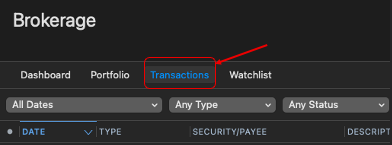
    7. Go to the Transactions tab. Screenshot 2026-03-02 at 8.43.26 AM.png
    8. Click New at the bottom left.
    9. Recreate the transaction or enter an adjustment as needed.

    Steps to reactivate the account.

    1. Open the account register.
    2. Click the Settings gear in the upper-right corner.
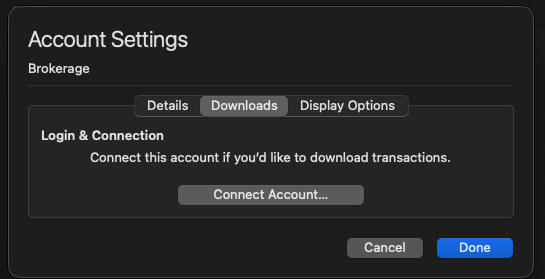
    3. Go to the Downloads tab.
    4. Click Connect Account... Screenshot 2026-03-02 at 8.47.14 AM.png
    5. Select or search for your financial institution.
    6. Click Continue and complete the prompts.
    7. When Quicken displays the available accounts, select LINK and carefully link to your existing Quicken account(s).
    8. Click Continue to finish.

    Regarding transfers between accounts in different currencies: if transactions are downloading into both accounts, I recommend manually correcting any that were not transferred properly (this may be related to the transition from Windows to Mac). After making corrections, run another update to confirm whether transactions download correctly.

    If the issue persists, please let me know exactly how Quicken is downloading the transactions, and I’ll be glad to assist you further.

    Quicken Laura

    Make sure to sign up for the email digest to see a round up of your top posts.

This discussion has been closed.