Bug: Quicken is downloading incorrect stock prices on weekend days

QuickeDan
QuickeDan Quicken Windows Subscription Member ✭✭✭

I just noticed that Quicken for Windows is downloading incorrect stock prices on weekend days (Sat & Sun).
I noticed it because the "Day Gain/Loss" column was not zero (which it should have been).
I'm on the latest version (R66.18) and just validated my Quicken file.
Digging into this, it seems that Quicken is downloading prices from the PREVIOUS week's Friday.
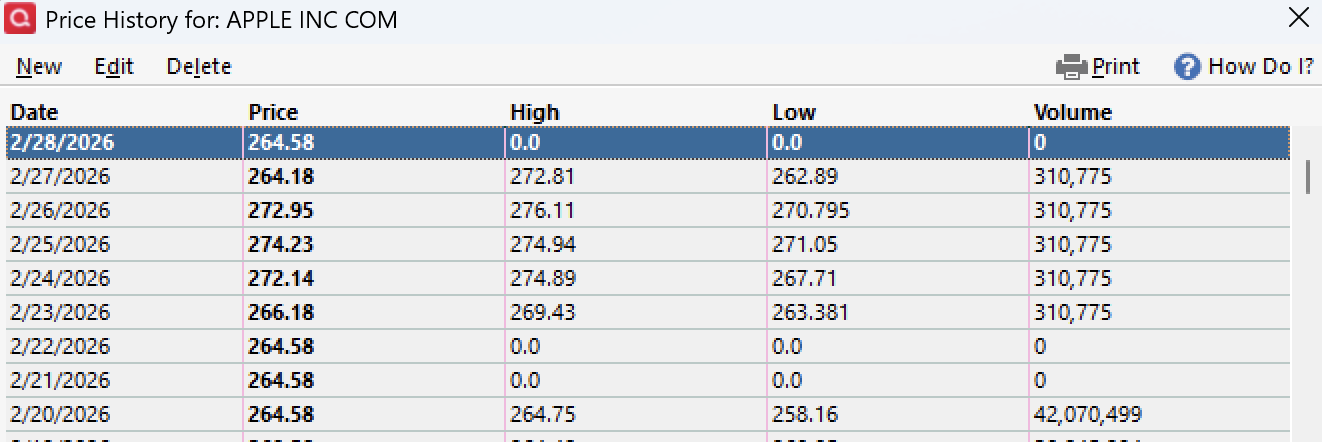
You can see that in the attached screenshot of quotes for Apple:
-The closing price from Fri 2/21 is 264.58.
-Quicken correctly used that closing price for Sat 2/22 and Sun 2/23, which is good.
-However, it incorrectly used that same closing price from Fri 2/21 for Sat 2/28 (today).
-If it were going to download a price for Sat 2/28, it should have downloaded the price from Fri 2/27which was 264.18.
Quicken team: could you please investigate and ensure that for weekend days Quicken either:
1) Downloads the closing price from the correct Friday immediately prior, or
2) Just doesn't download prices for Sat & Sun
I think #2 would work fine since to calculate current values, I believe Quicken uses the last quote it has.
Thanks!
Screenshot 2026-02-28 at 1.56.34 PM.png

Comments

  • QuickeDan
    QuickeDan Quicken Windows Subscription Member ✭✭✭

    FYI, 4 of the securities I found it did this for on Sat 2/28 were:
    AAPL
    AMZN
    VOO
    QQQ

    Those are stocks or ETFs. It is also happening for some mutual funds:
    LGILX
    CSRSC
    and most (likely all) of my Fidelity mutual funds

    FYI, I have real time quotes off (unchecked) in my preferences.

    I forgot to mention: the impact of this bug is that investing account values will be incorrect on Saturdays and Sunday (which is when many users tend to run their reports and analysis).

  • QuickeDan
    QuickeDan Quicken Windows Subscription Member ✭✭✭

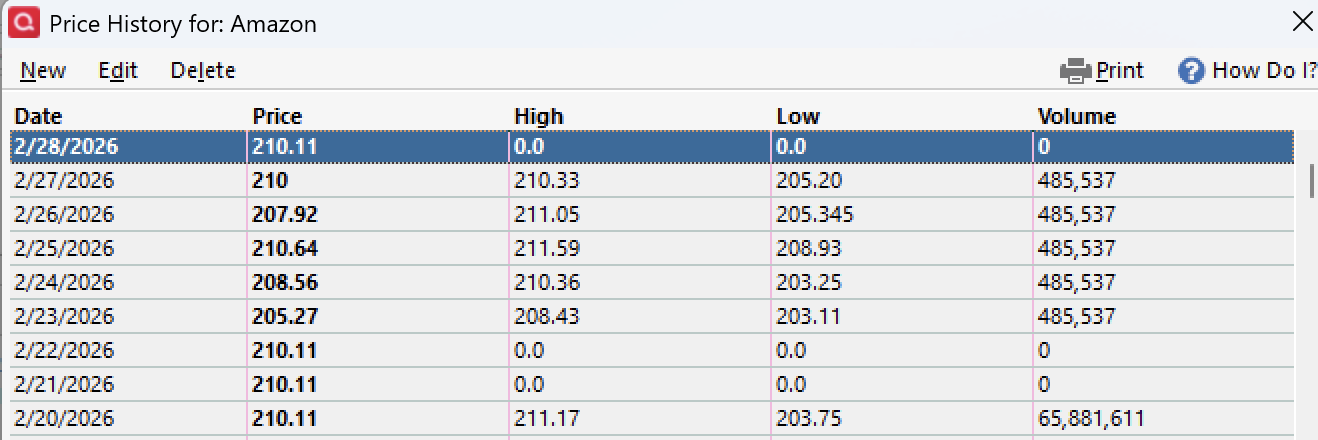
    Here's the Amazon price history screenshot. Same exact behavior

    Screenshot 2026-02-28 at 2.16.59 PM.png
  • q_lurker
    q_lurker Quicken Windows Subscription SuperUser ✭✭✭✭✭

    This seems to be the same behavior identified here:

    Since the Hi/Lo/Vol values are 0, that seems to be data from your FI, not from Quicken.

  • QuickeDan
    QuickeDan Quicken Windows Subscription Member ✭✭✭

    Hi Lo and Vol are expected to be 0 on a weekend day…

  • QuickeDan
    QuickeDan Quicken Windows Subscription Member ✭✭✭
    edited February 28

    @q_lurker: thanks for your comments and for the pointer to the other issue that was posted!
    Yes, it's the same behavior as reported in that post.
    As with that other person reporting the issue, my affected securities span multiple FIs: E*Trade, Well Fargo, and Fidelity.
    If it was just 1 FI, then I would be more inclined to agree that they are the culprit for the bad quotes.
    But since it's 3 different FIs, it makes me think the incorrect weekend quotes are more likely coming from the Quicken quotes download…
    To reconcile this with your point about FI-downloaded quotes not having hi, lo, and volume: I believe that could be true for quotes on real trading days. But I suspect that the Sat & Sun quotes are either coming from Quicken price download or being generated by Quicken (e.g. from the previous Friday quote) and Quicken deliberately zeros out those values because they don't make sense for a non-trading day.

    My mental model is that the only time Quicken takes/uses a price quote from an FI is for a specific transaction (e.g. buy or sell), so that it can get the transaction amount and cost basis correct. If for some reason you didn't also download quotes that day, the transaction price would be the only quote data for that day. But if you downloaded quotes, the price history would show the closing price, high, low, and volume downloaded from Quicken's servers.

    Looking at the details the other poster shared: his inaccurate AMZN quotes were on Sat 2/7 and Sun 2/8. His inaccurate quotes of 241.56 match what his screenshot shows for the Sat 1/31 closing value. Sat 1/31 should have the same value as Fri 1/30. Turns out his value for Sat 1/31 of 241.56 is wrong as well. My Quicken and separate online sources list the closing price on Fri 1/30 as 239.30 https://finance.yahoo.com/quote/AMZN/history/Random thought: I'm wondering if maybe markets being closed for President's Day (2/16) messed something up? Although the other poster had issues before then…

    Honestly, as I pointed out, we don't really need quotes for Sat & Sun in Quicken since they are just repeating the Friday value and Quicken falls back to using the most recent quote to calculate value anyways.
    I've been using Quicken for Windows since 1998. Quicken didn't use to download quotes for Sat & Sun…
    Since that got me curious, I looked through my long term AAPL price history. It looks like Quicken only started downloading prices for Sat and Sun starting 8/2/25…not sure why they started doing that…

    Something wonky is going on with Sat & Sun quotes…

    To keep things simple and avoid this issue from recurring in the future, I think it would be best for the Quicken team to go back to the way it worked before and stop having Quicken try to populate values for Sat & Sun.

  • q_lurker
    q_lurker Quicken Windows Subscription SuperUser ✭✭✭✭✭

    a) Brokerages send prices for all securities in the account (I don't know of any that don't do that.). So the brokerage sourced prices are not limited to only transaction prices. The timing of those prices can vary between brokerages. Some may offer intraday prices. Some will provide prior day's closing up until they 'determine' the current day's closing.

    For OFX style data downloads, that information would come through in this form as they report your investment positions:

    <INVPOSLIST>

    <POSMF>
    <INVPOS>
    <SECID><UNIQUEID>922908728<UNIQUEIDTYPE>CUSIP</SECID>
    <HELDINACCT>CASH
    <POSTYPE>LONG
    <UNITS>xxxx.xxx
    <UNITPRICE>160.62
    <MKTVAL>xxxx.xx
    <DTPRICEASOF>20251003160000.000[-5:EST]
    <MEMO>Price as of date based on closing price
    </INVPOS>
    <REINVDIV>Y
    <REINVCG>Y
    </POSMF>

    That example represents the price reported by Vanguard for a mutual fund date as of 10/03/2025 at 16:00 EST.

    I cannot say how EWC+ connections are relaying the comparable information.

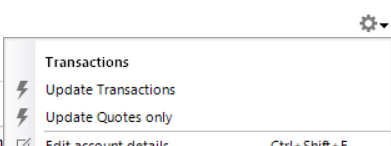
    b) The way to definitively identify the source it to separate out the download of quotes from Quicken's online services versus those downloads from your financial institutions. Those downloads commonly are both selected in the one-step update settings. They can also be independently called via the gear icon for a specific account. Note that the 'Update transactions' is transactions and holding from the brokerage while the 'Updates Quotes only' is the data from Quicken's data supplier.

    image.png
  • QuickeDan
    QuickeDan Quicken Windows Subscription Member ✭✭✭
    edited March 1

    @q_lurker: Thanks so much for your follow-up response and all that great info!
    Since today is Sunday, I realized I could do the test you proposed.
    And you were right!
    I started out with no price quotes for Sunday (today).
    Thanks for the screenshot of the gear icon dropdown: I'm familiar with those choices.
    The account I decided to try this on is a Fidelity Roth IRA. The screenshot you shared is for an investing account with transaction tracking. The text on my buttons is slightly different because my account was automatically changed from tracking transactions to Simple Tracking (I'm pretty sure that happened with the fall Fidelity OLT migration).
    I went to my Fidelity account screen and first clicked the "Update Quotes" button to get quotes from Quicken. No bad quotes were downloaded for today (Sunday). yay!
    Then from my Fidelity Roth IRA account screen, I clicked "Download positions" and sure enough bad quotes were downloaded for VOO and QQQ. But interestingly, not for the stocks in that account (tickers TM, OGN, MS, MRK, and D).
    But I know that AAPL and AMZN were messed up yesterday in my Wells Fargo Brokerage.

    I see that my E*Trade accounts that hold QQQ & VOO are again showing non-zero daily gain/loss for those securities which makes sense: even though the bad Sunday quotes were downloaded from Fidelity, they are now in Quicken's price history and therefore reflected everywhere in Quicken for those 2 securities.

    Given the above, it seems that Fidelity is clearly guilty and E*Trade can be exonerated :-)

    Looking at my Wells Fargo brokerage (the 3rd FI affected), I see that I now have bad Sunday quotes for AAPL and AMZN. I see that while those securities aren't in my Fidelity Roth IRA, they are in a different Fidelity (brokerage) account!

    Since I didn't do any Wells Fargo update today, all signs point to Fidelity :-)

    Looking more closely, it looks like Fidelity downloaded bad Sat & Sun quotes for ALL of the securities in my Fidelity accounts, including the mutual funds, even though I only updated that one Fidelity Roth IRA.

    So that seems to be the Occam's razor explanation: Fidelity is downloading incorrect quotes on Sat & Sun for all securities you have across your Fidelity accounts. In my case at least, it seems to be grabbing the quotes from 2 Fridays earlier (i.e. using the quotes from Fri 2/20 for Sat 2/28 and Sun 3/1 instead of using the quotes from Fri 2/27).

    Thanks again for sharing your expertise and helping me sort this out! Really appreciate you taking the time!

    Now hopefully Fidelity can fix their weekend price quotes issue…

    I only recently became aware of more of the details on Fidelity's OLT migration in the fall and all the issues with it. I know at least one of my Fidelity accounts hasn't updated since Oct 2025.

    I was about to try switching my Fidelity accounts from Simple Tracking to transaction tracking but paused when I saw this new issue/alert about Fidelity OLT from 2/25:

  • q_lurker
    q_lurker Quicken Windows Subscription SuperUser ✭✭✭✭✭

    My experience with Vanguard (still Direct Connect) is that I always get all connected accounts updated, even when I update from just a single account.

    I’d suggest you follow through with two more checks with E*Trade and WF as the first asks, just to make sure.

    And there is still the possibility that the EWC+ aggregator (Intuit) is mishandling the data. That part is still a nebulous black box for me.