Vancity update
Can Quicken give all the users connected to Vancity Savings and Credit Union an update of when the connectivity will be established to resume downloading of data into the Quicken program.
It is now March 1, 2026. Vancity made the switch on January 21, 2026 to a new digital platform and since then, Quicken no longer works on either Windows or Mac based systems.
All of us would appreciate a time line of when a fix will be available. We have all paid subscriptions to use Quicken. Hopefully we can get an honest answer.
Thank you.
Comments
-
What method are you trying to use to download transactions? Web Connect? Express Web Connect?
0 -
Hello - I am using Web connect. From the Vancity Savings and Credit Union web site each account provides an option to download transactions. You click on this option and a box open with various download options. You select Quicken.qfx as your choice.
I always get an error message : Quicken is unable to complete your request (OL-221-A)
I have had this same message since January 21, 2026. It seems no one can fix this issue. I have been in regular contact with Vancity and they inform me it is a Quicken problem.
Let me know if you know anything further.
Thanks.
0 -
Quicken Error OL-221-A indicates a syntax error in a downloaded QFX (Web Connect) file or a communication failure with a financial institution often caused by incorrect data formatting in the file, server maintenance, or outdated software. To resolve this, deactivate/reactivate the account, update Quicken, or contact your bank to report faulty download files.
I'm going to guess you will need to contact your bank to report faulty download files.
0 -
I did as instructed and deactivated/reactivated the account. The Quicken program is running the most recent release R6520 - 27.165.20 - and it came back with the same result - Error OL-221-A. All Vancity customers using Quicken are having the same issue. No one has successfully downloaded any data since January 21, 2026.
This is what Vancity keep advising:
Hello Bob,
Thanks for the email and the update. I’m sorry to hear that Quicken has not updated their interface so that it syncs with our new app. I reached out to our Online Banking Support Team again to investigate and was told that we have recently reached out to our 3rd‑party aggregators about the need to update their code, and it is taking longer than expected for this to happen. I can appreciate your frustration, and I want to assure you that our team has followed up with them and completed everything that can be done on our end. We have escalated this up.
The timeline I had given you in my last email was an approximation only and based on historical updates. Unfortunately, because the remaining work sits with the third party, we have no means of expediting other than periodically reaching out to them, which our team is doing.
I know this disruption has been inconvenient, and I genuinely appreciate your patience while this is being resolved.
Please feel free to reach out anytime if you have further questions or if there’s anything else I can look into for you.
Take care,
Adam Yusuf
Assistant Branch Manager
6288 Fraser Street, Vancouver, BC, V5W 3A1
T: 604.877.7072
Vancity is proud to operate on the traditional territories of the Coast Salish and Kwakwaka’wakw peoples, and we are committed to Reconciliation as a core value.
0 -
The third party is Intuit. In situations like this, it is best to get the issue escalated to Quicken’s online banking team, which is easier said than done. If you haven’t done so already, you should report this via Quicken’s Report a Problem feature. Other than that, just keep escalating with Quicken’s support. I’ve had to fight these battles many times and it is no fun. Goodluck!
0 -
I tried Quicken this morning and I am am happy to report that all my VanCity accounts updated successfully.
0 -
I, on the other hand, installed the latest update, tried again and still can not download from VanCity.
0 -
Try signing out of your Quicken ID and then signing back in.
0 -
I believe this is an issue from the Vancity side, but it may be some incorrect information that Quicken has supplied. I found a workaround that seems to work for using the manual download and import method rather than a direct connection, but you have to delete/deactivate every Vancity update link you have in your file.
I have included more information than probably long-term users need, but new users may not be as familiar with these deeper settings:
- from the Vancity website, download the transactions you want to update in Quicken
- select a timeframe that covers back to when your link broke or the last time your reconciled your account(s)
- Download Format is "Quicken.qfx"
- in Windows File Explorer (or from the download icon in Chrome), go to the downloaded file location
- find the file (it should look something like "Account_Statement_0260_10-Mar-2026.qfx") and right click on the file
- select "Edit in Notepad"
- there is a whole bunch of information in this file, but you are looking for the "<ACCTTYPE>" entry
- old Vancity banking platform had the account types of "SAVINGS" and "CHECKING" but new platform has "SA" and CA"
- this is where the issue seems to be
- replace "SA" or "CA" with "SAVINGS" or "CHECKING" as appropriate
- save the file
- ensure that your online services are deactivated for EVERY Vancity account you may have in your file
- right click on each Vancity account
- choose "Edit/Delete Account"
- select the "Online Services" tab
- select "Deactivate" and confirm this choice
- repeat for EVERY Vancity account that you download transactions to (or had a direct connection to)
- validate that you have cleared everything
- select "Tools" from the main menu bar
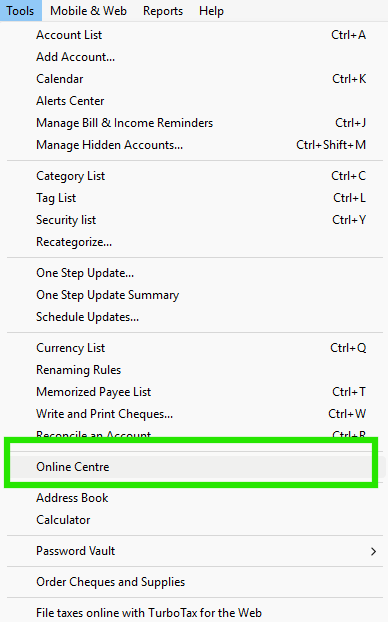
- select "Online Centre"
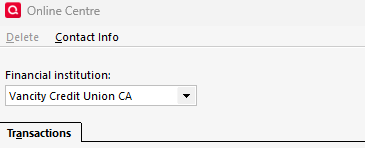
- ensure that neither "Vancity" nor "British Columbia Credit Unions" are shown in the Financial Institutions drop-down menu (if they are still there then you've missed the account shown; if you have accounts at other BC credit unions you MAY have to break their links as well
- you should be able to either import the file (File / File Import / Web Connect (.QFX) File) or double-click on the file in File Explorer
- you will be asked whether you wish to create a new account in Quicken or link to an existing (choose this option)
- files should import
- repeat as necessary to get things working for the rest of your accounts
- you may have to manually delete some duplicate transactions in the update register (highlight the ones you need to delete and then hit the <Delete> button in the reconciliation window
I tested this on my active Quicken file plus a couple of other files to ensure it worked, but I am just one guy hacking away because this broken feature got me a bit peeved. Vancity updated their business accounts to the new platform last night and I did before and after downloads to see where the changes were. The account information changed between the two but that information didn't crash the downloads - only the <ACCTTYPE> field crashed it. I then had to figure out how to get my working file back to accepting them (didn't at first).
I'm going to post this on a number of the other threads on this same topic and will send it to Vancity to clean things up. Hopefully Vancity will update their download protocols so things get back to working and that they will post when things are fixed. If they reply directly to me that things are fixed I will post on this thread.
This thread may be relevant for any other BC Credit Union or ATB customer with a similar issue.
0 - from the Vancity website, download the transactions you want to update in Quicken
-
Further to my previous comments.
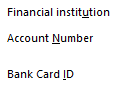
I experimented a bit with a new Quicken file and tried the Express Web Connect setup for Vancity and it worked for each of my member cards / account buckets, but still did not work when I tried with my primary member card. Experimented with a member card that just had one account and got it to work by ensuring every account was deactivated and that the "Account Number" and "Bank Card ID" boxes for each account were blank.
<Right Click> on your mouse over each linked account name to "Edit/Delete account" and then select the "Online Services" tab. <Deactivate> or other equivalent button. Then go back to the "General" tab to clear the "Account Number" and "Bank Card ID" boxes (and "Financial Institution" if it is still filled in).
When these steps are done for each of your linked accounts, open the Tools / Online Centre menu from the main menu bar. Vancity Credit Union CA should NOT appear as an available financial institution in the drop-down menu. If it does, you still have another account(s) connected (look at the Transactions below to see what may be still connected).
Doing these steps seemed to reset each of my Vancity accounts to be able to download using the Web Connect process in my relevant Quicken files. Try this first before doing the manual adjustment noted in my previous post. I believe the issue was the change in account type (<ACCTTYPE>) between the two versions of the Vancity banking platform messing things up.
0
Categories
- All Categories
- 16 Product Ideas
- 34 Announcements
- 248 Alerts, Online Banking & Known Product Issues
- 20 Product Alerts
- 517 Welcome to the Community!
- 682 Before you Buy
- 1.5K Product Ideas
- 55.6K Quicken Classic for Windows
- 16.8K Quicken Classic for Mac
- 1K Quicken Mobile
- 834 Quicken on the Web
- 126 Quicken LifeHub