Unable to Re-connect Synchrony Accounts after latest update
After the latest Quicken update, I am getting persistent C800 errors on ALL 5 of my Synchrony Bank cards (Lowes, Care Credit Mastercard, Ashley Advantage, Sams Club Mastercard, Sleep Number beds):
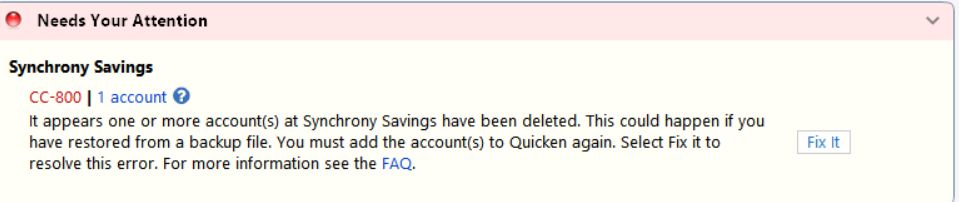
Have tried deactivating/reactivating them to no avail. Have also checked usernames/passwords outside of Quicken, and they work fine. When I try to re-add the accounts, I get the following error:
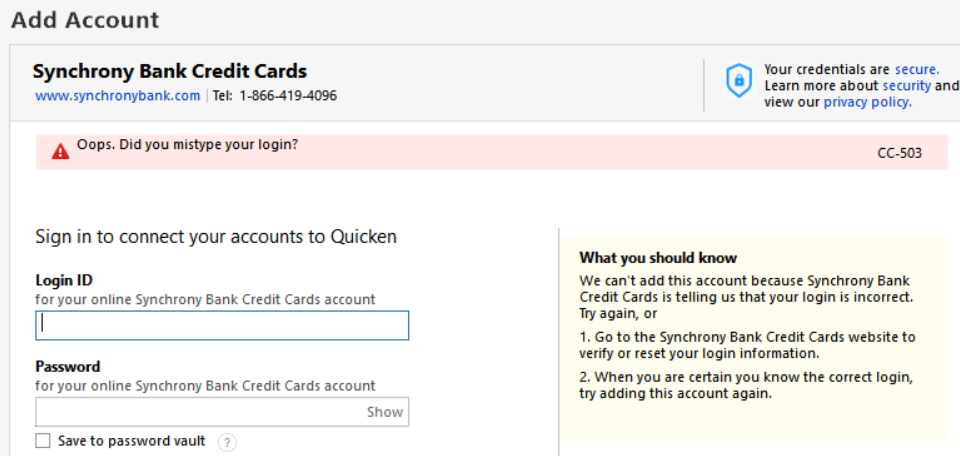
I have also taken all the recommended steps to resolve this but nothing works. Please help.
Answers
-
Hi @Bongo56,
Thank you for sharing the issue and outlining the steps you’ve already taken. I’ll be happy to help you troubleshoot further.
To better assist you, I’ll need a bit more information:
- Are all your Synchrony accounts under a single set of login credentials, or do you use different credentials for each account?
- Are you able to successfully log in on the bank’s website? If so, have you tried copying and pasting your User ID and password directly into Quicken to rule out any typing errors?
- What is the bank’s web address (URL) that you use to sign in?
- Have you noticed any recent changes on the bank’s website (such as security updates, multi-factor authentication changes, or interface updates)?
Once I have this information, I’ll be able to guide you through the next steps.
I look forward to your response.
Quicken Laura
Make sure to sign up for the email digest to see a round up of your top posts.
0
Categories
- All Categories
- 47 Product Ideas
- 34 Announcements
- 244 Alerts, Online Banking & Known Product Issues
- 22 Product Alerts
- 513 Welcome to the Community!
- 679 Before you Buy
- 1.4K Product Ideas
- 55.5K Quicken Classic for Windows
- 16.8K Quicken Classic for Mac
- 1K Quicken Mobile
- 829 Quicken on the Web
- 124 Quicken LifeHub


