I created a 2nd Quicken file without intending to, now want to eliminate it but not lose data
I use Quicken Classic Deluxe Version 8.4.2 on macOS 14.7.6 and was modifying last year's Tax Report 2024 first by just editing the date range to "Last Year". In the process, I think I was to add a new transaction and used a shortcut ⌘N and accidentally created a new Quicken file. Later on things got weird as I believe I was shifting between the two variants. Now I see there are the 2 variants, and I want to compare them to see if there is one that is more up to date or what I could grab from one to update the other. I just want to have one file with all the info.
Earnest
Answers
-
Oops! I see I posted this in the Quicken Classic for Windows. Now how to move it?
0 -
Hi @cm400,
Thank you for reaching out and for providing those details about what you're experiencing. No problem at all; I’ve moved your post to the Mac category, and I’m happy to help you identify the most current file.
Switching Between Data Files (Mac)
You can switch between data files using these steps:
- Go to File > Open Recent.
- Choose the file you want to open from the list.
- The file you are currently working in will appear at the top.
- The second file listed is typically the one that was opened previously.
- Once opened, review the latest transactions and historical data in each file. I recommend keeping the file that contains the most complete historical information, rather than just the one with the most recent activity.
Deleting a Data File in Quicken Classic for Mac
Quicken Classic for Mac does not allow you to delete data files directly within the application. If you no longer need a file, you will need to delete it manually using Finder.
Step 1: Move the File to an Easy-to-Find Location
- Open the file you want to delete.
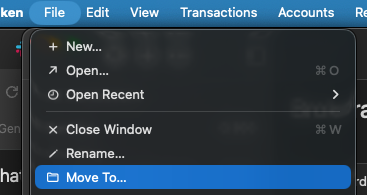
- Click File.
- Select Move To.
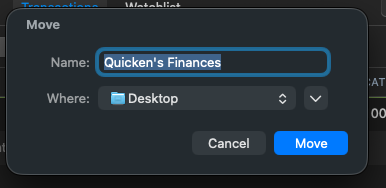
- Choose a convenient location (for example, your Desktop).
- Click Move.
- Quit Quicken.
Step 2: Delete the File Using Finder
- Open Finder.
- Locate the file.
- Drag the file to the Trash.
- To permanently delete it, choose Finder > Empty Trash.
⚠️ Until you empty the Trash, the file remains recoverable.
I hope this helps!
Quicken Laura
Make sure to sign up for the email digest to see a round up of your top posts.
0
Categories
- All Categories
- 49 Product Ideas
- 34 Announcements
- 244 Alerts, Online Banking & Known Product Issues
- 22 Product Alerts
- 514 Welcome to the Community!
- 679 Before you Buy
- 1.4K Product Ideas
- 55.5K Quicken Classic for Windows
- 16.8K Quicken Classic for Mac
- 1K Quicken Mobile
- 829 Quicken on the Web
- 125 Quicken LifeHub