Quicken crashes when I Open DataFile

Hi

I have a PC running Windows 11 Home. A few days ago, opening a data file I've been using for many years crashed Quicken. I've installed a recent patch, and that seemed to fix the issue, but then the following day, Quicken crashed again. Since then, I've reinstalled a new version of Quicken, I've tried to open a series of manually saved and automatically saved versions of the data file, and they all still crash the program. I've validated the file, still crashes. I've followed instructions to Supervalidate, but holding the control/shift button does not seem to open the Supervalidate option. This is the screen I get.

Thank you for any help!
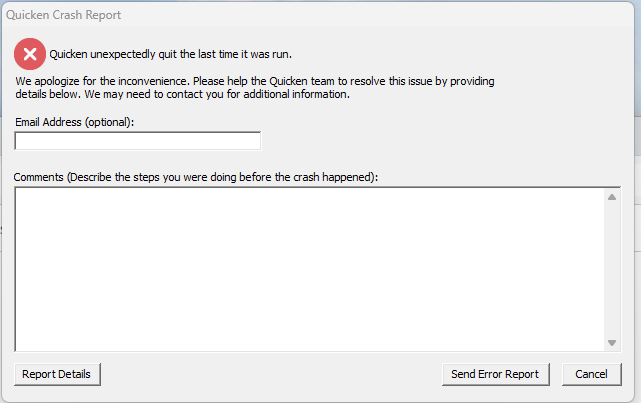
image.png
Tagged:

Comments

  • Quicken Laura
    Quicken Laura Quicken Windows Subscription Moderator mod
    edited March 9

    Hi @Anne Brillantes,

    Thank you for reaching out and sharing the steps you’ve taken so far. I’d be happy to help you troubleshoot this issue.

    To better understand the case, please help me to gather a bit more information.

    • Where is your Quicken data file located?
      To check, please open Quicken and go to File. At the bottom of the menu under Recent Files, the file with the check mark next to it is the one currently open. Please let me know the full file path shown there.
    • Is your file being backed up/ synced by any third-party services like Carbonite, OneDrive, or Backblaze?
    • Are you using a VPN, firewall, or antivirus software? If so, please let me know which one(s).
    • Do you have any pending Windows updates, or did you install a Windows update around the time the issue began?
    • Have you created a new test data file to see whether the same behavior occurs there?

    Once I have this information, I’ll be able to guide you through the next steps.

    I look forward to your response!

    Quicken Laura

    Make sure to sign up for the email digest to see a round up of your top posts.

  • Anne Brillantes
    Anne Brillantes Member ✭✭

    Hi - i spoke with quicken support over the phone. After exhausting his options, the best he was able to do was find a file 9 months old that didn't crash the software, and left me to update the file. This was pretty disappointing. Then several days later, after spending many hours updating and not even being close to finished, my original file suddenly worked again. This is great, but I wasted a lot of hours. :-(

  • Quicken Laura
    Quicken Laura Quicken Windows Subscription Moderator mod

    Hi @Anne Brillantes,

    I’m sorry to hear you had to go through such a labor-intensive process to get this resolved, but I’m glad your most recent file is now working properly. I recommend saving a current backup for safekeeping.

    Don't hesitate to reach out if you have any questions!

    Quicken Laura

    Make sure to sign up for the email digest to see a round up of your top posts.
