For years I've wondered why these 3 very important fields (Category, Tag, Memo) are isolated behind an additional click to activate them, and then edit them in yet another dialog box.
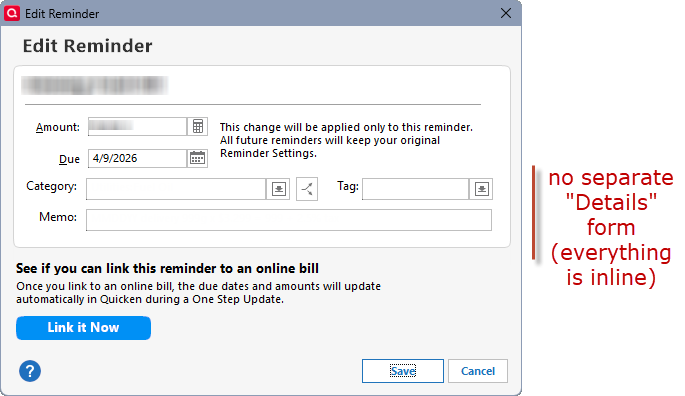
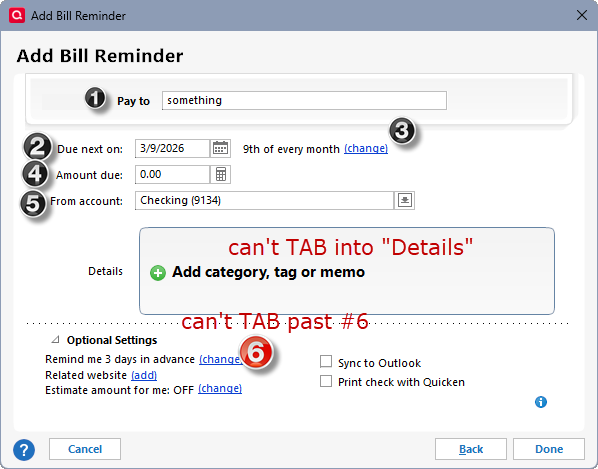
Please merge these three fields to the same top-level form so that they are directly inline with the Amount and Due date fields, etc., in Reminder Edit and Add dialogs. They are currently "nested" in a Details form that requires an extra click (and currently has no keyboard option to open it).
This change would simplify keyboard navigation and usability to have all fields immediately accessible in the same dialog, not to mention resolve the accessibility bug (see note below).
Here's a mockup of the EDIT form for consideration. (The ADD form would be updated the same way.)
For comparison, here are the current ADD and EDIT forms, with these three fields not accessible until a user CLICKS the DETAILS image (can't navigate via keyboard):
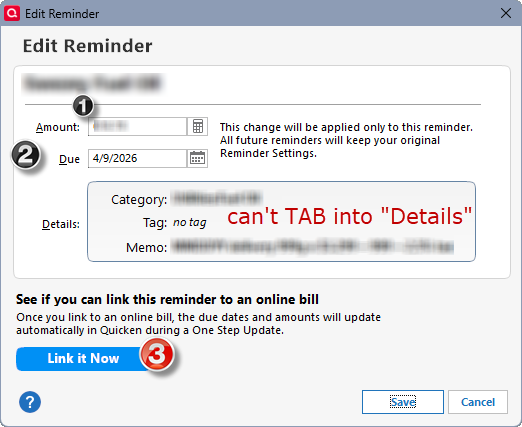
Note: I mentioned this proposed change as part of a BUG report in the Troubleshooting forum, as elevating the 3 fields would fix the current form navigation issues. See my bug report post here:
Quicken Classic DeluxeVersion: R66.23Build: 27.166.23
OS: Windows 11 Enterprise
