In the latest update to Quicken Classic R66.23 27.1.66.23
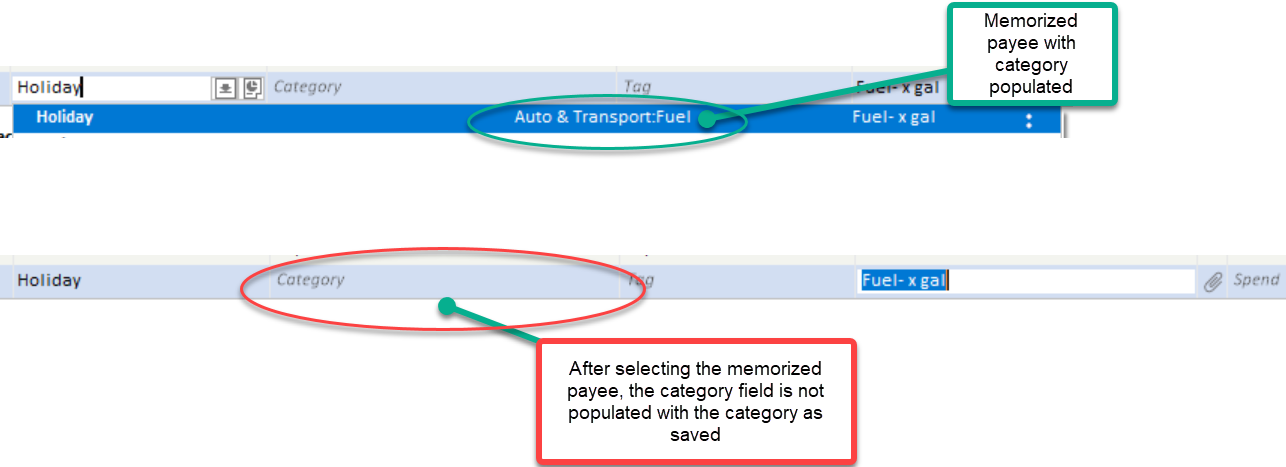
When I type in a memorized payee, and select a memorized transaction from the list, it doesn't populate the Memo, Category, or amount fields any longer. Is this a known issue?
Hi @dynamicfly,
Thank you for sharing the issue you’re experiencing with memorized transactions. At the moment, this is not a known issue. I tested the behavior on the latest version, and it appears to be working as expected. Let’s review a few settings to ensure everything is configured correctly on your end.
Check General Settings
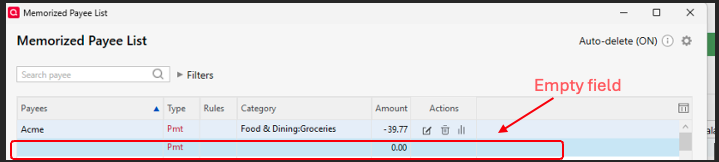
Check the Memorized Payee List
If there is more than one rule associated with the same payee, please make sure the one you want to use is locked, or delete the ones you no longer need.
To lock a payee:
Also, please verify that “Never auto-categorize this payee during QuickFill of downloads” is not enabled:
When Multiple Payees Exist For example, if there are two rules for a payee (e.g., Acme), and one rule is blank while the other contains details, Quicken may default to the blank rule if it was the most recently used. Locking the correct rule can help prevent this behavior.
Please let me know how it goes or if you have any questions. I’ll be happy to help further!
I started having this problem as well a couple weeks ago. Mine will populate the payee but not the category. v- 27.1.66.23
If this happens when creating a new transaction in the register, make sure that the Preferences settings have been enabled correctly. See previous comment about "Check General Settings", item 4.
This worked for me. I think that a recent update must've caused the "Recall Memorized Payees" box to become unchecked in the preferences.
Hi @batl,
That’s great to hear. I’m glad that worked for you!
Please don’t hesitate to reach out if you have any additional questions. I’m happy to help anytime!
However, there is something that has happened during a recent update that causes that setting to not "stick". When I exited Quicken and re-started it the next time I wanted to use the program, this setting had reverted back again to the "Recall Memorized Payees" box being unchecked.
I’m sorry to hear the issue is still persisting.
Let’s try installing the Quicken Mondo Patch to ensure the latest release is fully applied. This can help in case the previous update didn’t install completely. The issue with backup preferences changing after updates was addressed in R66.23.
Steps to install the Quicken Mondo Patch:
.EXE
Please let me know how it goes. I’ll be happy to assist further if needed.
Just checking in, we haven't heard back from you in a while. Do you still need assistance?
Hello again,
I'm checking in once more before this thread gets closed. If you need assistance, let us know.
Have been seeing the same issue for the last few months and have submitted problem report a couple times.
If a memorized payee is classified as "pmt" or a memorized payee is split with only 1 row completed in the split, when using the memorized payee, the category does not populate.
If this happens when creating a new transaction in the register, make sure that the Preferences settings have been enabled correctly. Scroll back to see one of the first comments in this discussion about "Check General Settings", item 4. And, yes, this does appear to have been caused by a bug which cleared some Preferences settings when it shouldn't have … 😦
yup - preferences are correct - nothing has changed there. Something that started a while back with one of the updates.
If the Preferences settings are correct and it still doesn't work …
Have you performed the standard troubleshooting tasks?