Investment Accounts beyond the possibility of reconciliation
I have about ten years of investment transactions during which time I have not properly maintained reconciliation with those accounts. This is despite fastidiously downloading transactions on a daily basis during that period. For that reason, the investment accounts in my Quicken Classic data file no longer represent an accurate accounting of my investments. I have all of the statements necessary to reconcile them, although it would be entirely impractical to do so for that period of time. I would like to know the best approach to correct the problem so that I can start anew. I would also like to know the consensus on the viability of reconciling investment accounts. Thanks in advance.
Answers
-
Hi @GerryP,
Thank you for sharing the issue you're experiencing. I’d be happy to help you find the best way to reconcile your accounts.
There are two relatively simple options you can try. Before proceeding, I recommend creating a backup of your data file.
Option 1: Adjust Security Values and Cash Balances
This option allows you to correct the balances as of today without re-entering your entire history. Your historical transactions remain intact, and your balances should be accurate moving forward.
- Open one of the affected accounts.
- Click Holdings.
- Compare each security’s value with the balance shown by your financial institution.
- If the value is incorrect, check both the number of shares and the share price.
If the number of shares is incorrect:
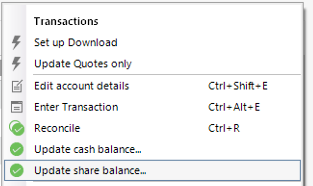
- Click the gear icon in the upper right.
- Select Update Share Balance.
- Enter the security name and the correct number of shares.
- Click OK.
If the share price is incorrect:
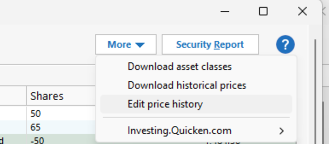
- Edit the most recent Buy or Add Shares transaction for that security and update the price.
If the cash balance is incorrect:
- Click the gear icon in the upper right.
- Select Update Cash Balance.
- Enter the correct amount and click OK.
Option 2: Create New Accounts and Archive the Old Ones
Please note that this option may impact your history, since the new accounts will only download transactions as far back as the financial institution allows.
- Go to Tools.
- Select Account List.
- Find the account and click Edit.
- In the Account Details window, open the Online Services tab.
- Click Deactivate next to the service.
- Click Yes to confirm.
Hide and separate the old accounts
- Go to Tools > Manage Hidden Accounts.
- Select the desired options, such as:
- Hide in Account Bar and Account List
- Hide in Transaction Entry Lists
- Keep this Account Separate
- Go to Tools > Add Account.
- Search for and select your financial institution.
- Choose the appropriate connection method if prompted.
- Follow the on-screen instructions to complete the setup.
Please let me know if you have more questions.
Quicken Laura
Make sure to sign up for the email digest to see a round up of your top posts.
0
Categories
- All Categories
- 52 Product Ideas
- 34 Announcements
- 248 Alerts, Online Banking & Known Product Issues
- 20 Product Alerts
- 515 Welcome to the Community!
- 680 Before you Buy
- 1.5K Product Ideas
- 55.6K Quicken Classic for Windows
- 16.8K Quicken Classic for Mac
- 1K Quicken Mobile
- 834 Quicken on the Web
- 127 Quicken LifeHub