Multiple sign ins for Chase accounts
I have several accounts with Chase, one of which has a different login because it has a different primary account holder. This wasn't an issue with updating transactions until recently. Now it won't let me download all of the accounts and has the "fix it" symbol next to one or more of our accounts in the account list. When we log in to re-activate one of them, the others get the symbol. Is there a way around this other than manually downloading the updated transactions from their website?
Comments
-
Hi @tamistl,
Thank you for reaching out. I’d be happy to help troubleshoot this issue.
From our end, I can see that multiple accounts are returning the same error, including Wells Fargo, PNC Bank (Web Connect), U.S. Bank Internet Banking, Victoria’s Secret Credit Card, and Chase. When the same error occurs across more than one financial institution, the best approach is to refresh the connections by deactivating and reactivating the affected accounts.
Please follow the steps below:
- Select Tools > Account List
- If present, select the Show Hidden Accounts checkbox at the bottom of the Account List
- Select Edit on each account with this error and select the Online Services tab.
- Click Deactivate.
- Click Yes to the message confirming if you want ot disable this service.
- When finished, close the Account List.
- Revoke Quicken’s third-party access from your account on the Financial Institutions website (some FIs don't have the option available, and that's okay; you can skip this step with those accounts).
- Go to Tools > Add Account.
- Search for and select your financial institution.
- If prompted, choose the appropriate connection method.
- Follow the on-screen instructions.
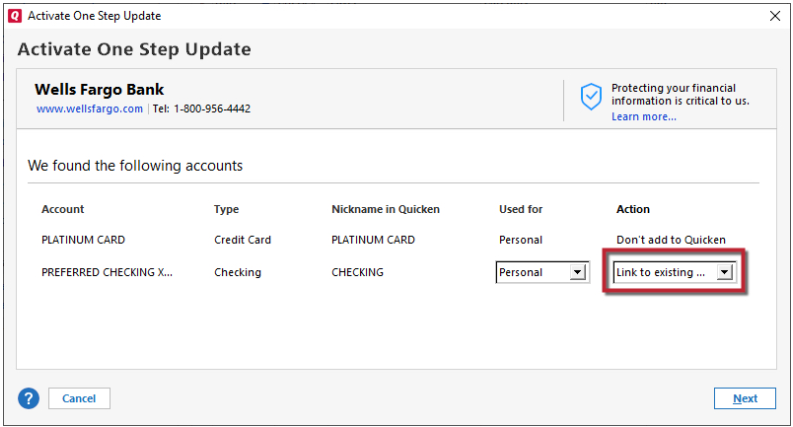
- When the list of found accounts appears, be sure to select Link to connect them to your existing accounts (do not add duplicates).
Once completed, please let me know how it goes or if the issue persists. I’ll be glad to assist further if needed.
Quicken Laura
Make sure to sign up for the email digest to see a round up of your top posts.
0 -
I had the same problem. I did have just one account updating with one-step update. Now it does not (it had it's own login credentials). But the other 2 accounts (which have the same login credentials but not the same as the other account), are now connected for one-step update. I did get the handy information box telling me to take the one account off of my one step update because Quicken couldn't find it at Chase (since it has a different login). How can I get all 3 accounts to update without having to disconnect the other accounts? Isn't it possible for both husband and wife to have separate credit card accounts at the same bank but paid out of joint finances?
0 -
Thank you for joining this thread. I’ve reviewed your accounts, and it appears that somehow the three Chase accounts are connected under the same user credentials. To troubleshoot the connection, we’ll need to reset the accounts as follows. Please make sure to save a backup before proceeding:
- Deactivate the three Chase accounts using the steps provided above.
- Reactivate only one user first.
- Clear your browser cookies.
- After clearing cookies, try reactivating the second user.
Steps to clear Cookies (Google Chrome)
- Click the three-dot menu in the upper-right corner of the browser.
- Select Delete browsing data.
- Check Cookies and other site data.
- Set the time range to Last hour.
- Click Delete data.
Once completed, follow the reactivation steps for the remaining accounts.
Please let me know how it goes!
Quicken Laura
Make sure to sign up for the email digest to see a round up of your top posts.
0 -
@Quicken Laura,
These are the steps I tried because her description was a more accurate way of describing mine. When I finished the second reactivation, it still gave me the message of telling me to remove the other Chase accounts that are under my other Chase login. If I have to, I guess I will deactivate the online update for the single account and keep the update for the other three set up. This wasn't an issue until a few months ago; I've always had separate logins through Chase without any update issues. Any other suggestions?
0 -
Hi @tamistl,
Thank you for following up.
After reviewing your accounts, it appears they are connected using two different sets of credentials. One set seems to be fully connected and working as expected. The second set does connect successfully; however, only one account is being linked, while the others under that same login are not being added.
Just to make sure we’re on the same page; were all accounts under both sets of credentials fully deactivated using the steps provided earlier? This would include any hidden accounts with Chase that may still be connected in Quicken; they should also be deactivated.
Please let me know, and we can continue troubleshooting from there.
Quicken Laura
Make sure to sign up for the email digest to see a round up of your top posts.
0