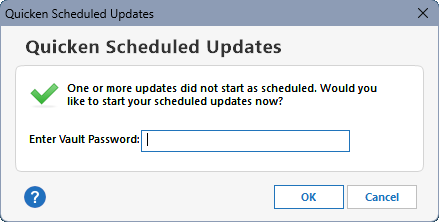
When you tell Quicken to schedule updates and specify to enter the password at Windows Startup, it's a guessing game where the password dialog (below) will show up:
- If you have other app windows open, the prompt could be behind any one of them.
- If you have multiple monitors, the prompt could be on any one of them.
- If you have multiple virtual desktops, the prompt could be on any one of them.
Why? Because this dialog isn't presented as a "windowed app", which would be reflected in the Windows taskbar as a running app, so you don't know (1) when it's open and (2) where it is.
Instead it's just a stray dialog that can be really hard to find.
Proposals for the Quicken Scheduled Updates prompt:
- Always show an icon in the Windows taskbar (flash as needed) when the prompt is open and is waiting for user input
- Force this dialog to be ON TOP OF ALL OTHER WINDOWS,
- Always show this dialog on the PRIMARY DESKTOP/MONITOR
Implementing only the first proposal would suffice, as clicking that Scheduled Update icon in the taskbar would surface the dialog, so I really hope this can be implemented soon!