American Express - CC-601 - We cannot find an account with non-zero balance
Hello,
My American Express accounts stopped syncing with this error:
CC-601 - We cannot find an account with a non-zero balance or with any transaction in the last 12 months. Please check on your FI website and try again.
I saw another recent post where this is happening to Fidelity accounts as well. Please advise.
Comments
-
Hi @terry@,
You are correct that some customers have recently experienced issues with Fidelity; however, that situation is not related to American Express, even though the same error code may appear in both cases.
If you have been receiving the error for more than 24 hours, please send your log files to help us investigate further by following these steps:
- Open Quicken
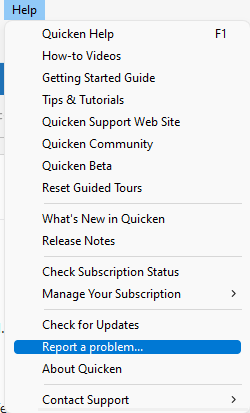
- Click Help
- Select Report a Problem
- Click Send to Quicken
Once submitted, please let me know. I look forward to your response!
Quicken Laura
Make sure to sign up for the email digest to see a round up of your top posts.
0 -
For the last 3 days I have received the same error message when trying to download Amex balances for my 12 Amex accounts.
CC-601 - We cannot find an account with a non-zero balance or with any transaction in the last 12 months.
Please advise,
Reinhard Thomas
2 -
Hi @TTom37,
Thank you for following up and for providing your log files; I appreciate you taking the time to do that. I was able to confirm the error you’re encountering.
At this point, I recommend reaching out to Quicken Support directly. They can work with you in real time, guide you through advanced troubleshooting steps, and escalate the issue if necessary.
You can find the Quicken Support phone number through the link provided here. Phone support is available Monday through Friday, from 5:00 AM to 5:00 PM PT.
I apologize that I’m not able to assist further with this issue, but they will be best equipped to help resolve it quickly.
Feel free to reach out if you have additional questions!
Quicken Laura
Make sure to sign up for the email digest to see a round up of your top posts.
0 -
Thank you, Laura. I will contact Support.
0 -
I called support yesterday and they confirmed an issue and said they had to escalate. I am still waiting for resolution on this. How can I find out the status? I was not given a ticket # or any sort of tracking mechanism.
This has been going on for almost a week and I need to get my finances reconciled.
0 -
Hi @terry@,
Thank you for contacting Quicken Support. Our team will reach out to you via email with any updates regarding your case.
For your reference, your escalation ticket number is 12296504.
Please don’t hesitate to reach out if you have any additional questions!
Quicken Laura
Make sure to sign up for the email digest to see a round up of your top posts.
0 -
I am having the same problem and just submitted my Quicken report and logs.
0 -
Hi @KRL60,
Thank you for sending your logs. I was able to verify the error code, and it appears that it started less than 24 hours ago. As mentioned previously, this can sometimes occur if something on the bank’s side is temporarily blocking Quicken from connecting.
I recommend waiting 24 hours and then attempting to download your account information again. If the error persists after that time, please contact Quicken Support so the issue can be further investigated and escalated if necessary.
For more details, you can also refer to the official FDP-101 support article.
@terry@,
I’ve reviewed your account, and it looks like your American Express accounts were successfully connected this morning. Could you please confirm whether everything is now working, or if you are still encountering the CC-601 error?Thank you!
Quicken Laura
Make sure to sign up for the email digest to see a round up of your top posts.
0 -
I am having the same issue CC-601 error with American Express downloads. I have submitted my log files around 8:00 CDT this morning via the report a problem in Quicken.
0 -
I spent 20 minutes with Quicken support and went through a number of steps (deactivating accounts and setting up again, copying to new data file, etc.) and the error persists. I was then told it was a known problem with American Express under case number 11617102 (not my case number for my call) and had been escalated, but no resolution time frame yet available.
0 -
I have been experiencing the same thing with American Express (2 bank, 4 credit cards), and USAA (3 accounts). Wed appreciate if you would escalate further.
I'm getting really tired of paying for a product that keeps raising its price and gets more and more unreliable.
0 -
I am also having the same problem with American Express (CC-601). Is there any resolution to this yet?
0 -
I am yet another customer with the (CC-601) error, with one credit card and two bank accounts at American Express. I have gone through the recommended steps of deactivating and reactivating online access, which had worked flawlessly until this month. I am disappointed in Quicken taking so long to fix what is clearly plaguing many customers. Especially because this BS is occurring during tax season, and due to it dragging on for weeks with no clear path to resolution, it impels me to find a better solution than Quicken. I have better uses for my time than to deal with your support people for 20 minutes, dig up logfiles, etc., when so many people have already been down that road. This problem is with Quicken or its aggregators. Fix it or watch your subscriptions decline.
0 -
Hi everyone,
Thank you for joining this thread and sharing your experiences.
This issue has been reported internally, and we are aware of an outage affecting connections to American Express. We appreciate those of you who have submitted log files; this information is helping our teams investigate and narrow down the cause. Ticket #11617102 is associated with the active global alert.
For now, we recommend waiting and trying again periodically while the issue is being addressed.
We appreciate your patience as we work toward a resolution.
Quicken Laura
Make sure to sign up for the email digest to see a round up of your top posts.
0 -
Is there any update? At some point, it will be time to abandon Quicken when it can't update so many important accounts.
0 -
Hi everyone,
At this time, there are no new updates, but our team is actively working on the issue. We truly appreciate your patience while we continue investigating.
There is an active Community Alert for this issue; you can bookmark it to receive notifications as soon as updates become available.
Please feel free to reach out if you have any additional questions.
Quicken Laura
Make sure to sign up for the email digest to see a round up of your top posts.
0 -
This morning I deactivated both my Amex credit cards and my bank account, and then attempted to set up just one credit card, and it worked, downloading all the back transactions and some erroneous adjustments that I deleted. So I added the second credit card, and it also worked, downloading back transactions and a couple of adjustments I deleted. I then ran a full One Step Update, and it completed without the CC-601. I don't use the bank account much, so I'm not going to press my luck. I'll wait to see if it works again tomorrow.
2 -
That’s great news! Thank you for sharing what worked for you; this will definitely help other users who might be experiencing the same issue.
Quicken Laura
Make sure to sign up for the email digest to see a round up of your top posts.
0 -
I started seeing this problem around April 18th and so it is getting long in the tooth (at least a month). I tried one of the suggestions regarding de-activating and reactivating 3rd party access, etc., and it didn't resolve the issue.
0 -
Hi @james C,
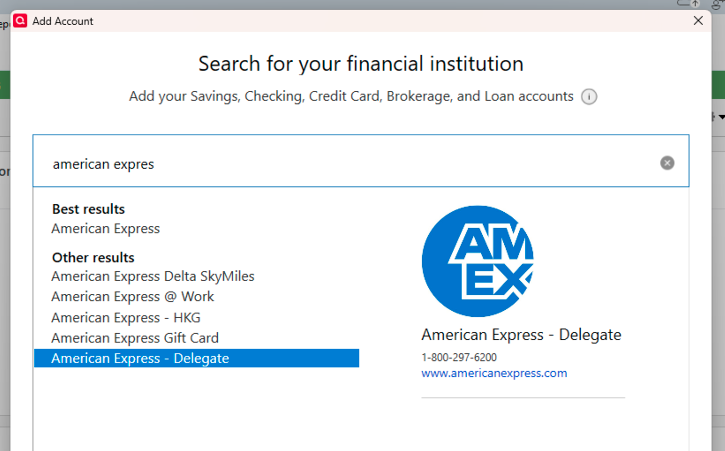
I’m sorry to hear that you’re still experiencing issues with American Express. While we are still working on a permanent fix, as a workaround, you can try connecting your accounts using American Express – Delegate instead of the regular American Express option.
To do this, first deactivate all affected accounts, and then reconnect them using American Express – Delegate.
Step 1: Deactivate all affected accounts
- Go to Tools > Account List.
- In the Account List, select the account and click Edit.
- In the Account Details window, open the Online Services tab.
- Click Deactivate next to the online service.
- Confirm by clicking Yes.
- Repeat these steps for each affected account.
- Log in to your bank’s website and revoke Quicken’s third-party access (if applicable).
Step 2: Reactivate and link the accounts
- Go to Tools > Add Account.
- Search for and select the Financial Institution.
- If prompted, choose the appropriate connection method.
- Follow the on-screen instructions to sign in.
- When the list of found accounts appears, make sure to select Link to connect them to your existing accounts (do not choose Add, as that would create duplicates).
Please don’t hesitate to reach out if you have any additional questions or need further guidance!
Quicken Laura
Make sure to sign up for the email digest to see a round up of your top posts.
0 -
I am having this same issue. Seems to work using the Delegate connection, but not with the normal connection. Is this issue still being worked and any timeframe for resolution. It's a bit annoying having to get a text message to confirm 2FA for every AmEx update…
0 -
Thank you for reaching out. I completely understand how frustrating this situation can be. The team is actively working on it, though we don’t have a specific timeline for a fix just yet. In the meantime, you can bookmark the Community Alert for this issue to get notifications as soon as any updates are posted.
Quicken Laura
Make sure to sign up for the email digest to see a round up of your top posts.
0 -
I tried method proposed by KKL 60 today and it worked for me (only reactivating credit card account and leaving savings account de-activated).
0 -
typo above, I am referring to KRL 60's method (not KKL 60).
0